
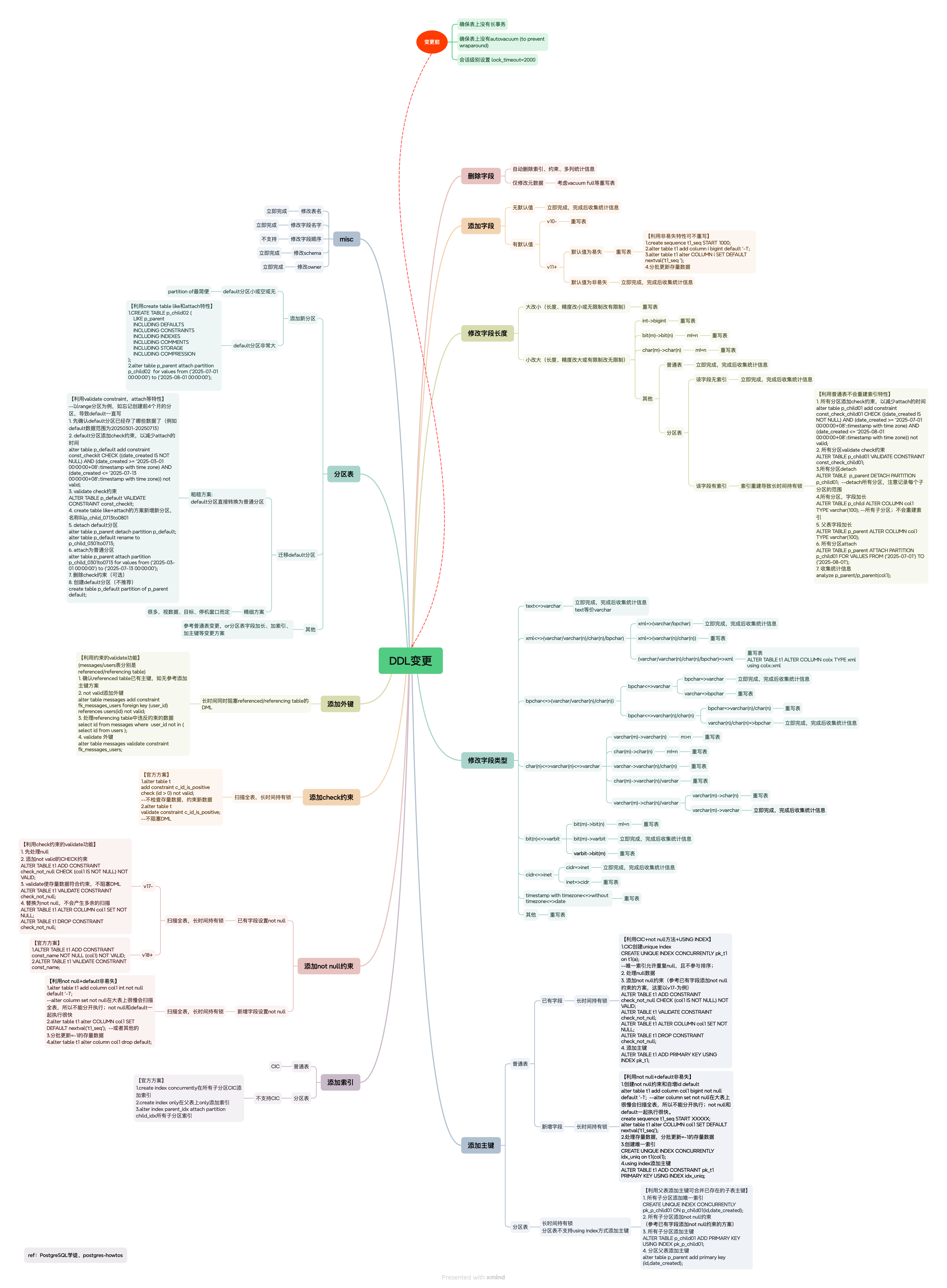
Key Points for Understanding This Diagram#
Before making changes:
Ensure no long-running transactions on the table — long transactions hold locks persistently; this is a well-known hazard in PostgreSQL and should be handled first.
Ensure no autovacuum (to prevent wraparound) is running — autovacuum generally does not block SQL, but
to prevent wraparoundvacuums are an exception.Autovacuum workers generally don’t block other commands. If a process attempts to acquire a lock that conflicts with the
SHARE UPDATE EXCLUSIVElock held by autovacuum, lock acquisition will interrupt the autovacuum. However, if the autovacuum is running to prevent transaction ID wraparound (i.e., the autovacuum query name in thepg_stat_activityview ends with(to prevent wraparound)), the autovacuum is not automatically interrupted.lock_timeout=2000— if the lock cannot be acquired within 2 seconds, give up to avoid causing widespread blocking.
Edge cases for widening column types:
- Widening a column (e.g.,
varchar(10)→varchar(20)) generally does not rewrite the table, but there are exceptions. Watch out especially forint→bigint(common for primary keys) andchar(n)→char(m). - Partitioned table indexes — widening a column on a partitioned table does not rewrite the table, but it DOES rebuild indexes. Index rebuilds on partitioned tables are typically very slow and can cause prolonged AccessExclusive-lock blocking. This behavior is unique to partitioned tables and does not apply to regular tables.
Changing column types:
- Almost always rewrites the table, except for certain type-equivalent cases or other “widening” scenarios.
Reducing DDL lock levels — tips:
- Use
CREATE INDEX CONCURRENTLYfor indexes. If the parent table does not support it, run CIC on individual partitions (remember toALTER INDEX ... ATTACH PARTITIONafterwards). - Add primary keys with
USING INDEX. If partitions do not support it, leverage the behavior where adding a PK on a child table + adding a PK on the parent merges the existing child PK. - Use
VALIDATE CONSTRAINTfor constraint validation. - Before PG 17,
NOT NULLwithVALIDATE CONSTRAINTis not supported — useCHECK (col1 IS NOT NULL)instead. Converting thisCHECKtoNOT NULLlater does not cause extra scans. - Adding a column with a volatile
DEFAULTrewrites the table. Use a non-volatile default first (no rewrite), thenUPDATEexisting rows as needed. - When attaching partitions, use
CHECKconstraints to reduce downtime. AddingCHECKconstraints can itself useVALIDATE CONSTRAINT. CREATE TABLE ... LIKE+ATTACH PARTITIONuses a much lower lock level thanPARTITION OF(though I still preferPARTITION OF).
After making changes:
- Remember to collect statistics (
ANALYZE) — needed in many scenarios.
Case Study#
Example — 2026 Partition Creation Failure: Converting a Default Partition to a Regular Partition#
-- 1. Confirm the data range in the default partition
SELECT min(created_date), max(created_date) FROM lzltab_new_default;
-- Only 2024 data present

-- 2. Add a CHECK constraint to the default partition
ALTER TABLE lzltab_new_default ADD CONSTRAINT const_checkit_lzl01
CHECK ((created_date IS NOT NULL)
   AND (created_date >= '2024-01-01 00:00:00'::timestamp(6) without time zone)
   AND (created_date <  '2025-01-01 00:00:00'::timestamp(6) without time zone))
NOT VALID;

-- 3. Validate the CHECK constraint
ALTER TABLE lzltab_new_default VALIDATE CONSTRAINT const_checkit_lzl01;
-- SHARE UPDATE EXCLUSIVE lock

-- 4. Detach the default partition
ALTER TABLE lzltab DETACH PARTITION lzltab_new_default;
ALTER TABLE lzltab_new_default RENAME TO lzltab_new_2024;

-- 5. Attach as a regular partition
ALTER TABLE lzltab ATTACH PARTITION lzltab_new_2024
FOR VALUES FROM ('2024-01-01 00:00:00'::timestamp(6) without time zone)
          TO     ('2025-01-01 00:00:00'::timestamp(6) without time zone);

-- 6. Create new sub-partitions
\i add_partition_lzltab.sql

-- 7. Drop the CHECK constraint
ALTER TABLE lzltab_new_2024 DROP CONSTRAINT const_checkit_lzl01;

-- 8. Create a new default partition
CREATE TABLE lzltab_default PARTITION OF lzltab DEFAULT;
Since the default partition only contained 2024 data, the entire process was transparent to the application.
If the default partition contains current data, create future partitions using CREATE TABLE ... LIKE + ATTACH first, then restructure once writes to the default partition stop.