
What is PostgreSQL Streaming Replication?#
Streaming Replication is a method for transmitting WAL logs introduced in PostgreSQL 9.0. As soon as the primary database generates a log, it is immediately passed to the standby database.
Before PostgreSQL 9.0, PostgreSQL could only transfer WAL logs one at a time (log shipping), and the standby database lagged behind the primary by at least one WAL log.
PostgreSQL Streaming Replication Processes#
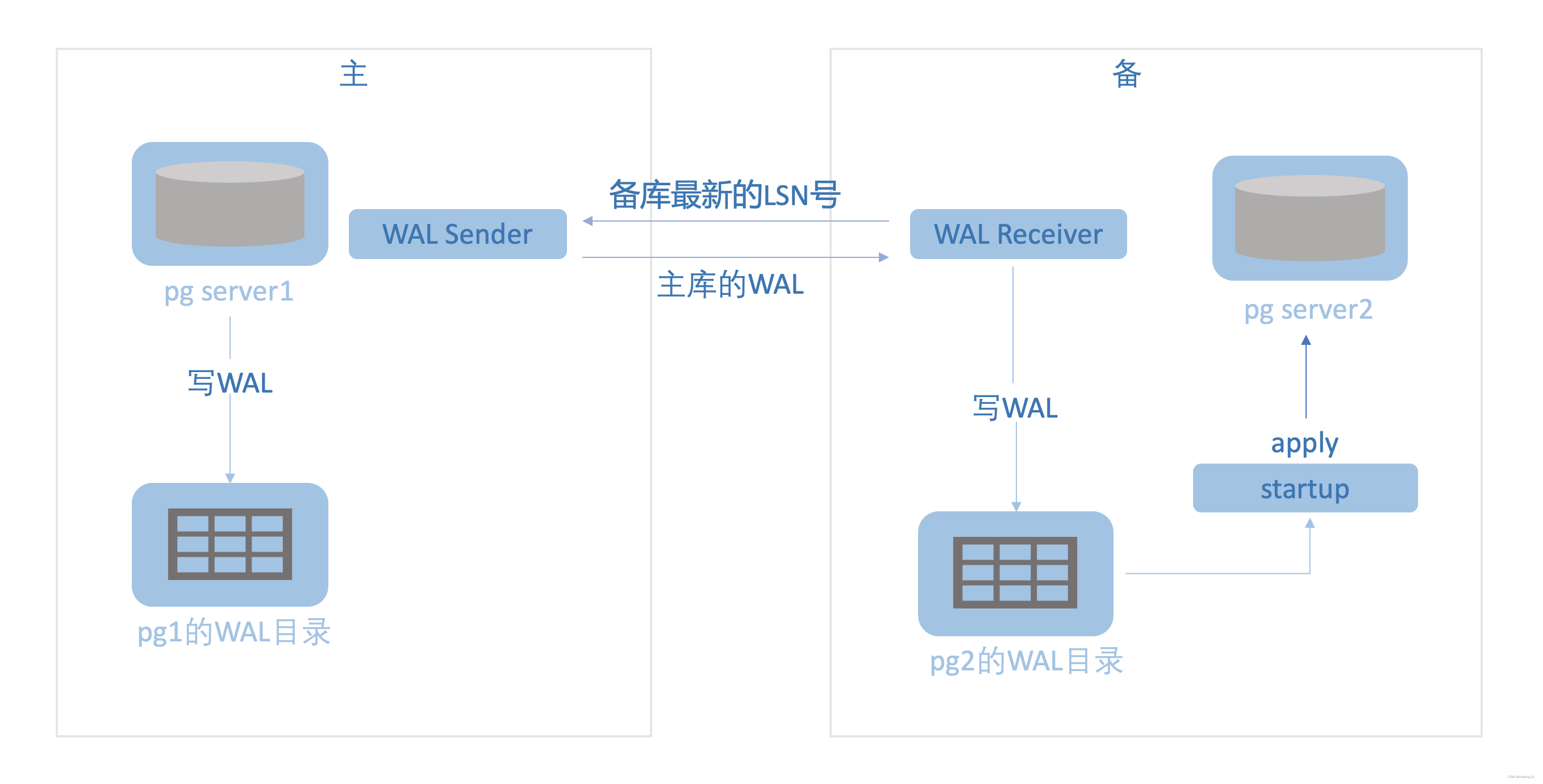
wal sender: The wal sender exists on the primary database. The wal sender process transmits the WAL between the primary’s latest LSN and the standby’s latest LSN to the standby. wal receiver: The wal receiver exists on the standby database. The wal receiver process transmits the standby’s latest LSN to the primary. The wal receiver receives WAL data passed by the wal sender and writes it to WAL logs. startup: The standby instance recovery process. It replays WAL logs on the standby database.
pg       16776 14632  0 13:33 ?        00:00:00 postgres: wal sender process lzl 172.17.100.150(13338) streaming 0/3002D30

pg       16775 15329  0 13:33 ?        00:00:00 postgres: wal receiver process   streaming 0/3002D30
pg       15330 15329  0 10:26 ?        00:00:00 postgres: startup process   recovering 000000010000000000000003
PostgreSQL Streaming Replication Principles#
PostgreSQL streaming replication is primarily divided into two phases: the instance recovery phase and the primary-standby synchronization phase. Instance Recovery Phase: When a PostgreSQL database crashes abnormally, upon startup, PostgreSQL replays all WAL logs after the last checkpoint before the crash (this is the same principle as instance recovery in Oracle, MySQL, and other relational databases — the goal is to bring the database to a consistent state). When setting up a PostgreSQL standby database, the primary is generally not shut down. At this point, the backup taken from the primary is in an inconsistent state, and the startup process performs instance recovery when the standby starts. Primary-Standby Synchronization Phase: The wal receiver process transmits the standby’s latest LSN to the primary. The wal sender transmits the WAL between the primary’s latest LSN and the standby’s latest LSN to the wal receiver. The wal receiver receives the WAL and writes it to disk, and the startup process replays the WAL logs on the standby.
Synchronous and Asynchronous#
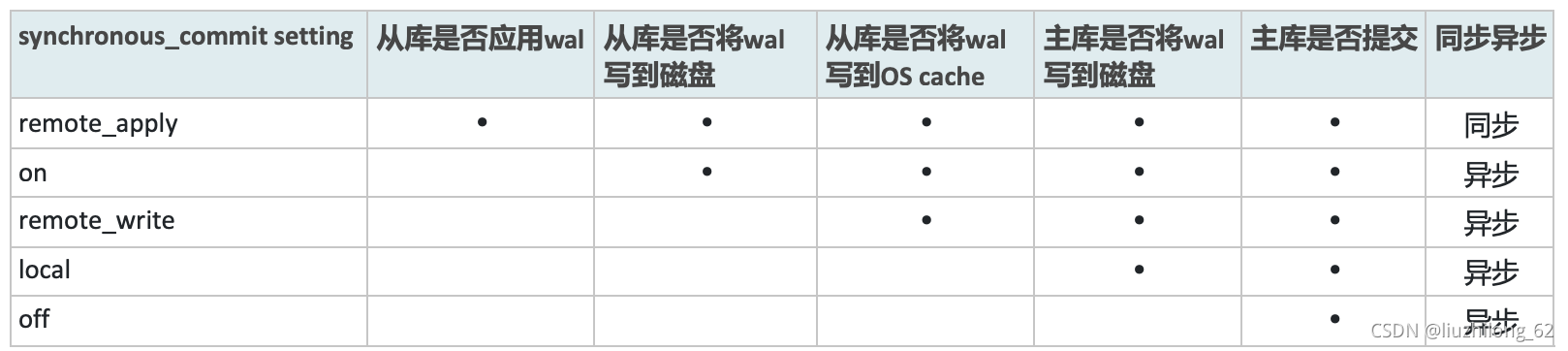
PostgreSQL primary-standby has 5 modes, controlled by the synchronous_commit parameter. The essence of the synchronous_commit parameter is to control when the primary commits.
remote_apply: The primary commits only after all standby databases have applied the WAL. This mode is synchronous — the primary and standby are consistent. Data that can be queried on the primary can definitely also be queried on the standby. In this mode there is no primary-standby lag, but it affects the primary commit time because the primary commit needs to wait for network transmission and standby application time.
The meaning of synchronous_commit has two scenarios: with and without standby databases (when synchronous_standby_names is empty or non-empty):
When synchronous_standby_names is non-empty: remote_apply: The standby has applied the WAL, only then can the primary commit. In this mode the primary and standby are synchronous. on: default. The primary commits when both primary and standby WAL have been written to disk. Similar to semi-synchronous, no data will be lost. remote_write: The primary commits when the standby has received the WAL and written the WAL log to the filesystem cache. At this point the standby has received the WAL but hasn’t flushed it to disk yet. If the OS crashes, data will be lost. local: The primary commits when its WAL is flushed to disk. This mode is asynchronous — the primary doesn’t need to confirm the standby’s status before committing. off: The primary can commit without its own WAL being flushed to disk. There is a risk of data loss. Not recommended.
When synchronous_standby_names is empty: (When synchronous_standby_names is empty, only on and off are effective for synchronous_commit. If set to remote_apply, remote_write, or local, they are still treated as on.) on: default. The database WAL must be written to disk before a transaction can commit. off: The primary can commit without its own WAL being flushed to disk. There is a risk of data loss. Not recommended.
Primary-Standby Synchronization Relationship
Primary-Standby Reliability

Failover#
When the primary crashes, the standby needs to initiate failover, at which point the standby becomes the new primary. PostgreSQL does not provide a method to detect failures, but it does provide a method to activate the primary. (Typically, third-party tools call the PostgreSQL activation method, while primary-standby monitoring, primary crash detection, connection switching, etc. are not handled by PostgreSQL itself.) PostgreSQL provides 2 methods to activate a standby as the primary: the trigger_file file and the pg_ctl promote command. (In PostgreSQL 12 and later, trigger_file becomes promote_trigger_file.) Both trigger_file and pg_ctl promote can complete the task of activating the standby with a single command. The difference is that trigger_file requires the trigger_file configuration to be written in recovery.conf in advance. Using trigger_file for primary-standby switchover (pg_ctl promote has the same effect and is simpler):
- Configure trigger_file in the standby’s recovery.conf
- Shut down the primary
- touch trigger_file to start the old standby as the new primary
- Configure recovery.conf to start the old primary as the new standby
- Observe the new and old primary/standby databases
Failover Example: Environment: Primary 172.17.100.150 5432 Standby 172.17.100.150 5433
1. Configure trigger_file in standby recovery.conf
$ cat recovery.conf|grep trigger
trigger_file = '/pg/pg96data_sla/trigger.kenyon'
$ ll /pg/pg96data_sla/trigger.kenyon
ls: cannot access /pg/pg96data_sla/trigger.kenyon: No such file or directory
Simply configure the trigger file path in recovery.conf. The trigger file won’t appear until it’s created.
Add configuration to standby postgres.conf
max_wal_senders = 6 #max_wal_senders is the maximum number of sender processes, default is 0, so the standby must configure this before switchover
hot_standby=on  #Enable query functionality on standby
2. Shut down the primary
$ pg_ctl stop -D  /pg/pg96data_pri -m fast
waiting for server to shut down.... done
server stopped
(Check if primary WAL has been fully applied by the standby: pg9.6- cd pg_xlog; pg 10+ cd pg_wal)
ls -ltr|tail -n 1 |awk '{print $NF}'|while read xlog;do pg_xlogdump $xlog;doneLook for the keyword “shutdown” in the standby’s WAL
3. touch to activate standby (or pg_ctl promote -D /pg/pg96data_sla)
$ touch /pg/pg96data_sla/trigger.kenyonAt this point recovery.conf becomes recovery.done
4. Set up primary as standby Configure the new standby’s recovery.conf file. You can directly copy from the old standby and modify the IP and directory.
vi $new_standby/recover.conf
standby_mode = on
primary_conninfo = 'host=172.17.100.150 port=5433 user=lzl password=lzl'
recovery_target_timeline = 'latest'
Configure postgres.conf, write hot_standby = on to enable queries on the standby
vi $new_standby/postgres.conf
hot_standby = on
Start the new standby
/pg/pg96/bin/pg_ctl -D /pg/pg96data_pri -l /pg/pg96data_pri/server.log start5. Check primary and standby
postgres=# \x
Expanded display is on.
postgres=# select * from  pg_stat_replication ;
-[ RECORD 1 ]----+------------------------------
pid              | 24766
usesysid         | 16384
usename          | lzl
application_name | walreceiver
client_addr      | 172.17.100.150
client_hostname  |
client_port      | 47345
backend_start    | 2021-07-30 07:44:05.582546+00
backend_xmin     |
state            | streaming
sent_location    | 0/4033790
write_location   | 0/4033790
flush_location   | 0/4033790
replay_location  | 0/4033790
sync_priority    | 0
sync_state | asyncpg_basebackup#
pg_basebackup is PostgreSQL’s built-in backup tool for performing base backups. pg_basebackup can be used for PITR and also for constructing log-shipping standby and streaming standby. It is PostgreSQL’s physical backup tool. https://liuzhilong.blog.csdn.net/article/details/119533506
pg_rewind#
pg_rewind can be used as a maintenance tool for PostgreSQL primary-standby setups. When the timelines of two PostgreSQL instances diverge, pg_rewind can synchronize between the instances. (For example, if the standby is running after failover while the primary was still running, the timelines of primary and standby will have diverged.) https://liuzhilong.blog.csdn.net/article/details/119250794
Replication Slots#
What are PostgreSQL Replication Slots? In a primary-standby architecture, if the standby hasn’t received WAL logs yet but the primary has already deleted them, such lag cannot be automatically recovered. Replication slots ensure that the primary won’t delete WAL logs that haven’t been transmitted to the standby yet. Without replication slots, you might need to use wal_keep_size/wal_keep_segments and archive_command to ensure WAL logs aren’t deleted, but this approach always retains too many WAL files and cannot guarantee that WAL won’t be deleted when lag is significant. This is exactly why replication slots were created. However, replication slots may cause the primary to never delete WAL (e.g., if the standby has crashed), causing disk space to fill up. In this case, max_slot_wal_keep_size is needed to set an upper limit on WAL file retention.
Replication Slot Parameters:
max_slot_wal_keep_size: When replication slots are in use, this parameter defines the maximum size of WAL files in the pg_wal directory. The default value is -1, meaning there is no upper limit on the size of WAL files retained by the primary for the standby.
wal_keep_segments/wal_keep_size: PostgreSQL 12 and below use wal_keep_segments, PostgreSQL 13 and above use wal_keep_size. Ensures that WAL files under pg_wal are not deleted. Without replication slots, WAL files exceeding this size may be deleted, potentially causing the standby to be unable to catch up. If set too large, it may cause the directory to grow excessively. The default is 0, meaning WAL files are not retained. If WAL is deleted, the following error may occur:
ERROR: requested WAL segment xxxx has already been removed
At this point the standby can only hope for archives; otherwise, it must be rebuilt.
primary_slot_name: Sets the slot name, indicating that the PostgreSQL primary-standby setup uses replication slots. So enabling PostgreSQL replication slots requires at least the following configuration:
primary_conninfo = ‘host=172.17.100.150 port=5433 user=lzl password=lzl’
primary_slot_name = ‘pg_slot_lzl’
max_replication_slots: The maximum number of replication slots. Takes effect upon restart. If there aren’t enough replication slots, the standby will fail to start. This value should be set relatively high. In PostgreSQL versions below 9.6, the default is 0; in PostgreSQL 10 and above, it’s 10.
Creating PostgreSQL Replication Slots
1. Set max_replication_slots on the primary Primary: (my PostgreSQL version is 9.6) max_replication_slots=10 Add to postgres.conf and restart the primary
2. Create replication slot Create replication slot:
postgres=# SELECT * FROM pg_create_physical_replication_slot('pg_slot_lzl');
  slot_name  | xlog_position
-------------+---------------
 pg_slot_lzl |
View replication slot
postgres=# SELECT slot_name, slot_type, active FROM pg_replication_slots;
  slot_name  | slot_type | active
-------------+-----------+--------
 pg_slot_lzl | physical  | f
3. Set primary_slot_name on the standby
primary_slot_name = 'pg_slot_lzl'
Add to recovery.conf and restart the standby
4. Check replication slot
postgres=# select *,pg_xlogfile_name(restart_lsn)as current_xxlog from pg_replication_slots;
  slot_name  | plugin | slot_type | datoid | database | active | active_pid | xmin | catalog_xmin | restart_lsn | confirmed_flush_lsn |      current_xxlog
-------------+--------+-----------+--------+----------+--------+------------+------+--------------+-------------+---------------------+--------------------------
 pg_slot_lzl |        | physical  |        |          | t      |      12802 |      |              | 0/A002340   |                     | 00000002000000000000000A
--pg_xlogfile_name(restart_lsn) to view current WAL log info
Query Conflicts#
What are Query Conflicts?
The standby may encounter the following error during queries:
ERROR:canceling statement due to conflict with recovery
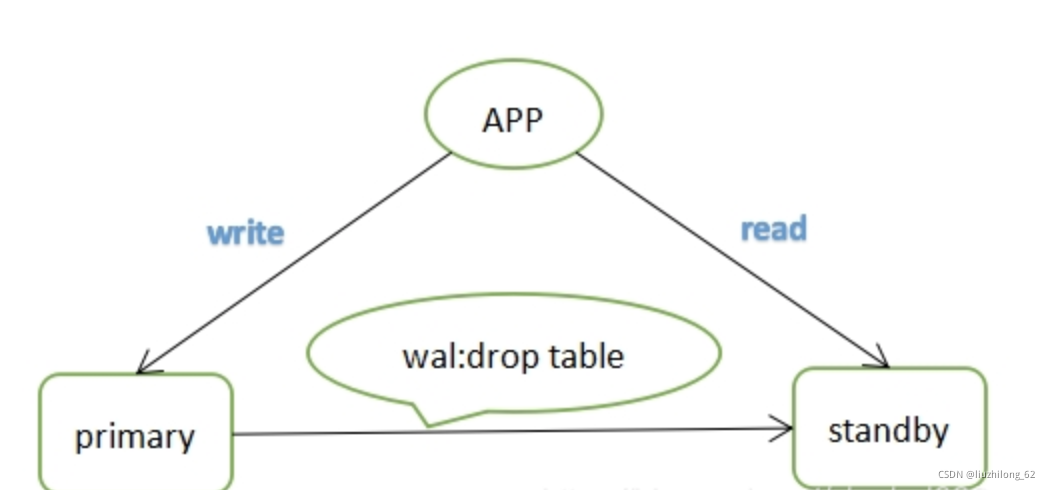
Why do conflicts occur? Let’s think carefully. For example, if the standby is executing a query based on a certain table (this query could be from an application or a manual connection), and the primary executes a drop table operation, this operation is written to WAL logs and transmitted to the standby for application. To ensure data consistency, PostgreSQL will inevitably replay the data quickly, at which point the drop table and select will conflict, as shown below:
Conflict scenarios: The above only introduces one type of query conflict. To summarize, there are several situations:
- Primary exclusive locks (including explicit LOCK commands and various DDL operations)
- Primary vacuum cleaning up dead tuples — if the standby is using those tuples, a conflict will occur
- Primary drops the tablespace that the standby query is using
- Primary drops the database that the standby is using
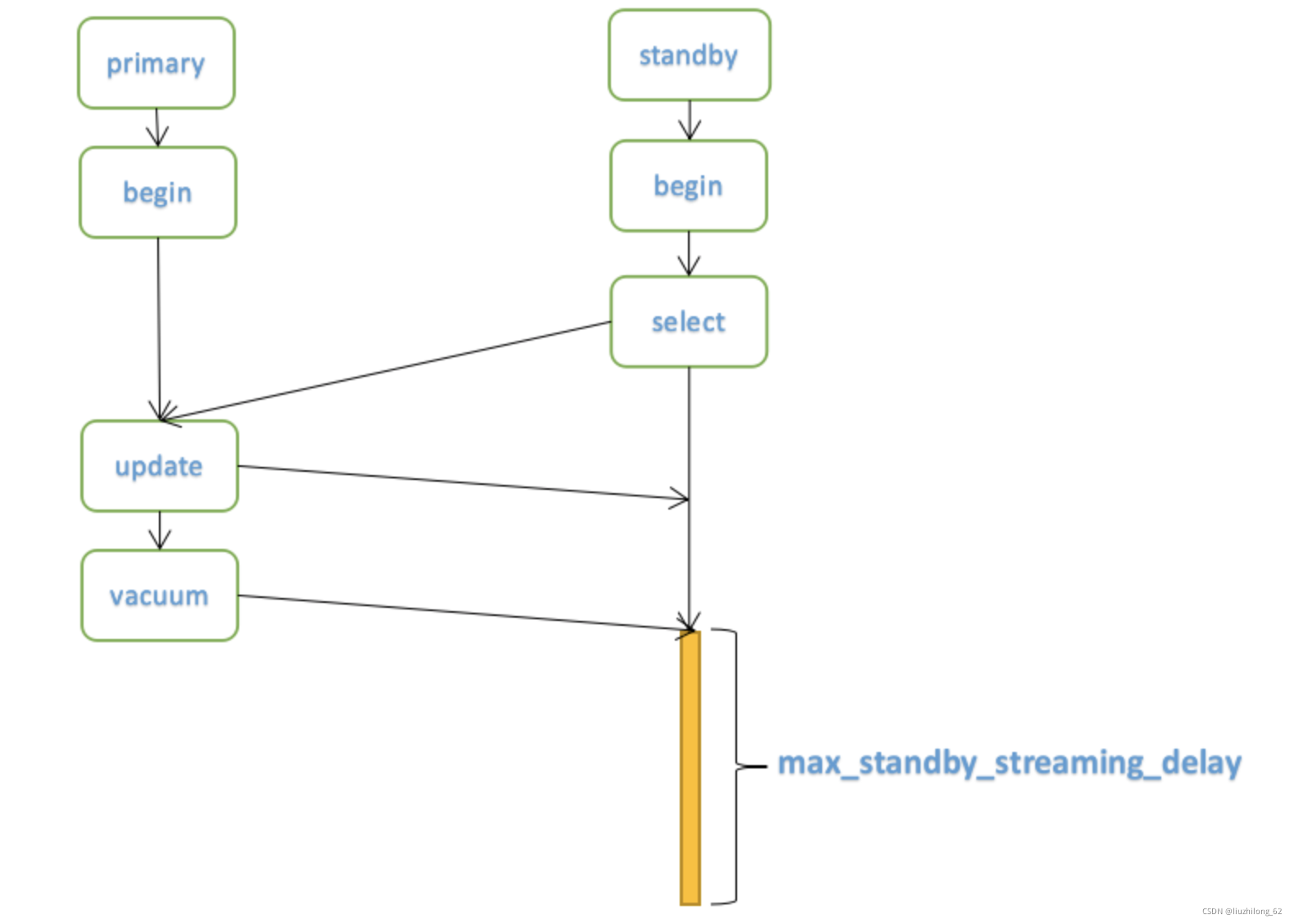
Consider a primary-only scenario: Scenario 1: A session issues a drop table and finds that a select statement is currently executing. The session can only wait for the select to complete its transaction. Scenario 2: A session issues a vacuum or automatic background vacuum — it won’t conflict with current database queries because vacuum won’t clean up tuples that are in use.
The standby’s handling is different. Because the primary doesn’t know the standby’s transaction status, and the standby needs to stay consistent with the primary, this is why “query conflicts” occur.
Query Conflict Parameters hot_standby_feedback: This is the most frequently mentioned parameter in the topic of query conflicts. Let’s explore it in detail below. Suppose, without a standby, Session 1 queries a row of data, Session 2 deletes that data and commits. Then Session 2 performs a vacuum. We know this vacuum won’t delete that row because Session 1’s transaction still needs to use that tuple, so it won’t be cleaned up. What about in a primary-standby setup? How does the primary know that the standby is still querying when it’s about to perform a vacuum? This is the purpose of this parameter. After setting hot_standby_feedback, the standby will periodically notify the primary of the minimum active transaction ID (xmin) value, so the primary vacuum process won’t clean up tuples with values greater than xmin. This parameter helps reduce conflicts but cannot completely avoid them. If you think about it carefully, this parameter only reduces conflicts caused by the primary vacuuming dead tuples — it cannot resolve conflicts caused by exclusive locks. Or conflicts caused by network interruptions: if the network between primary and standby is interrupted, the standby cannot send the xmin value to the primary normally. If the interruption is long enough, the primary will still clean up useless tuples during this period, and after the network recovers, the vacuum conflict described above may occur. It’s worth noting that the hot_standby_feedback parameter won’t override the value limited by the old_snapshot_threshold parameter on the primary. The old_snapshot_threshold parameter limits the infinite expansion of dead tuples. When transaction information exceeds the old_snapshot_threshold limit, cleanup will still occur.
max_standby_streaming_delay: The waiting time before the standby cancels a query due to a conflict caused by receiving WAL stream logs. Setting this parameter means that when a conflict occurs, the standby query won’t be immediately canceled but will wait for a period before throwing an error if it hasn’t finished. The value can be set based on the expected runtime of potential long transactions on the standby.
max_standby_archive_delay: The waiting time before the standby cancels a query due to a conflict caused by processing archived WAL logs. Similar to the parameter above.
vacuum_defer_cleanup_age: Specifies the number of transactions by which vacuum delays cleaning up dead tuples. Vacuum will delay clearing invalid records. The number of deferred transactions is set through vacuum_defer_cleanup_age. That is, vacuum and vacuum full operations won’t immediately clean up recently deleted tuples.
You can view conflict occurrences through the pg_stat_database and pg_stat_database_conflicts views.
Other Related Parameters#
Transmission Parameters max_wal_senders: The maximum number of services that can fetch WAL using wal sender, i.e., the maximum number of standby databases + basebackup clients. PostgreSQL 9.6 defaults to 0; PostgreSQL 10 and later default to 10. wal_send_timeout: Interrupt replication after WAL transmission fails for xx seconds. When the standby crashes or the network is interrupted for a long time, WAL will no longer attempt transmission. Default is 60. 0 means never interrupt replication. track_commit_timestamp: Record transaction timestamps. Default is off.
Primary Parameters synchronous_standby_names: Configured on the primary. The standby replication list. There are several forms (s1, s2, s3 represent the standby’s application_name, configured in recovery.conf): synchronous_standby_names=‘s1’ means the primary can commit when s1 standby returns. synchronous_standby_names=‘FIRST 2 (s1,s2,s3)’ means the primary can commit when the first two of the three standbys (s1 and s2) return. synchronous_standby_names=‘ANY 2 (s1,s2,s3)’ means the primary can commit when any two of the three standbys return. synchronous_standby_names=’’ means matching any host — the primary can commit when any host returns. wal_level: WAL log level. This parameter determines how much information is written to WAL logs. The default is replica, which supports replication and WAL archiving while also supporting standby read-only queries. minimal: Other than records needed for instance crash recovery, nothing else is recorded. For example, CREATE TABLE AS, CREATE INDEX, CLUSTER, COPY can be skipped. The log information recorded in this mode is insufficient to support WAL archiving and streaming replication. logical: Adds additional information on top of replica to support logical decoding. This mode increases WAL log volume, especially for databases with many UPDATE and DELETE operations. Before PostgreSQL 9.6, there were also archive and hot_standby modes, which map to the current replica mode. synchronous_commit: As discussed earlier, 5 modes, each with pros and cons. archive_mode: archive_mode = on enables archiving. archive_command: Archiving command. PostgreSQL archiving directly calls operating system commands. Can be a simple cp command to the backup side. listen_addresses: Listening addresses. ‘’ means listen on all IPs. Default is local.
Standby Parameters hot_standby: on enables standby read-only queries. primary_conninfo: The connection string for the standby to connect to the primary. E.g., primary_conninfo = ‘host=172.17.100.150 port=5432 user=lzl password=lzl’. trigger_file/promote_trigger_file: The trigger file for activating the standby. Before PostgreSQL 12 it’s called trigger_file; PostgreSQL 12 and later use promote_trigger_file. Both trigger_file and pg_ctl promote can activate the standby with a single command, as demonstrated earlier. wal_receiver_create_temp_slot: When there is no slot, temporarily create one (named after primary_slot_name). Default is off.
References:#
《The Way of PostgreSQL》(self-cultivation) https://www.postgresql.org/docs/current/warm-standby.html
https://www.postgresql.org/docs/13/high-availability.html
https://www.postgresql.org/docs/current/runtime-config-replication.html
https://www.postgresql.org/docs/13/runtime-config-wal.html
https://www.postgresql.org/docs/current/app-pgbasebackup.html
https://www.postgresql.org/docs/current/hot-standby.html#HOT-STANDBY-CONFLICT
https://cloud.tencent.com/developer/article/1555354
https://wiki.postgresql.org/wiki/Streaming_Replication
https://www.percona.com/blog/2018/09/07/setting-up-streaming-replication-postgresql/
https://www.cybertec-postgresql.com/en/the-synchronous_commit-parameter/