
What is Logical Replication#
PostgreSQL logical replication is based on logical decoding, which parses WAL log streams into a specified format for output. The subscriber node receives the parsed data and applies it.
Logical replication differs from streaming replication (physical replication) which is based on instance-level primary-standby where the physical structures are identical. Logical replication can selectively replicate at the table level. Logical Replication in official documentation specifically refers to the “publish-subscribe” model. In fact, many tools can use logical decoding for heterogeneous database data synchronization.
pg9.4’s pglogical plugin can support logical replication (https://github.com/2ndQuadrant/pglogical), and pg10 onwards natively supports logical replication.
Logical replication can be used for database upgrades, heterogeneous data migration, table-level data synchronization links, subscribing to data streams, etc.
Logical Decoding#
Logical decoding can parse table data changes in WAL logs into row data streams or SQL text. These row data streams or SQL text can be consumed by other types of databases or software. The specific parsing format is determined by the output plugin.
Replication Slots#
In logical replication, a replication slot represents a data change stream. Like physical replication slots, logical replication slots also ensure that after an abnormal replication interruption, the related WAL logs are not deleted, so that WAL log parsing can continue after replication reconnects. A database can have multiple replication slots. Each replication slot has only one output plugin, and each replication slot represents one replication link. Replication slots are essentially used to manage replication links. Unlike streaming replication which can function without replication slots, logical replication must have replication slots.
Output Plugin#
The output plugin converts WAL log information into the format required by the replication slot. PostgreSQL has some built-in output plugins and additional ones can be added through plugins. Each logical replication slot has an output plugin for WAL-related parsing work.
Output plugins use callback functions to manage parsing. For example, OUTPUT_PLUGIN_BINARY_OUTPUT and OUTPUT_PLUGIN_TEXTUAL_OUTPUT are used to set whether the out_type is binary or text. There are also callback functions to notify the plugin of transaction data changes and sort transactions. Callback functions of course don’t need to be used manually; some built-in output plugins are already packaged.
Each output plugin has some different parsing behaviors and output formats.
Several Common Output Plugins#
test_decoding: This is a sample output plugin, essentially the raw form of an output plugin. Official documentation says it’s a template, but it can still parse. This output plugin comes with PostgreSQL but needs to be compiled in contrib.
pgoutput: The default output plugin for the publish-subscribe model. In publish-subscribe, the walsender process uses this output plugin to logically decode WAL logs.
decoder_raw: Parses into SQL text format. This is not included with PostgreSQL; compile it yourself: https://github.com/michaelpq/pg_plugins/tree/main/decoder_raw
wal2json: This output plugin converts WAL log information into JSON format.
Other output plugins can be referenced at: https://wiki.postgresql.org/wiki/Logical_Decoding_Plugins
Some domestic vendors have also made their own output plugins.
Relationship between several output plugins and logical replication plugins:
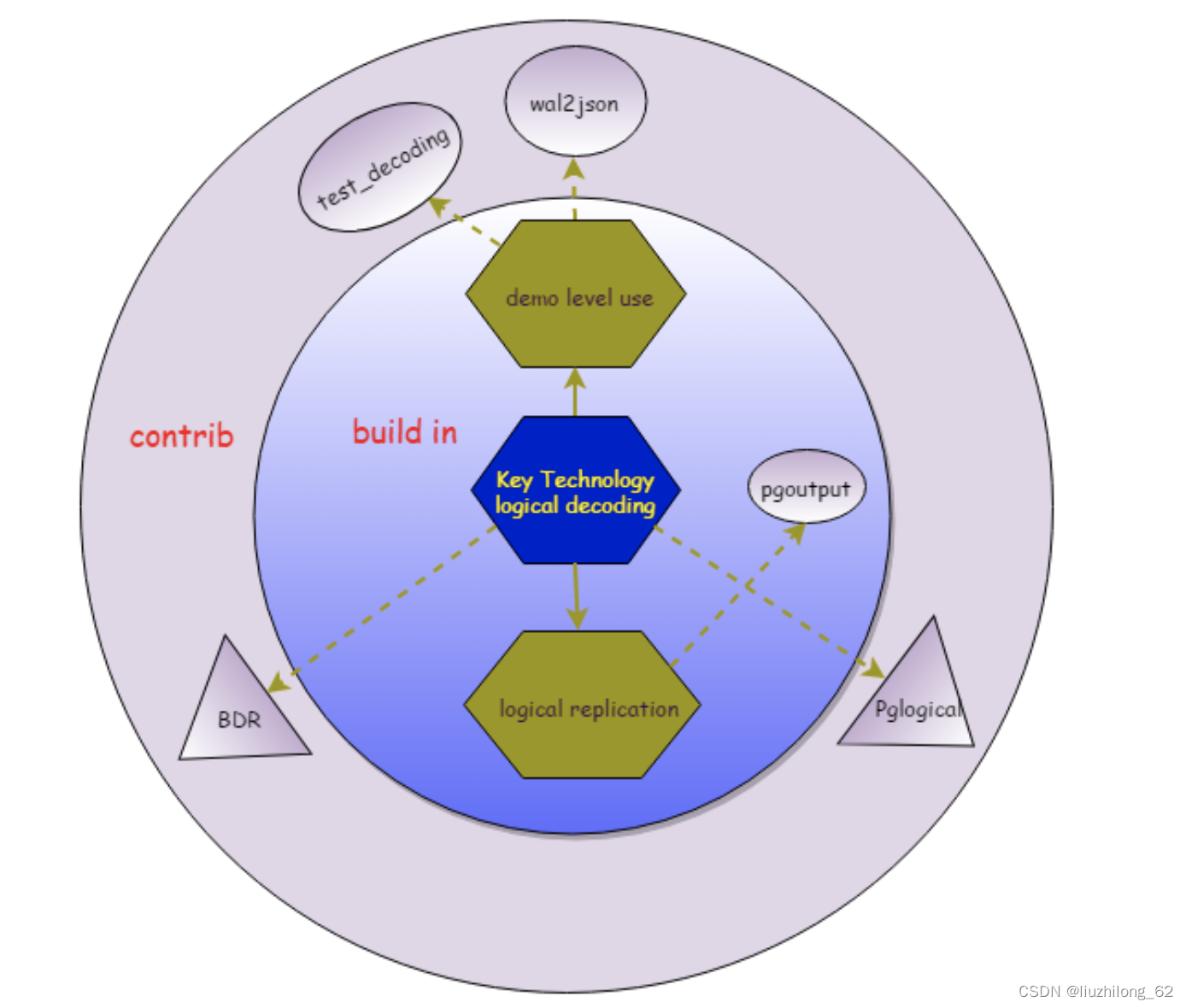

pgoutput, test_decoding, and wal2json have been introduced above.
pglogical was the predecessor of pglogical replication in pg9.4.
BDR was developed by 2ndQuadrant, supporting bidirectional replication and DDL synchronization with more powerful features. BDR 3.0 onwards became closed-source.
Functions and Tools for Manually Receiving Parsed Data#
pg_logical_slot_get_changes(): Displays parsed data and consumes it.
pg_logical_slot_peek_changes(): Displays parsed data without consuming it.
pg_recvlogical: A tool included with PostgreSQL that can consume data within a replication slot, equivalent to the downstream of logical replication. The corresponding physical WAL receiving tool is pg_receivewal.
Logical Decoding Test 1: Observing data parsing with 2 different output plugins#
-- Create two logical replication slots using logical_test and logical_raw respectively

lzldb=# select pg_create_logical_replication_slot('logical_test','test_decoding');

 pg_create_logical_replication_slot

------------------------------------

 (logical_test,0/1756F50)

lzldb=# select pg_create_logical_replication_slot('logical_raw','decoder_raw');

 pg_create_logical_replication_slot

------------------------------------

 (logical_raw,0/1756F88)

-- Only the upstream is created, slot is in f state

lzldb=# select * from pg_replication_slots;

  slot_name  |    plugin     | slot_type | datoid | database | temporary | active | active_pid | xmin | catalog_xmin | restart_lsn | confirmed_flush_lsn | wal_status | safe_wal_size

--------------+---------------+-----------+--------+----------+-----------+--------+------------+------+--------------+-------------+---------------------+------------+---------------

 logical_test | test_decoding | logical   | 16385 | lzldb    | f         | f      |            |      |         558 | 0/1766878   | 0/17668B0           | reserved   |

 logical_raw | decoder_raw   | logical   | 16385 | lzldb    | f         | f      |            |      |         557 | 0/1756F50   | 0/1756F88           | reserved   |

-- Create a table

lzldb=# create table tdecoder222(a int,b varchar(10));

CREATE TABLE

-- Attempt to get this DDL

lzldb=# SELECT * FROM pg_logical_slot_get_changes('logical_raw', NULL, NULL, 'include-xids', '0');

ERROR:  option "include-xids" = "0" is unknown

CONTEXT:  slot "logical_raw", output plugin "decoder_raw", in the startup callback

lzldb=# SELECT * FROM pg_logical_slot_get_changes('logical_test', NULL, NULL, 'include-xids', '0');

    lsn   | xid |  data

-----------+-----+--------

 0/17669C8 | 558 | BEGIN

 0/1776778 | 558 | COMMIT

-- We can see that decoder_raw didn't parse the DDL at all, and logical_test only got the DDL transaction without the DDL statement itself, essentially not parsing the DDL

-- Insert a row

lzldb=# insert into tdecoder222 values(1,'lzl');

INSERT 0 1

lzldb=# select * from pg_logical_slot_peek_changes('logical_test',null,null);

    lsn   | xid |                                  data

-----------+-----+---------------------------------------------------------------------------

 0/1776890 | 560 | BEGIN 560

 0/1776890 | 560 | table public.tdecoder222: INSERT: a[integer]:1 b[character varying]:'lzl'

 0/1776900 | 560 | COMMIT 560

lzldb=# select * from pg_logical_slot_peek_changes('logical_raw',null,null);

    lsn   | xid |                          data

-----------+-----+----------------------------------------------------------

 0/1776890 | 560 | INSERT INTO public.tdecoder222 (a, b) VALUES (1, 'lzl');

-- test_decoding parsed the transaction

-- decoder_raw parsed the transaction into SQL statements
This test allows us to conclude:
- Replication slots in f state still parse, waiting for downstream consumption
- Each output plugin has some different parsing behaviors and output formats
Logical Decoding Test 2: Using pg_recvlogical to receive logically decoded data, simulating a logical replication link#
-- Configure passwordless login

[pg@lzl ~]$ vi .pgpass

[pg@lzl ~]$ cat .pgpass

lzl:5410:lzldb:pg:pg

[pg@lzl ~]$ chmod 0600 .pgpass

-- Start pg_recvlogical

[pg@lzl ~]$ pg_recvlogical -h lzl -p 5410 -d lzldb -U pg --slot=logical_raw --start -f recv.sql &

[pg@lzl ~]$ ps -ef|grep recv|grep -v grep

pg 7747 7355 0 21:40 pts/3 00:00:00 pg_recvlogical -h lzl -p 5410 -d lzldb -U pg --slot=logical_raw --start -f recv.sqllzldb=# insert into tdecoder222 values(2,'qwe');
INSERT 0 1
lzldb=# update tdecoder222 set b='asd' where a=2;
UPDATE 1
[pg@lzl ~]$ tail -2f recv.sql
INSERT INTO public.tdecoder222 (a, b) VALUES (2, 'qwe');
-- update was not correctly parsed
-- Add a primary key to the table
lzldb=# alter table tdecoder222 add primary key(a);
ALTER TABLE
lzldb=# insert into tdecoder222 values(100,'lzl1');
INSERT 0 1
lzldb=# insert into tdecoder222 values(200,'lzl2');
INSERT 0 1
lzldb=# update tdecoder222 set b='lzlupdate' where a=200;
UPDATE 1
[pg@lzl ~]$ tail -3f recv.sql
INSERT INTO public.tdecoder222 (a, b) VALUES (100, 'lzl1');
INSERT INTO public.tdecoder222 (a, b) VALUES (200, 'lzl2');
UPDATE public.tdecoder222 SET a = 200, b = 'lzlupdate' WHERE a = 200;– After adding a primary key, update was correctly parsed by decoder_raw – Without a primary key, it won’t be correctly parsed. This is related to replica identity, which will be introduced later.
Prerequisites for Logical Replication#
1. Parameters#
1.1 Basic Required Parameters
- wal_level. Takes effect after restart, default is replica. The wal_level parameter must be logical. logical does not change WAL to logical; it means that on top of supporting physical replication (replica), the necessary information for logical decoding is added. Since pg9.6, there are only minimal, replica, and logical, with information content increasing successively.
- max_replication_slots. Takes effect after restart, default value below pg9.6 is 0, pg10 and above is 10. 10 is generally sufficient. Like physical replication, logical replication generally also uses replication slots. PostgreSQL backups and physical replication can both occupy replication slot counts.
1.2 Source-side Required Parameters
- max_wal_senders. Takes effect after restart, default 10. Sender process count limit. The publisher’s sender transmits the parsed logs. Generally, one logical replication slot corresponds to one sender and one worker. This is similar to physical replication, where one physical replication slot corresponds to one sender and one receiver.
1.3 Target-side Required Parameters
- max_worker_processes. Takes effect after restart, default 8. Worker process count limit. Parallel processes (parallel queries, parallel statistics collection, etc., limited by max_parallel_workers), logical replication worker processes (max_logical_replication_workers), and some other programs that need to fork workers are all related to this parameter. It should be set to max_parallel_workers + logical replication apply workers + other background workers.
- max_logical_replication_workers. Takes effect after restart, default 4. Logical replication worker process count, including logical replication apply worker processes and table sync worker processes.
- max_sync_workers_per_subscription. Takes effect after reload, default 2. Sync worker processes when adding new tables to logical replication. Currently, one table has only one parallel.
- The above three parameters are tiered: max_sync_workers_per_subscription < max_logical_replication_workers < max_worker_processes. In short, there must be workers available.
2. Permissions#
- Replication user permissions. Logical replication users need replication privileges.
ALTER ROLE <usename> WITH REPLICATION;
- HBA access restrictions, allowing downstream to access the database using the replication user.
host lzldb user1 172.17.100.150/32 md5
- For the publish-subscribe model, CREATE permission on the database or superuser permission is needed.
When creating a publication, for table only, at least the table owner with CREATE permission is needed. All other publications require superuser.
When creating a subscription, superuser is required.
grant create on database lzl1db to owner1; or
alter user replicate1 superuser;
- Additionally, read or write permissions on tables during replication are also necessary.
Logical Synchronization Between PostgreSQL Instances — Publish and Subscribe#
PostgreSQL’s built-in logical replication is based on the publish-subscribe model. The publish-subscribe model does not parse into SQL for application.
Publication#
- A publisher can have multiple publications, and each publication can have multiple tables.
- When publishing, you can specify:
for table — publishes certain tables. New tables need to be explicitly added with ALTER PUBLICATION ADD TABLE. At minimum, the table owner is needed to create this publication.
for all tables — publishes all tables under the database. New tables are automatically published. Superuser is required to create this publication.
for all tables in schema — publishes all tables under the schema. New tables are automatically published. Superuser is required to create this publication. Supported starting from pg15.
- Publications by default include INSERT, UPDATE, DELETE, and TRUNCATE. You can also specify to replicate only certain commands. DDL is not synchronized. (Official documentation verbatim. This means truncate is not considered DDL in PostgreSQL — leaving this as a topic for later research. Truncate is DDL in MySQL and Oracle.)
- Only base tables can be published; temporary tables, foreign tables, views, sequences, etc. cannot be published. Partitioned table publishing is related to PostgreSQL version and partition attributes. pg15 defaults to publishing all partitions of a partitioned table.
- publish_via_partition_root. Supported from pg13. This publication parameter indicates whether partitioned tables use partitions for filtering (false, default) or use the parent partition for row filtering. If set to true, heterogeneous partitioned table logical replication is supported, such as partitioned table to regular table replication. truncate replication is not possible when true.
Subscription#
- A subscription has only one publisher but can subscribe to multiple publications on the publisher.
- A subscriber can have multiple subscriptions, each receiving data from one replication slot.
- One subscription corresponds to one replication slot, which is on the publisher side.
- When creating or deleting a subscription, the replication slot is automatically created or deleted on the publisher by default.
- Creating a subscription requires superuser.
- DDL is not synchronized; tables must already be created.
- Existing data is synchronized by default, via COPY snapshot to the subscriber.
- Synchronization can be paused and resumed with ALTER SUBSCRIPTION sub1 {ENABLE|DISABLE}.
- When a publication adds new tables, refresh is needed on the subscriber side: alter subscription sub1 refresh publication.
- Schema names, table names, and column names must be consistent between publication and subscription. Column types can differ (as long as implicit conversion succeeds). Column order can be different.
- Subscriptions also have some attributes, such as binary transfer, streaming, synchronous commit, two-phase commit, etc.
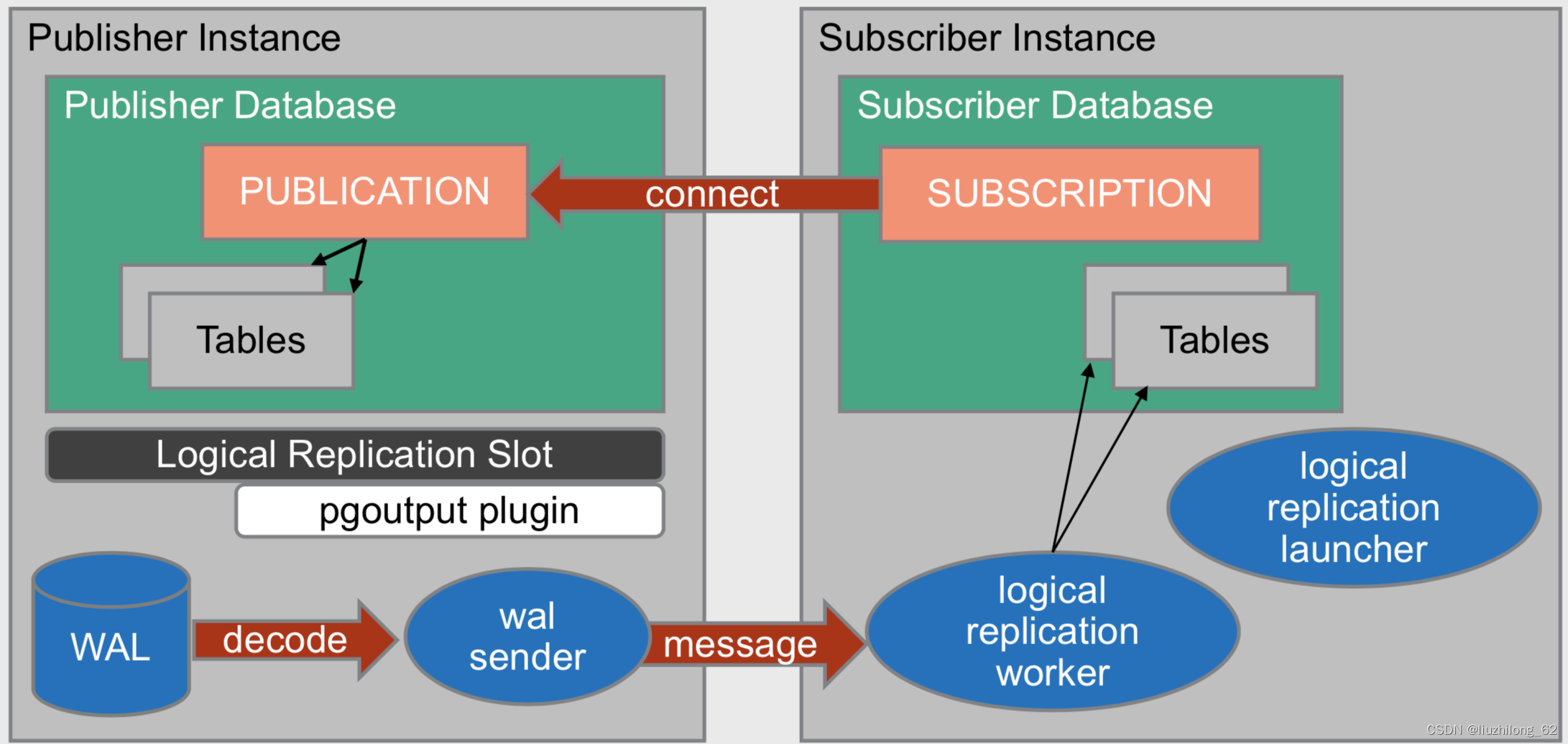
- logical replication launcher is used to start the subscriber-side worker processes and only exists at startup.
/*-------------------------------------------------------------------------
...
 * IDENTIFICATION

 *          src/backend/replication/logical/launcher.c
...
 * NOTES
 *          This module contains the logical replication worker launcher which
 *          uses the background worker infrastructure to start the logical
 *          replication workers for every enabled subscription.
 *-------------------------------------------------------------------------

 */
Publish-Subscribe Related Views#
pg_publication; – View publications. Publications themselves are stateless; replication slots are stateful, so there’s no pg_stat_publication.
pg_publication_tables – View published tables, simple and clear.
pg_publication_rel – View published tables, all IDs.
pg_stat_subscription – View subscription status, pid is the worker process pid.
pg_subscription – View subscriptions.
pg_subscription_rel – View subscription tables. There’s no pg_subscription_tables. Additionally, this view can show the sync status of individual tables under a subscription, which the replication slot view cannot do.
\dRp list replication publications
\dRs list replication subscriptions
Creating a Publication and Subscription#
Using a dedicated replication user replicate1, create a publication and subscription in the database lzldb to implement logical replication of table trep1.
Role | Host IP | Port | Database | Schema | Table | Replication User | Version |
|---|---|---|---|---|---|---|---|
Publisher | 172.17.100.150 | 5410 | lzldb | public | trep1 | replicate1 | pg13 |
Subscriber | 172.17.100.150 | 5412 | lzlbd | public | trep1 | replicate1 | pg13 |
Creating the Publication#
# Modify postgres.conf, wal_level parameter takes effect after restart

wal_level=logical

# Modify pg_hba.conf file, takes effect after reload

host    lzldb    replicate1  172.17.100.150/32        md5

-- Create replication user and grant privileges

create user replicate1 with password 'replicate1';

alter user replicate1 with replication;

grant create on database lzldb to replicate1;

-- Create the table to be replicated and grant privileges to the replication user

\c lzldb replicate1   -- If the replication user is not the table owner, should grant select on trep1 to replicate1

create table trep1(a int primary key,b char(10));

insert into trep1 values(1,'abc')

-- Create publication, superuser can also be used

\c lzldb replicate1

create publication pub_lzl1 for table trep1;

-- View publication. \dRp or pg_publication
lzldb=# select * from pg_publication;

  oid  | pubname  | pubowner | puballtables | pubinsert | pubupdate | pubdelete | pubtruncate | pubviaroot

-------|----------|----------|--------------|-----------|-----------|-----------|-------------|-----------
 16400 | pub_lzl1 |    16392 | f            | t         | t         | t         | t           | f
Creating the Subscription#
-- Create table definition

create table trep1(a int primary key,b char(10));

-- Use superuser to create subscription

CREATE SUBSCRIPTION sub_test

CONNECTION 'host=172.17.100.150 port=5410 dbname=lzldb user=replicate1 password=replicate1'

PUBLICATION pub_lzl1;

lzlbd=# select * from pg_subscription; -- View subscription. \dRs or pg_subscription

  oid  | subdbid | subname  | subowner | subenabled |                                 subconninfo                                   | subslotname | subsynccommit | subpublications

-------|---------|----------|----------|------------|--------------------------------------------------------------------------------|-------------|---------------+-----------------
 16394 |  16384 | sub_test |       10 | t          | host=172.17.100.150 port=5410 dbname=lzldb user=replicate1 password=replicate1 | sub_test    | off           | {pub_lzl1}

lzlbd=# select * from trep1; -- Verify existing data has been synchronized

 a |    b

---+------------
 1 | abc
Publish-Subscribe Model Test 1: Truncate Synchronization#
lzldb=# truncate table trep1;

TRUNCATE TABLE

lzldb=# select * from trep1;

 a | b

---+---
(0 rows)

lzlbd=# select * from trep1; -- In publish-subscribe mode, truncate is synchronized

 a | b

---+---
(0 rows)
Publish-Subscribe Model Test 2: Adding New Table Synchronization#
-- Under an existing publish-subscribe, add a new table synchronization. lzldb is publisher, lzlbd is subscriber

lzldb=# create table tab_pk(a int,b varchar(10));

CREATE TABLE

lzldb=# alter table tab_pk add primary key(a);

ALTER TABLE

lzldb=# alter publication pub_lzl1 add table tab_pk;

ALTER PUBLICATION

-- After adding a table on the publisher, refresh must be executed on the subscriber. Refresh defaults to synchronizing existing data

lzlbd=#  alter subscription sub_test refresh publication;

ALTER SUBSCRIPTION

lzlbd=# select * from pg_subscription_rel ;

 srsubid | srrelid | srsubstate | srsublsn

---------+---------+------------+-----------
    16394 |  16389 | r          | 0/15F2898
    16394 |   16400 | d          |

-- Subscription state codes: i = initializing, d = copying data, s = synchronized, r = ready (normal replication)

-- At this point, table tab_pk data has not been synchronized because the subscriber's replication user lacks query permission on the table

lzldb=# grant select on tab_full to replicate1;

GRANT

lzlbd=# select * from pg_subscription_rel ;

 srsubid | srrelid | srsubstate | srsublsn

---------+---------+------------+-----------
    16394 |  16389 | r          | 0/15F2898
    16394 |  16400 | r          | 0/172D830

-- Subscription is in ready state, new table synchronization complete
Replica Identity#
Replica identity is written into WAL logs to identify a row of data. Whether it’s publish-subscribe or third-party logical sync tools, they all need to locate rows in the table to identify which row downstream the update or delete affects.
PostgreSQL supports 4 replica identity modes.
- default(d): Default identity for non-system tables. Uses primary key if the table has one; if no primary key, it’s nothing.
- index(i): Uses a non-null unique index as the identity. Must be non-null and unique to identify a row. If only unique, there can be multiple null values. You can also explicitly specify the primary key in index mode.
- full(f): Uses all columns of the row as the identity. Full mode increases WAL log volume.
- nothing(n): Default mode for system tables. No identity; update and delete cannot affect downstream.
-- View table's replica identity:
select relname,relreplident from pg_class where relname='tabname1';
-- When a table's replica identity is i, check if the index is the replica identity:
\d tabname
select rel.relname,idx.indisreplident from pg_index idx ,pg_class rel where idx.indexrelid=rel.oid and relname='idx_1';
Modify table replica identity:
ALTER TABLE tab1 REPLICA IDENTITY { DEFAULT | USING INDEX index_name | FULL | NOTHING };Replica Identity Test 1: Setting a non-null unique index as replica identity for a table without a primary key#
lzldb=# create table tab_idx(a int,b varchar(10));

CREATE TABLE

lzldb=# select relname,relreplident from pg_class where relname='tab_idx';

 relname | relreplident

---------+--------------
 tab_idx | d

lzldb=# create unique index idx_1 on tab_idx(b);

CREATE INDEX

lzldb=# alter table tab_idx alter b set not null; -- The index used as replica identity must be a non-null unique index

ALTER TABLE

lzldb=#  select rel.relname,idx.indisreplident from pg_index idx ,pg_class rel where idx.indexrelid=rel.oid and  relname='idx_1';

 relname | indisreplident

---------+----------------
 idx_1  | f

lzldb=# alter table tab_idx REPLICA IDENTITY using index idx_1; -- Modify table's replica identity

ALTER TABLE

lzldb=#  select rel.relname,idx.indisreplident from pg_index idx ,pg_class rel where idx.indexrelid=rel.oid and  relname='idx_1';

 relname | indisreplident

---------+----------------
 idx_1  | t

lzldb=# \d tab_idx   -- pg_index or \d to view index replica identity. \d can only display explicitly modified index replica identity

                     Table "public.tab_idx"

 Column |         Type          | Collation | Nullable | Default

--------+-----------------------+-----------+----------+---------
 a      | integer               |           |          |
 b      | character varying(10) |           | not null |

Indexes:
    "idx_1" UNIQUE, btree (b) REPLICA IDENTITY
Replica Identity Test 2: Full mode — can duplicate rows be synchronized normally?#
-- Execute the following on the publisher

lzldb=# create  table tab_full (a int,b varchar(10)); -- Add table sync without primary key and non-null index

CREATE TABLE

lzldb=# insert into tab_full values(1,'abc');  -- Insert 5 identical rows

INSERT 0 1

lzldb=# grant select on tab_full to replicate1;

GRANT

lzldb=# alter publication tab_full add table tab_pk;

ALTER PUBLICATION

--

lzlbd=#  alter subscription sub_test refresh publication;

ALTER SUBSCRIPTION

lzlbd=# select ctid,* from tab_full ;

 ctid  | a |  b

-------+---+-----
 (0,1) | 1 | abc
 (0,2) | 1 | abc
 (0,3) | 1 | abc
 (0,4) | 1 | abc
 (0,5) | 1 | abc

lzldb=# delete from tab_full where ctid='(0,2)';

ERROR:  cannot delete from table "tab_full" because it does not have a replica identity and publishes deletes

HINT:  To enable deleting from the table, set REPLICA IDENTITY using ALTER TABLE.

lzldb=# update tab_full set a=2 where ctid='(0,5)';

ERROR:  cannot update table "tab_full" because it does not have a replica identity and publishes updates

HINT:  To enable updating the table, set REPLICA IDENTITY using ALTER TABLE.

-- When the table's replica identity is d(default), without a primary key it's nothing. nothing cannot replicate delete and update.

lzldb=# alter table tab_full replica identity full;

ALTER TABLE

lzldb=# delete from tab_full where ctid='(0,2)';    -- After setting replica identity to full, delete succeeds

DELETE 1

lzlbd=# select ctid,* from tab_full ;     --

 ctid  | a |  b

-------+---+-----
 (0,2) | 1 | abc
 (0,3) | 1 | abc
 (0,4) | 1 | abc
 (0,5) | 1 | abc

lzldb=# update tab_full set a=2 where ctid='(0,5)';

UPDATE 1

lzldb=#  select ctid,* from tab_full;

 ctid  | a |  b

-------+---+-----
 (0,1) | 1 | abc
 (0,3) | 1 | abc
 (0,4) | 1 | abc
 (0,6) | 2 | abc

lzlbd=# select ctid,* from tab_full ;

 ctid  | a |  b

-------+---+-----
 (0,3) | 1 | abc
 (0,4) | 1 | abc
 (0,5) | 1 | abc
 (0,6) | 2 | abc
– This example proves 3 points: – 1. When replica identity is d(default), it defaults to primary key; if no primary key, it’s nothing. – 2. nothing cannot replicate delete and update. – 3. Duplicate data in full mode can also be normally logically replicated. Although the ctid of data rows differs, the replication goal is still achieved.
Third-Party Synchronization Software#
Third-party synchronization software already has relatively mature solutions and is widely used, such as OGG, DTS, KTL, etc.
These sync tools are very flexible. They can achieve true heterogeneous synchronization, from PostgreSQL databases to different databases or Kafka, big data consumption platforms, etc.
Of course, they can also sync from other architecture data platforms to PostgreSQL databases, such as the now common Oracle to PostgreSQL sync scenario.
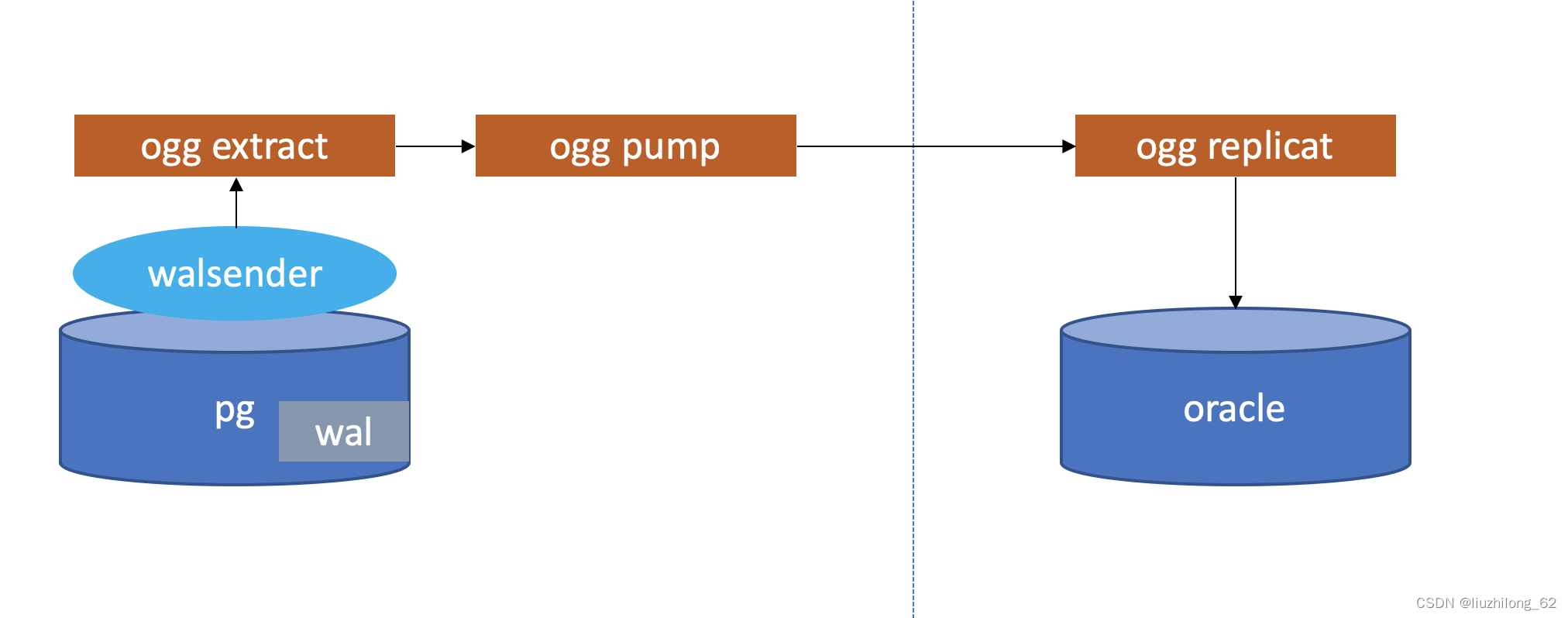
Since we’re mainly discussing the PostgreSQL database itself, when PostgreSQL acts as the downstream target, it’s just some data write issues with very few problems. There won’t be logical decoding, replication slot issues, etc. So this small section won’t discuss PostgreSQL as a heterogeneous sync target. We’ll only observe and summarize scenarios where PostgreSQL acts as the upstream syncing to heterogeneous databases. These third-party tools generally utilize PostgreSQL’s own logical decoding, specify their own output plugin, and automatically create replication slots and replication links. Some tools automatically create subscriptions, while others only have replication slots without subscriptions.
Having already understood logical decoding, output plugins, replication slots, replica identity, and prerequisites for replication, let’s simulate a PostgreSQL to Oracle sync by directly configuring the prerequisites and starting synchronization.
Creating OGG Sync from PostgreSQL to Oracle#
Software Installation:
ogg for oracle: Oracle GoldenGate 21.3.0.0.0 for Oracle on Linux x86-64
ogg for pg: Oracle GoldenGate 21.3.0.0.0 for PostgreSQL on Linux x86-64
oracle: 11.2.0.4
pg: 13.10
Installation steps:
OGG installation and deployment won’t be introduced here. I followed the article’s installation steps step by step. Installation article reference: https://liuzhilong.blog.csdn.net/article/details/129252320?spm=1001.2014.3001.5502
Sync architecture diagram:
lzldb=# select * from pg_replication_slots where slot_name='ext_pg_5d4b1d39f7494f79';

-[ RECORD 1 ]-------+------------------------
slot_name           | ext_pg_5d4b1d39f7494f79
plugin              | test_decoding -- OGG defaults to using test-decoding
slot_type           | logical
datoid              | 16385
database            | lzldb
temporary           | f
active              | t   -- As long as OGG extract is running, the replication slot is active
active_pid          | 3509
xmin                |
catalog_xmin        | 591
restart_lsn         | 0/17F3E38
confirmed_flush_lsn | 0/17F4020
wal_status          | reserved
safe_wal_size       |

select * from pg_stat_replication
-[ RECORD 2 ]----+------------------------------
pid              | 3509
usesysid         | 10
usename          | pg
application_name |GoldenGateCapture
client_addr      | 127.0.0.1
client_hostname  |
client_port      | 43665
backend_start    | 2023-02-28 15:12:17.350469+08
backend_xmin     |
state            | streaming
sent_lsn         | 0/17F4140
write_lsn        | 0/17F4020
flush_lsn        | 0/17F4020
replay_lsn       |
write_lag        |
flush_lag        |
replay_lag       |
sync_priority    | 0
sync_state       | async
reply_time       | 2023-02-28 16:39:44.986625+08

-- replay_lsn has no value
-- Even lag has no value
Logical Replication Monitoring#
An important method for logical replication lag monitoring is checking lag from the replication software. Without that, you can only check from the replication slot view. The replication slot view provides quite a lot of information, such as whether the replication slot is active directly indicating whether the replication link is syncing.
The replication slot view is very important for logical replication monitoring. Some additional monitoring for publish-subscribe was introduced earlier. Here we focus on broader logical replication monitoring.
pg_replication_slots#
The replication slot view shows information about each replication slot and some slot statuses. Manually created slots or slots automatically created by tools and subscriptions are all displayed here.
| slot_name | Replication slot name |
|---|---|
| plugin | Output plugin name for logical replication slots. If empty, it’s a physical replication slot |
| slot_type | physical or logical |
| datoid | Database ID for logical replication slot |
| database | Database for logical replication slot |
| temporary | Whether it’s a temporary replication slot. Temporary slots are not written to disk and are automatically deleted when the session ends. pg_basebackup uses temporary slots by default |
| active | Replication slot status: t or f. If f, you should quickly consider restarting the replication link or deleting it, as it may block WAL log deletion and fill up the primary database disk. This is related to the max_slot_wal_keep_size parameter |
| active_pid | walsender PID using this replication slot. Only present when the slot status is t |
| xmin | Minimum transaction ID the slot needs to hold |
| catalog_xmin | Minimum catalog transaction ID the slot needs to hold |
| restart_lsn | LSN position of WAL the slot needs to retain to ensure downstream consumer’s required WAL won’t be cleaned. max_slot_wal_keep_size parameter is the maximum WAL size the slot needs to retain. Beyond this value, WAL can also be deleted. Default -1 means never cleaned. This value represents the LSN position after the downstream’s latest checkpoint consumption and can help locate replication link lag |
| confirmed_flush_lsn | LSN confirmed received by the logical replication downstream. Empty for physical replication slots |
| wal_status | Status of WAL claimed by this replication slot reserved: the slot reserves WAL, WAL hasn’t exceeded max_wal_size (auto-checkpoint interval) extended: the slot reserves WAL, WAL has exceeded max_wal_size but the slot still retains it. WAL in this state is still within wal_keep_size or max_slot_wal_keep_size unreserved: the slot no longer retains needed WAL, WAL will be deleted at next checkpoint lost: WAL needed by the slot has been cleaned, slot is invalid. The last two states are seen only when max_slot_wal_keep_size is non-negative. This is easy to understand, since max_slot_wal_keep_size is the criterion for whether WAL can be deleted. Without a mechanism to delete slot WAL, unreserved and lost states wouldn't appear. If restart_lsn is NULL, this field is null. Also easy to understand — if there's no WAL LSN, you can't know the WAL retention position or judge whether WAL has exceeded wal_keep_size or max_slot_wal_keep_size. |
| safe_wal_size | Number of WAL bytes that can be written before WAL files would be deleted. If this value is negative or zero, it means max_slot_wal_keep_size has been exceeded, and WAL files will be deleted as soon as a checkpoint occurs, requiring the standby using this slot to be rebuilt |
pg_stat_replication#
Rather than replication status, it’s more accurate to call it walsender status. This view shows the status of each walsender, one record per walsender.
- If present in pg_replication_slots but not in pg_stat_replication, the walsender is gone; logical replication is down; pg_replication_slots active should be f.
- If absent in pg_replication_slots but present in pg_stat_replication, this is physical replication without a replication slot.
You can have replication stat info without a replication slot. Replication slots with walsenders also need this view because it reveals more replication status info than pg_replication_slots.
So when the replication slot hasn’t failed, pg_stat_replication is very important for monitoring logical replication lag.
| pid | walsender PID, same as pg_replication_slots active_pid |
|---|---|
| usesysid | User OID connected to this walsender, i.e., the downstream’s replication user OID |
| usename | Username connected to this walsender |
| application_name | Downstream application name. If subscription, it’s the subscription name. If pg_recvlogical, it’s pg_recvlogical |
| client_addr | Downstream IP. If empty, it’s a local socket connection |
| client_hostname | Downstream hostname |
| client_port | Downstream port. If -1, it’s a local socket connection |
| backend_start | Backend start time, i.e., when downstream connected to walsender |
| backend_xmin | Standby’s xmin when hot_standby_feedback is enabled. This is clearly for physical replication |
| state | States are relatively easy to understand. startup: walsender starting. catchup: walsender catching up with primary logs. streaming: walsender has caught up with primary logs, normal replication state. backup: walsender sending backup, this state appears for walsender used for backup. stopping: walsender stopping |
| sent_lsn | LSN sent |
| write_lsn | LSN written to disk by downstream |
| flush_lsn | LSN flushed to disk by downstream |
| replay_lsn | LSN replayed by downstream |
| write_lag | Log lag between primary flush wal and downstream write |
| flush_lag | Log lag between primary flush wal and downstream flush |
| replay_lag | Log lag between primary flush wal and downstream relay |
| sync_priority | Synchronization priority |
| sync_state | Synchronization state |
| reply_time | Last reply time |
Relationship between sent_lsn, write_lsn, flush_lsn, replay_lsn#
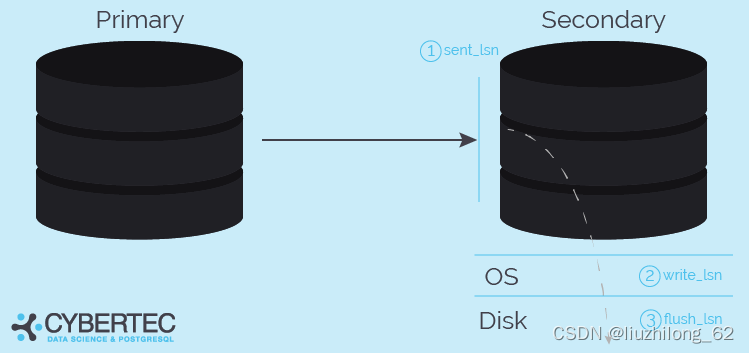
The above nicely shows the hierarchical relationship of sent_lsn, write_lsn, flush_lsn.
These monitoring metrics look very much like streaming replication. For logical replication, sent_lsn, write_lsn, flush_lsn also generally have values.
However, when logical replication doesn’t know what the downstream is, the replay log replay action may not exist, so logical replication may not have replay_lsn.
But one thing is confirmed effective: sent_lsn.
After reviewing pg_replication_slots and pg_stat_replication view monitoring, we find that neither shows log parsing delay; at most, you can see log transmission delay.
pg_stat_replication_slots#
This view has been available since pg14. It specifically monitors logical replication slot status and can additionally monitor spill status. For pg13, you can only check the pg_replslot directory. Spill will be introduced later.
Logical Replication Slot Transaction Snapshots and pg_logical Directory#
The transaction snapshots needed by replication slots are persisted to disk. The source code is in snapbuild.c.
void
SnapBuildSerializationPoint(SnapBuild *builder, XLogRecPtr lsn)
{
if (builder->state < SNAPBUILD_CONSISTENT)
SnapBuildRestore(builder, lsn);
else
SnapBuildSerialize(builder, lsn);
}
Snap persistence has two behaviors: one is restore, loading from disk to memory; the other is serialize, persisting from memory to disk.
Transaction snapshot persistence:
SnapBuildSerialize(SnapBuild *builder, XLogRecPtr lsn)
...
sprintf(path, "pg_logical/snapshots/%X-%X.snap",
(uint32) (lsn >> 32), (uint32) lsn);
...
else if (ret == 0)
{
/*
 * somebody else has already serialized to this point, don't overwrite
 * but remember location, so we don't need to read old data again.
 *
 * To be sure it has been synced to disk after the rename() from the
 * tempfile filename to the real filename, we just repeat the fsync.
 * That ought to be cheap because in most scenarios it should already
 * be safely on disk.
 */
fsync_fname(path, false);
fsync_fname("pg_logical/snapshots", true);

builder->last_serialized_snapshot = lsn;
goto out;
}
Transaction snapshot loading into memory:
SnapBuildRestore(SnapBuild *builder, XLogRecPtr lsn)
...
if (builder->state == SNAPBUILD_CONSISTENT)
return false;

sprintf(path, "pg_logical/snapshots/%X-%X.snap",
(uint32) (lsn >> 32), (uint32) lsn);

fd = OpenTransientFile(path, O_RDONLY | PG_BINARY);
The transactions needed by logical replication slots, before being committed, store dirty transaction data and unconsumed data under pg_logical/snapshots/. After committing data or starting the replication slot, data is handed to reorderbuffer; or after cleaning the replication slot, the data is released.
My environment has a long-unused slot with restart_lsn at 0/1776858:
postgres=# select slot_name,plugin,slot_type,database,active,restart_lsn from pg_replication_slots where slot_name='logical_test';
 slot_name |  plugin   | slot_type | database | active | restart_lsn
--------------+---------------+-----------+----------+--------+-------------
 logical_test | test_decoding | logical  | lzldb  | f   | 0/1776858
The oldest snapshot under pg_logical/snapshots/ is it:
[pg@lzl snapshots]$ ll
total 300
-rw------- 1 pg pg 144 Feb 23 20:41 0-1776858.snap
-rw------- 1 pg pg 144 Feb 23 20:44 0-1776900.snap
-rw------- 1 pg pg 144 Feb 23 20:45 0-1776938.snap
Delete unwanted replication slot:
select pg_drop_replication_slot('logical_test');After a few minutes, snap is deleted:
[pg@lzl snapshots]$ ll 0-1776858.snap
ls: cannot access 0-1776858.snap: No such file or directory
Logical Decoding Working Memory and Spill to pg_replslot#
logical_decoding_work_mem#
Before pg13, logical decoding would retain at most 4096 changes in memory (max_changes_in_memory hardcoded). Beyond 4096 changes, transaction data would be written to disk.
pg13 introduced the logical_decoding_work_mem parameter. Working memory used by logical decoding. All walsender decoding uses this shared memory area. If the data held by logical decoding exceeds this memory value, it’s written to disk. Logical decoding working memory size defaults to 64MB.
Related ReorderBuffer and Spill#
Description in reorderbuffer.c:
 *          This module gets handed individual pieces of transactions in the order
 *          toplevel transaction sized pieces. When a transaction is completely
 *          reassembled - signaled by reading the transaction commit record - it
 *          will then call the output plugin (cf. ReorderBufferCommit()) with the
 *          individual changes. The output plugins rely on snapshots built by
 *          snapbuild.c which hands them to us.
When a transaction commits, reorderbuffer can receive transaction entries and sort them, then send data changes to the output plugin for output. The output plugin relies on snapshots built by snapbuild.c, which are handed to reorderbuffer.
/*
 * Maximum number of changes kept in memory, per transaction. After that,
 * changes are spooled to disk.
 *
 * The current value should be sufficient to decode the entire transaction
 * without hitting disk in OLTP workloads, while starting to spool to disk in
 * other workloads reasonably fast.
 *
 * At some point in the future it probably makes sense to have a more elaborate
 * resource management here, but it's not entirely clear what that would look
 * like.
 */
int                        logical_decoding_work_mem;
static const Size max_changes_in_memory = 4096; /* XXX for restore only */
When parsed data exceeds logical_decoding_work_mem, it’s written to disk. max_changes_in_memory is hardcoded at 4096, now only used to trigger disk restore. In pg12 source, there’s no int logical_decoding_work_mem, and subsequent serialization was also judged based on max_changes_in_memory.
In pg13, Disk serialization source code starts from line 2333. When parsed data in memory exceeds logical_decoding_work_mem, the largest transaction is spilled to disk. ReorderBufferLargestTXN(rb) finds the largest transaction. ReorderBufferSerializeTXN(rb, txn) persists this transaction. The immediately following code is ReorderBufferSerializeTXN():
/*
 * Spill data of a large transaction (and its subtransactions) to disk.
 */
static void
ReorderBufferSerializeTXN(ReorderBuffer *rb, ReorderBufferTXN *txn)
{
dlist_iter        subtxn_i;
dlist_mutable_iter change_i;
int                        fd = -1;
XLogSegNo        curOpenSegNo = 0;
Size                spilled = 0;

elog(DEBUG2, "spill %u changes in XID %u to disk",
 (uint32) txn->nentries_mem, txn->xid);

/* do the same to all child TXs */
...
At debug2 level, spill logs are output:
/*
 * Given a replication slot, transaction ID and segment number, fill in the
 * corresponding spill file into 'path', which is a caller-owned buffer of size
 * at least MAXPGPATH.
 */
static void
ReorderBufferSerializedPath(char *path, ReplicationSlot *slot, TransactionId xid,
XLogSegNo segno)
{
XLogRecPtr        recptr;

XLogSegNoOffsetToRecPtr(segno, 0, wal_segment_size, recptr);

snprintf(path, MAXPGPATH, "pg_replslot/%s/xid-%u-lsn-%X-%X.spill",
 NameStr(MyReplicationSlot->data.name),
 xid,
 (uint32) (recptr >> 32), (uint32) recptr);
}
Persisted to pg_replslot/replication_slot_name/xid-%u-lsn-%X-%X.spill.
Similarly, besides serialize, there’s also restore:
/*
 * Restore a number of changes spilled to disk back into memory.
 */
static Size
ReorderBufferRestoreChanges(ReorderBuffer *rb, ReorderBufferTXN *txn,
TXNEntryFile *file, XLogSegNo *segno)
{
Size                restored = 0;
XLogSegNo        last_segno;
...
while (restored < max_changes_in_memory && *segno <= last_segno)
{
int                        readBytes;
ReorderBufferDiskChange *ondisk;

...
/*
 * Read the statically sized part of a change which has information
 * about the total size. If we couldn't read a record, we're at the
 * end of this file.
 */
ReorderBufferSerializeReserve(rb, sizeof(ReorderBufferDiskChange));
readBytes = FileRead(file->vfd, rb->outbuf,
 sizeof(ReorderBufferDiskChange),
 file->curOffset, WAIT_EVENT_REORDER_BUFFER_READ);
...
/*
 * ok, read a full change from disk, now restore it into proper
 * in-memory format
 */
ReorderBufferRestoreChange(rb, txn, rb->outbuf);
restored++;
}

return restored;
}
ReorderBufferRestoreChanges() just does judgment and looping (restored++), calling ReorderBufferRestoreChange():
static void
ReorderBufferRestoreChange(ReorderBuffer *rb, ReorderBufferTXN *txn,
   char *data)
{
...
/*
 * Update memory accounting for the restored change.  We need to do this
 * although we don't check the memory limit when restoring the changes in
 * this branch (we only do that when initially queueing the changes after
 * decoding), because we will release the changes later, and that will
 * update the accounting too (subtracting the size from the counters). And
 * we don't want to underflow there.
 */
ReorderBufferChangeMemoryUpdate(rb, change, true,
ReorderBufferChangeSize(change));
}
Looking at ReorderBufferRestoreChanges(), its while loop judgment is restored < max_changes_in_memory, and restored starts at 0. It will loop 4096 times. There’s a comment in ReorderBufferRestoreChange explaining that although restore isn’t based on memory limit, it still needs to update memory usage to prevent underflow. Meaning: since I just restored it, don’t spill it again in a nested fashion. (It feels a bit odd — clearly judging by memory limit would be better rather than hardcoding the restore loop count.)
Interpreting the logical decoding process based on source code:
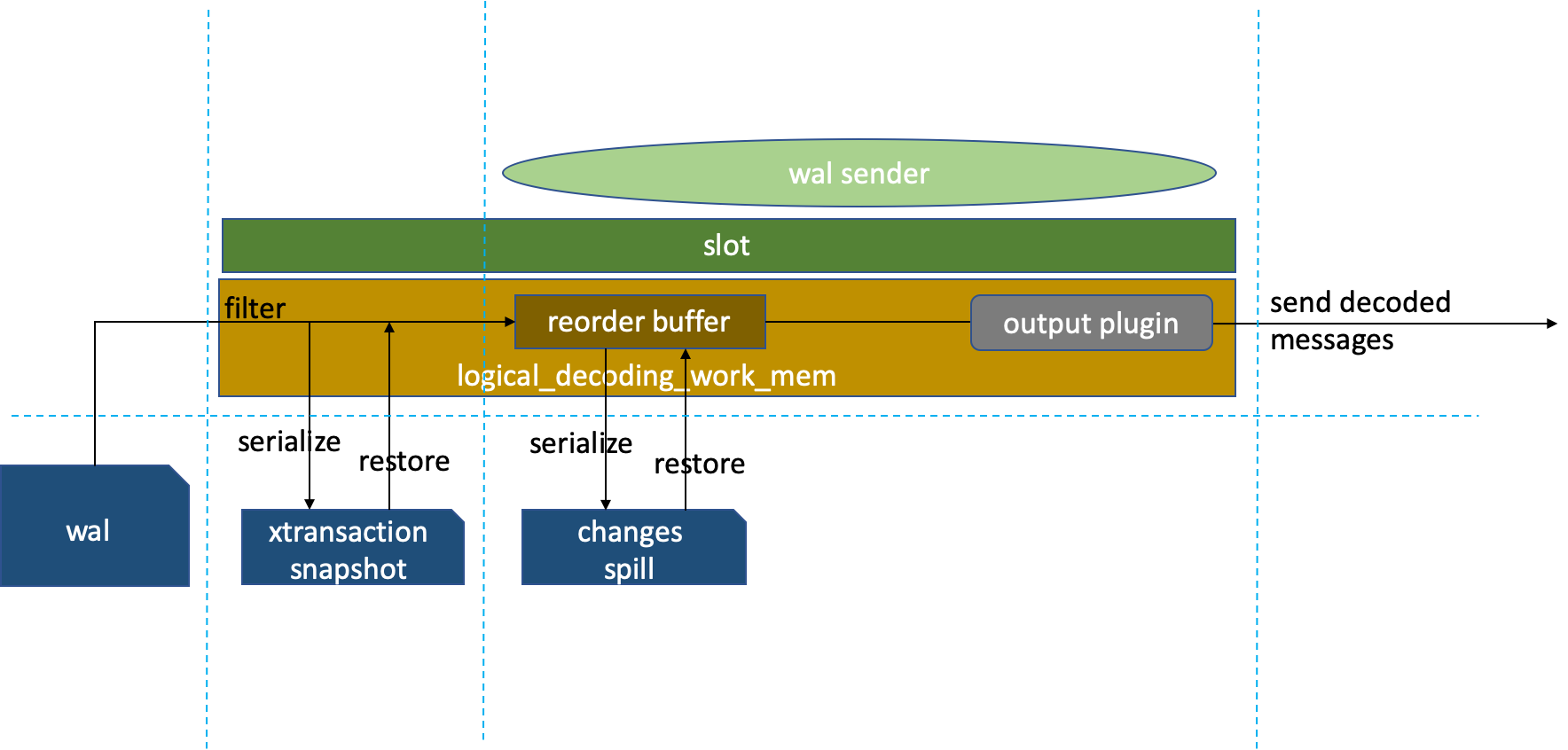
xtransaction snap preserves the metadata needed for parsing locks. When the replication slot is inactive or the transaction is uncommitted, snap persists to pg_logical/snapshots/%restart_lsn.snap. After the replication slot restarts or the transaction commits, the transaction snap metadata on disk is read into memory and sent to reorderbuffer for WAL parsing, sorted by transaction start order. If logical decoding data fills up the logical_decoding_work_mem memory area, change entries persist the largest transaction to pg_replslot/slot_name/xid-%u-lsn-%X-%X.spill, send other in-memory transactions to the output plugin for format conversion, and finally send the decoded information to the downstream.
In fact, we can see that long transactions and large transactions can make the entire logical replication link very slow. Large transactions are preferentially spilled to disk, then loaded back from disk to memory after the transaction completes.
Summary#
- Logical replication is managed through replication slots: one replication slot, one walsender process, one output plugin.
- The output plugin determines the output form of logically decoded data, specified when creating the replication slot.
- Replica identity priority recommendation: primary key -> non-null unique index -> full.
- The publish-subscribe model is PostgreSQL’s built-in logical replication, using pgoutput by default. Publications can be used independently.
- The publisher process is walsender, and the subscriber process is worker. Pay attention to their respective process parameters.
- There are many third-party logical replication tools; they generally use PostgreSQL’s logical decoding system.
- For monitoring replication links, pay attention to pg_replication_slots and pg_stat_replication.
- The pg_logical directory stores transaction parsing metadata snaps, waiting for transaction commit before parsing.
- The pg_replslot directory stores transaction information exceeding logical_decoding_work_mem, called spill.
References#
Book: PostgreSQL in Action
Official Documentation:
PostgreSQL: Documentation: 15: Chapter 49. Logical Decoding
PostgreSQL: Documentation: 15: 49.1. Logical Decoding Examples
PostgreSQL: Documentation: 15: pg_recvlogical
PostgreSQL: Documentation: 14: 52.81. pg_replication_slots
PostgreSQL: Documentation: 13: 19.6. Replication
PostgreSQL: Documentation: 13: 48.6. Logical Decoding Output Plugins
PostgreSQL: Documentation: 15: 31.1. Publication
PostgreSQL: Documentation: 15: 31.2. Subscription
PostgreSQL: Documentation: 15: CREATE PUBLICATION
Highly Recommended:
https://www.pgconf.asia/JA/2017/wp-content/uploads/sites/2/2017/12/D2-A7-EN.pdf
Logical replication internals | Select * from Adrien
An Overview of Logical Replication in PostgreSQL - Highgo Software Inc.
Discussing Logical Decoding from Real Cases
Long-Troubling Logical Decoding Anomalies
Monitoring replication: pg_stat_replication - CYBERTEC
Other References:
https://zhuanlan.zhihu.com/p/311496301
A Guide to PostgreSQL Change Data Capture - DZone
Change data capture in Postgres: How to use logical decoding and wal2json - Microsoft Community Hub
Analyzing PostgreSQL Logical Replication Principles - CSDN Blog
http://pigsty.cc/en/blog/2021/03/03/postgres-logical-replication-explained/