
OGG software version: (19.1.0.0.4) Oracle version: 11.2.0.4 PG version: pg10 OGG download: https://www.oracle.com/technetwork/middleware/goldengate/downloads/index.html
glibc issue handling: https://www.cnblogs.com/hxlasky/p/16779047.html
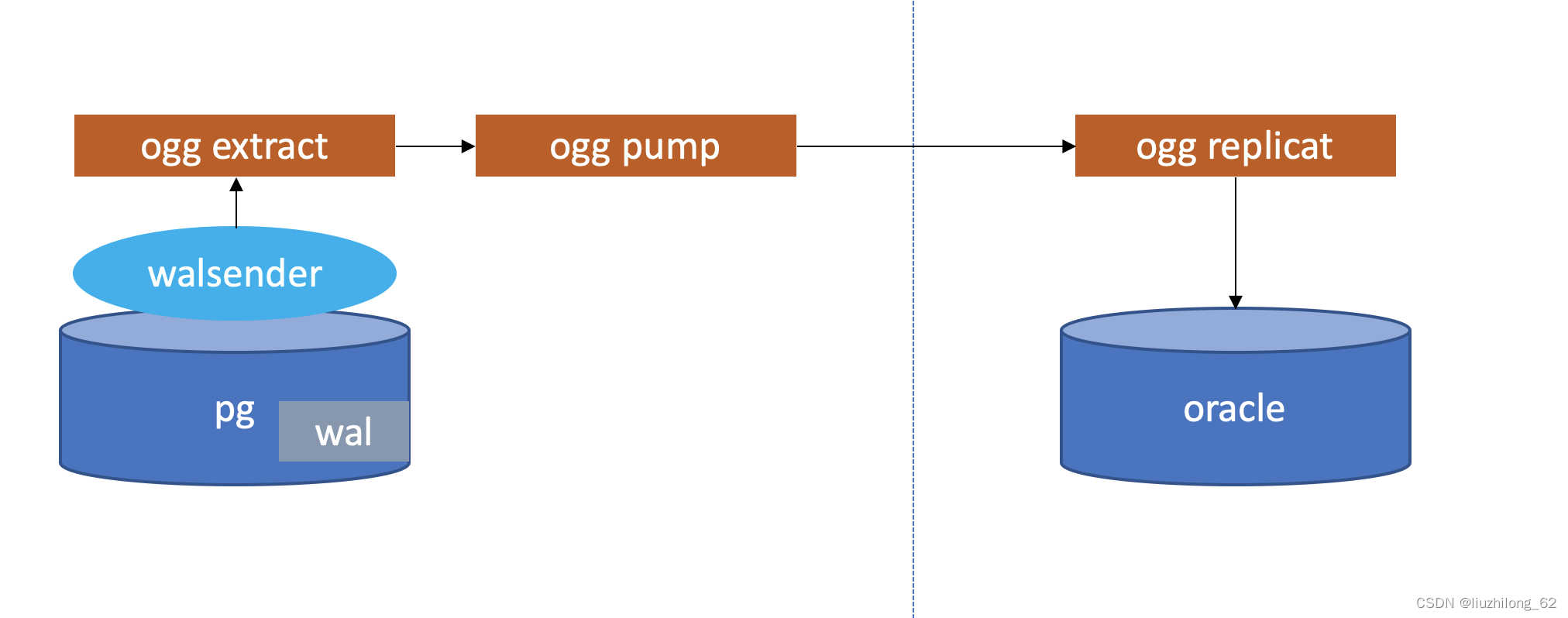
1. Create Database and Table on Source#
[root@node2 ~]# su - postgres
Last login: Tue Jul 21 21:08:52 CST 2020 on pts/0
[postgres@node2 ~]$ pg_ctl -D /opt/pgsql_data -l logfile start
waiting for server to start.... done
server started
postgres=# create database test
postgres=# \c lzldb
postgres=# create table tab1(id int primary key,name varchar(20))
2. Create Database and Table on Target#
sqlplus / as sysdba
SQL> create table ORALZL.tab1(id number primary key,name varchar2(20));
3. Extract and Install OGG for PostgreSQL#
-- Unlike OGG for Oracle, OGG for PG only needs extraction. Oracle version requires running runInstaller.
[postgres@node1 ~]$ id postgres
uid=54323(postgres) gid=54330(postgres) groups=54330(postgres)
[postgres@node1 ~]$ exit
logout
[root@node1 ~]# mkdir /ogg
[root@node1 ~]# chown -R postgres /ogg
[root@node1 ~]# chmod -R 755 /ogg
[root@node1 ~]#
[root@node1 soft]# ls -l

total 240744

-rw-r--r--. 1 root root 87028695 Jul 22 02:51 19100200714_ggs_Linux_x64_PostgreSQL_64bit.zip
[root@node1 soft]# chmod 777 19100200714_ggs_Linux_x64_PostgreSQL_64bit.zip
[root@node1 soft]# unzip 19100200714_ggs_Linux_x64_PostgreSQL_64bit.zip
Archive: 19100200714_ggs_Linux_x64_PostgreSQL_64bit.zip
 inflating: ggs_Linux_x64_PostgreSQL_64bit.tar
 inflating: OGG-19.1.0.0-README.txt
 inflating: release-notes-oracle-goldengate_19.1.0.200714.pdf
[root@node1 soft]# chmod 777 ggs_Linux_x64_PostgreSQL_64bit.tar
[root@node1 soft]# su - postgres
[postgres@node1 ~]$ cd /soft
[postgres@node1 soft]$ tar -xf ggs_Linux_x64_PostgreSQL_64bit.tar -C /ogg
4. Configure PG User Environment Variables#
Source PG:
[postgres@node1 ~]$ cat .bash_profile
## .bash_profile
## Get the aliases and functions
if [ -f ~/.bashrc ]; then
. ~/.bashrc
fi
## User specific environment and startup programs
PATH=$PATH:$HOME/.local/bin:$HOME/bin
export GGHOME=/ogg
export PG_DATA=/opt/pgsql/pgsql/bin
export PATH=$PG_DATA:$PATH
export PG_HOME=/opt/pgsql/pgsql
export LD_LIBRARY_PATH=$PG_HOME/lib:$LD_LIBRARY_PATH:$GGHOME/lib
export ODBCINI=/home/postgres/odbc.ini
export DD_ODBC_HOME=/ogg
export PATH
[postgres@node1 ~]$ source .bash_profile
5. Configure Manager Process#
[postgres@node1 ~]$ cd /ogg
[postgres@node1 ogg]$ ./ggsci
Oracle GoldenGate Command Interpreter for PostgreSQL
Version 19.1.0.0.200714 OGGCORE_19.1.0.0.0OGGBP_PLATFORMS_200628.2141
Linux, x64, 64bit (optimized), PostgreSQL on Jun 29 2020 03:59:15
Operating system character set identified as UTF-8.
Copyright (C) 1995, 2019, Oracle and/or its affiliates. All rights reserved.
GGSCI (node1) 2> info all
Program   Status   Group    Lag at Chkpt Time Since Chkpt
MANAGER   STOPPED

GGSCI (node1) 3> create subdirs
Creating subdirectories under current directory /ogg
Parameter file         /ogg/dirprm: created.
Report file          /ogg/dirrpt: created.
Checkpoint file        /ogg/dirchk: created.
Process status files      /ogg/dirpcs: created.
SQL script files        /ogg/dirsql: created.
Database definitions files   /ogg/dirdef: created.
Extract data files       /ogg/dirdat: created.
Temporary files        /ogg/dirtmp: created.
Credential store files     /ogg/dircrd: created.
Masterkey wallet files     /ogg/dirwlt: created.
Dump files           /ogg/dirdmp: created.
GGSCI (node1) 4> edit params mgr
GGSCI (node1) 5> view params mgr
port 7809
GGSCI (node1) 6> start mgr
Manager started.
GGSCI (node1) 7> info all
Program   Status   Group    Lag at Chkpt Time Since Chkpt
MANAGER   RUNNING
6. Adjust Source PostgreSQL Parameters#
[postgres@node1 ogg]$ vi /opt/pgsql_data/postgresql.conf
wal_level = logical      #minimal, replica, or logical
max_replication_slots = 10  #max number of replication slots
max_wal_sender = 10      #maximum number of wal sender processes
wal_receiver_status_interval=10s #optional, keep the system default
wal_sender_timeout      #optional, keep the system default
track_commit_timestamp    #optional, keep the system default
wal_receiver_status_interval=10s
wal_sender_timeout = 60s
track_commit_timestamp=off
Restart source PostgreSQL after adjustment:
[postgres@node1 ogg]$ pg_ctl -D /opt/pgsql_data -l logfile stop
[postgres@node1 ogg]$ pg_ctl -D /opt/pgsql_data -l logfile start
7. Configure OGG for PG Data Source#
cd /home/postgres/
vi odbc.ini
[ODBC Data Sources]
PGDSN=DataDirect 7.1 PostgreSQL Wire Protocol
postgres=DataDirect 7.1 PostgreSQL Wire Protocol
scott=DataDirect 7.1 PostgreSQL Wire Protocol
[ODBC]
IANAAppCodePage=4
InstallDir=/ogg
[PGDSN]
Driver=/ogg/lib/GGpsql25.so
Description=DataDirect 7.1 PostgreSQL Wire Protocol
Database=test
HostName=192.168.1.112
PortNumber=5432
LogonID=postgres
Password=postgres
8. Connection Test#
[postgres@node1 ~]$ cd /ogg
[postgres@node1 ogg]$ ./ggsci
--dblogin sourcedb pgdsn userid pg, password 123456
GGSCI (node1) 1> dblogin sourcedb pgdsn userid postgres, password postgres
2020-07-22 03:10:44 INFO  OGG-03036 Database character set identified as UTF-8. Locale: en_US.UTF-8.
2020-07-22 03:10:44 INFO  OGG-03037 Session character set identified as UTF-8.
Successfully logged into database.
GGSCI (node1 as postgres@pgdsn) 2>
9. Enable Table-Level Supplemental Logging#
Source:
GGSCI (node1) 3> dblogin sourcedb pgdsn userid postgres, password postgres
2020-07-22 03:21:01 INFO  OGG-03036 Database character set identified as UTF-8. Locale: en_US.UTF-8.
2020-07-22 03:21:01 INFO  OGG-03037 Session character set identified as UTF-8.
Successfully logged into database.
GGSCI (node1 as postgres@pgdsn) 4> add trandata public.tab1 --If table has primary key, this step can be skipped
Logging of supplemental log data is enabled for table public.tab1. REPLICA IDENTITY was DEFAULT and is changed to FULL
GGSCI (node1 as postgres@pgdsn) 5>
GGSCI (node1 as postgres@pgdsn) 5> info trandata public.tab1
Logging of supplemental log data is enabled for table public.t1 with REPLICA IDENTITY set to FULL
10. Register Extract Process on PG#
Registering an extract process on PG essentially creates a replication slot. The output plugin defaults to test_decoding.
 GGSCI (node1 as postgres@pgdsn) 6> Register Extract ext_pg
 2020-07-22 03:25:27 INFO  OGG-25355 Successfully created replication slot 'ext_pg_2947c06e0ea2ec74' for EXTRACT group 'EXT_PG' in database 'test'.
11. Configure Extract and Pump Processes#
Configure extract process:
 edit param ext_pg

SETENV ( PGCLIENTENCODING = "UTF8" )
 SETENV (NLS_LANG="AMERICAN_AMERICA.AL32UTF8")
 extract ext_pg
 SETENV (ODBCINI="/home/pg/odbc.ini" )
 SOURCEDB pgdsn, USERID pg, PASSWORD 123456
 exttrail ./dirdat/st
 TABLE PUBLIC.TAB1;
 ----GETTRUNCATES  ### This feature on PostgreSQL 10.12: ERROR OGG-25541 GETTRUNCATES is not valid. PostgreSQL supports TRUNCATE capture from version 11.
Note: PG to Oracle cannot sync TRUNCATE commands.
Configure pump process:
 extract pump_pg
 SETENV (ODBCINI="/home/pg/odbc.ini" )
 RMTHOST 172.17.100.150, MGRPORT 7809, compress
 numfiles 10000
 RMTTRAIL ./dirdat/rt
 TABLE PUBLIC.TAB1;
12. Add Trail and Start Extract/Pump#
ADD extract ext_pg, TRANLOG,BEGIN now
 add exttrail ./dirdat/st,extract ext_pg,megabytes 500
 add extract pump_pg,exttrailsource ./dirdat/st
 add rmttrail ./dirdat/rt,extract pump_pg,megabytes 500
 start ext_pg
 start pump_pg
13. Configure defgen#
If table structures are consistent, you can configure ASSUMETARGETDEFS.
edit param defgen

DEFSFILE ./dirdef/tab1.def, PURGE
 SOURCEDB pgdsn, USERID pg, PASSWORD 123456
 TABLE PUBLIC.tab1;
Generate table definition file:
defgen paramfile /oggpg/dirdef/tab1.prmCopy the defgen file to the target’s dirdef directory.
14. Verify Trail Delivery on Target#
[oracle@lzl dirdat]$ cd dirdat
 [oracle@lzl dirdat]$ ll
 -rw-r----- 1 pg pg 1439 Feb 28 11:02 rt000000000
15. Register Extract Process on PG#
Registering an extract process on PG creates a replication slot:
GGSCI (node1 as postgres@pgdsn) 6> Register Extract ext_pg
2020-07-22 03:25:27 INFO  OGG-25355 Successfully created replication slot 'ext_pg_2947c06e0ea2ec74' for EXTRACT group 'EXT_PG' in database 'test'.
16. Configure Oracle User Environment Variables#
export ORACLE_BASE=/oracle/app/oracle
 export ORACLE_HOME=$ORACLE_BASE/product/11.2.0/dbhome_1
 export ORACLE_SID=oralzl
 export OGG_HOME=/oggfororacle
 export PATH=$ORACLE_HOME/bin:$ORACLE_HOME/OPatch:$PATH
 export TNS_ADMIN=$ORACLE_HOME/network/admin
 export LD_LIBRARY_PATH=$ORACLE_HOME/lib:$OGG_HOME:$ORACLE_HOME/lib32:/lib/usr/lib:/usr/local/lib
17. Configure Oracle Listener and TNS#
OGG for Oracle defaults to using TNS_ADMIN’s tns.
You can also manually configure during extract configuration, e.g.: USERID [email protected]:1521/oralzl, PASSWORD 123456
18. Install OGG for Oracle on Target#
Download OGG software. Configure oggcore.rsp file:
oracle.install.responseFileVersion=/home/oracle/oggcore.rsp
INSTALL_OPTION=ORA11g
SOFTWARE_LOCATION=/ogg
START_MANAGER=false
MANAGER_PORT=7809
DATABASE_LOCATION=/oracle/db/11.2.0.4
INVENTORY_LOCATION=/oracle/oraInventory
UNIX_GROUP_NAME=oinstall
Silent install OGG:
./runInstaller -silent -nowait -responseFile /home/oracle/oggcore.rsp19. Oracle Database User and Privileges#
create user goldengate identified by "123456";
 grant create session,alter session to goldengate;
 grant alter system to goldengate;
 grant resource to goldengate;
 grant connect to goldengate;
 grant select any dictionary to goldengate;
 grant flashback any table to goldengate;
 grant select any table to goldengate;
 grant select any table to goldengate;
 grant insert any table to goldengate;
 grant update any table to goldengate;
 grant delete any table to goldengate;
 grant select on dba_clusters to goldengate;
 grant execute on dbms_flashback to goldengate;
 grant create table to goldengate;
 grant create sequence to goldengate;
 grant alter any table to goldengate;
 grant dba to goldengate;
 grant lock any table to goldengate;
20. Target Manager Process#
edit param mgr

PORT 7809
 DYNAMICPORTLIST 7810-7980
 PURGEOLDEXTRACTS ./dirdat/*, USECHECKPOINTS, MINKEEPDAYS 3
 PURGEDDLHISTORY MINKEEPDAYS 7, MAXKEEPDAYS 10
 LAGREPORTHOURS 1
 LAGINFOMINUTES 30
 LAGCRITICALMINUTES 45
start mgr21. Configure Replicat Process on Target#
GGSCI (node2) 8> dblogin userid [email protected]:1521/oralzl,password 123456
GGSCI (node2 as postgres@pgdsn) 9> add checkpointtable goldengate.chkt
Successfully created checkpoint table public.chkt.
Replicat process:
 edit param rep_pg
REPLICAT rep_pg
 USERID [email protected]:1521/oralzl, PASSWORD 123456
 SOURCEDEFS ./dirdef/tab1.def
 MAP public.tab1, TARGET oralzl.tab1;
add replicat rep_pg,exttrail ./dirdat/rt,checkpointtable goldengate.chkt
 start rep_pg
22. Test Sync#
[postgres@node1 ~]$ psql
postgres=# \c lzldb
test=# \d tab1;
Table "public.tab1"
Column | Type | Collation | Nullable | Default
--------+-----------------------+-----------+----------+---------
id | integer | | not null |
name | character varying(20) | | |
Indexes:
"t1_pkey" PRIMARY KEY, btree (id)
lzldb=# insert into t2 values(1,'lzl1') ;
INSERT 0 1
lzldb=# select * from t2;
id | name
----+------
1 | lzl1
[postgres@node2 ~]$sqlplus / as sysdba
SQL> select * from oralzl.tab1;
id name
---------- ----------
1 lzl1 Original link: https://lastdba.com/en/2024/08/13/ogg-building-pg-oracle-sync/