
What is a Partitioned Table#
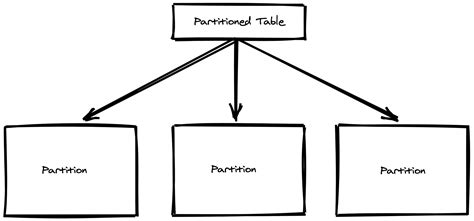 Database partitioning splits table data into smaller physical shards to improve performance, availability, and manageability. Partitioned tables are a common optimization technique for large tables in relational databases. DBMS generally provide partition management, and applications can access partitioned tables directly without changing their architecture—though good performance requires proper partition access patterns.
Partitioned tables are a common database technology, but PostgreSQL partitioned tables have many unique characteristics: multiple implementation approaches, partitions being regular tables, partition maintenance strategies, SQL optimization considerations, and some known issues.
Partition Table Implementations#
PostgreSQL provides various partition implementation approaches. The officially supported methods are declarative partitioning and inheritance partitioning, while third-party plugins include pg_pathman, pg_partman, etc. Since the introduction of official declarative partitioning, only one approach is generally recommended: declarative partitioning. Covering every implementation’s features, details, and history would make this article excessively long and is less relevant going forward. This article focuses mainly on declarative partitioning, with brief introductions to other approaches. However, due to existing deployments and feature differences, understanding declarative partitioning, inheritance partitioning, and pg_pathman remains valuable.
Declarative Partitioning#
Declarative partitioning, also called native partitioning, has been supported since PG10. It is the “officially supported” partitioning approach and the most recommended method. Although different from inheritance partitioning, declarative partitioning is also implemented internally using table inheritance. It supports only three partition methods: RANGE, LIST, and HASH.
RANGE Partitioning#
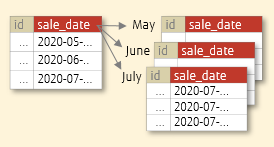 RANGE partitioned tables split data by range, with partition boundaries defined as [t1, t2) (inclusive lower bound, exclusive upper bound).
CREATE TABLE PUBLIC.LZLPARTITION1
(
    id int,
    name varchar(50) NULL,
    DATE_CREATED timestamp NOT NULL DEFAULT now()
) PARTITION BY RANGE(DATE_CREATED);
alter table public.lzlpartition1 add primary key(id,DATE_CREATED)create table LZLPARTITION1_202301 partition of LZLPARTITION1 for values from ('2023-01-01 00:00:00') to ('2023-02-01 00:00:00');
create table LZLPARTITION1_202302 partition of LZLPARTITION1 for values from ('2023-02-01 00:00:00') to ('2023-03-01 00:00:00');-- Insert some data into the partitioned table
=> INSERT INTO lzlpartition1 SELECT random() * 10000, md5(g::text),g
FROM generate_series('2023-01-01'::date, '2023-02-28'::date, '1 minute') as g;
INSERT 0 83521For RANGE partitioning, the FROM t1 TO t2 boundary uses the [t1, t2) convention: the lower bound is inclusive and the upper bound is exclusive.
Inspecting the partitioned table shows that each partition is also an independent table:
lzldb=> \d+ lzlpartition1
                                             Partitioned table "public.lzlpartition1"
    Column    |            Type             | Collation | Nullable | Default | Storage  | Compression | Stats target | Description
--------------+-----------------------------+-----------+----------+---------+----------+-------------+--------------+-------------
 id           | integer                     |           | not null |         | plain    |             |              |
 name         | character varying(50)       |           |          |         | extended |             |              |
 date_created | timestamp without time zone |           | not null | now()   | plain    |             |              |
Partition key: RANGE (date_created)
Indexes:
    "lzlpartition1_pkey" PRIMARY KEY, btree (id, date_created)
Partitions: lzlpartition1_202301 FOR VALUES FROM ('2023-01-01 00:00:00') TO ('2023-02-01 00:00:00'),
lzlpartition1_202302 FOR VALUES FROM ('2023-02-01 00:00:00') TO ('2023-03-01 00:00:00')lzldb=> \d+ lzlpartition1_202301
Table "public.lzlpartition1_202301"
Column | Type | Collation | Nullable | Default | Storage | Compression | Stats target | Description
--------------+-----------------------------+-----------+----------+---------+----------+-------------+--------------+-------------
id | integer | | not null | | plain | | |
name | character varying(50) | | | | extended | | |
date_created | timestamp without time zone | | not null | now() | plain | | |
Partition of: lzlpartition1 FOR VALUES FROM ('2023-01-01 00:00:00') TO ('2023-02-01 00:00:00')
Partition constraint: ((date_created IS NOT NULL) AND (date_created >= '2023-01-01 00:00:00'::timestamp without time zone) AND (date_created < '2023-02-01 00:00:00'::timestamp without time zone))
Indexes:
"lzlpartition1_202301_pkey" PRIMARY KEY, btree (id, date_created)
Access method: heapPrimary keys, indexes, and NOT NULL/CHECK constraints are automatically created on partitions. Since partitions are independent tables, constraints and indexes can also be created on individual partitions. (ATTACH does not automatically create these — see the ATTACH section for details.)
LIST Partitioning#
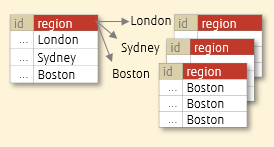 LIST partitioning stores data in the corresponding partition based on specified partition key values.
CREATE TABLE cities (
    city_id      bigserial not null,
    name         text,
    population   bigint
) PARTITION BY LIST (left(lower(name), 1));
CREATE TABLE cities_ab
PARTITION OF cities FOR VALUES IN ('a', 'b');
CREATE TABLE cities_null
PARTITION OF cities (
CONSTRAINT city_id_nonzero CHECK (city_id != 0)
) FOR VALUES IN (null);insert into cities(name,population) values('Acity',10);
insert into cities(name,population) values(null,20);=> SELECT tableoid::regclass,* FROM cities;
tableoid | city_id | name | population
-------------+---------+--------+------------
cities_ab | 1 | Acity | 10
cities_null | 2 | [null] | 20LIST partitioned tables support creating a NULL partition.
HASH Partitioning#
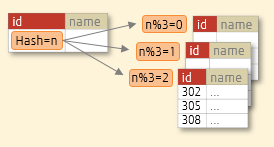 HASH partitioning distributes data across partitions to spread out hot data evenly.
CREATE TABLE orders (order_id int,name varchar(10)) PARTITION BY HASH (order_id);
CREATE TABLE orders_p1 PARTITION OF orders
    FOR VALUES WITH (MODULUS 3, REMAINDER 0);
CREATE TABLE orders_p2 PARTITION OF orders
    FOR VALUES WITH (MODULUS 3, REMAINDER 1);
CREATE TABLE orders_p3 PARTITION OF orders
    FOR VALUES WITH (MODULUS 3, REMAINDER 2);
You cannot create a default partition, nor can you create more partitions than the specified MODULUS.
=> CREATE TABLE orders_p2 PARTITION OF orders
->     FOR VALUES WITH (MODULUS 3, REMAINDER 4);
ERROR:  42P16: remainder for hash partition must be less than modulus
LOCATION:  transformPartitionBound, parse_utilcmd.c:3939

=> CREATE TABLE orders_p4 PARTITION OF orders default;
ERROR:  42P16: a hash-partitioned table may not have a default partition
LOCATION:  transformPartitionBound, parse_utilcmd.c:3909
Insert data:
=>insert into orders values(generate_series(1,10000),'a');
INSERT 0 10000
=>SELECT tableoid::regclass,count(*) FROM orders group by tableoid::regclass;
 tableoid  | count
-----------+-------
 orders_p1 |  3277
 orders_p3 |  3354
 orders_p2 |  3369
 =>select tableoid::regclass,* from orders limit 30;
 tableoid  | order_id | name
-----------+----------+------
 orders_p1 |        2 | a
 orders_p1 |        4 | a
 orders_p1 |        6 | a
 orders_p1 |        8 | a
 orders_p1 |       15 | a
 orders_p1 |       16 | a
 orders_p1 |       18 | a
 orders_p1 |       19 | a
 orders_p1 |       20 | a
HASH partition data is distributed evenly across partitions:
-- Insert 100 NULL rows
=> insert into orders values(null,generate_series(1,100)::text);
INSERT 0 100
=>  SELECT tableoid::regclass,count(*) FROM orders where order_id is null group by tableoid::regclass;
 tableoid  | count
-----------+-------
 orders_p1 |   100
-- All NULL data ends up on the remainder 0 partition
=>\d+ orders_p1
                                         Table "public.orders_p1"
  Column  |         Type          | Collation | Nullable | Default | Storage  | Stats target | Description
----------+-----------------------+-----------+----------+---------+----------+--------------+-------------
 order_id | integer               |           |          |         | plain    |              |
 name     | character varying(10) |           |          |         | extended |              |
Partition of: orders FOR VALUES WITH (modulus 3, remainder 0)
Partition constraint: satisfies_hash_partition('412053'::oid, 3, 0, order_id)
Although HASH partitioned tables have no concept of a NULL partition, they can store NULL data. NULL values are placed on the remainder 0 partition.
Multi-level (Mixed) Partitioning#
Partitions can themselves be further partitioned, forming a cascading structure. Sub-partitions can use different partition methods — this is called mixed partitioning.
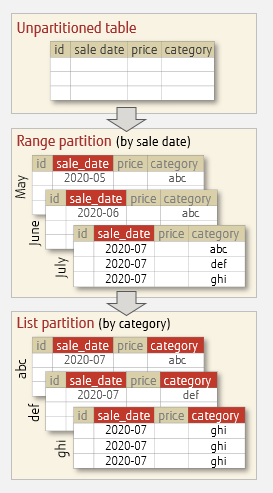 Creating a mixed partition:
create table part_1000(id bigserial not null,name varchar(10),createddate timestamp) partition by range(createddate);
create table part_2001 partition of part_1000 for values from ('2023-01-01 00:00:00') to ('2023-02-01 00:00:00') partition by list(name) ;
create table part_2002 partition of part_1000 for values from ('2023-02-01 00:00:00') to ('2023-03-01 00:00:00') partition by list(name) ;
create table part_2003 partition of part_1000 for values from ('2023-03-01 00:00:00') to ('2023-04-01 00:00:00') partition by list(name) ;
create table part_3001 partition of part_2001 FOR VALUES IN ('abc');
create table part_3002 partition of part_2001 FOR VALUES IN ('def');
create table part_3003 partition of part_2001 FOR VALUES IN ('jkl');
\d+ only shows the immediate next-level partitions:
 \d+ part_1000
                                                       Partitioned table "dbmgr.part_1000"
   Column    |            Type             | Collation | Nullable |                Default                | Storage  | Stats target | Description
-------------+-----------------------------+-----------+----------+---------------------------------------+----------+--------------+-------------
 id          | bigint                      |           | not null | nextval('part_1000_id_seq'::regclass) | plain    |              |
 name        | character varying(10)       |           |          |                                       | extended |              |
 createddate | timestamp without time zone |           |          |                                       | plain    |              |
Partition key: RANGE (createddate)
Partitions: part_2001 FOR VALUES FROM ('2023-01-01 00:00:00') TO ('2023-02-01 00:00:00'), PARTITIONED,
            part_2002 FOR VALUES FROM ('2023-02-01 00:00:00') TO ('2023-03-01 00:00:00'), PARTITIONED,
            part_2003 FOR VALUES FROM ('2023-03-01 00:00:00') TO ('2023-04-01 00:00:00'), PARTITIONED
=> \d+ part_2001
                                                       Partitioned table "dbmgr.part_2001"
   Column    |            Type             | Collation | Nullable |                Default                | Storage  | Stats target | Description
-------------+-----------------------------+-----------+----------+---------------------------------------+----------+--------------+-------------
 id          | bigint                      |           | not null | nextval('part_1000_id_seq'::regclass) | plain    |              |
 name        | character varying(10)       |           |          |                                       | extended |              |
 createddate | timestamp without time zone |           |          |                                       | plain    |              |
Partition of: part_1000 FOR VALUES FROM ('2023-01-01 00:00:00') TO ('2023-02-01 00:00:00')
Partition constraint: ((createddate IS NOT NULL) AND (createddate >= '2023-01-01 00:00:00'::timestamp without time zone) AND (createddate < '2023-02-01 00:00:00'::timestamp without time zone))
Partition key: LIST (name)
Partitions: part_3001 FOR VALUES IN ('abc'),
            part_3002 FOR VALUES IN ('def'),
            part_3003 FOR VALUES IN ('jkl')
Now insert a row:
=> insert into part_1000 values(random() * 10000,'abc','2023-01-01 08:00:00');
INSERT 0 1
=> SELECT tableoid::regclass,* FROM part_1000;
 tableoid  |  id  | name |     createddate
-----------+------+------+---------------------
 part_3001 | 6385 | abc  | 2023-01-01 08:00:00
Data is stored in the lowest-level sub-partition.
Declarative Partitioning Feature Summary#
- No INTERVAL partitioning. There is no built-in automatic partition creation feature, which makes maintenance more cumbersome.
- Partitions themselves are tables. This is a distinctive characteristic. This not only allows PostgreSQL to flexibly operate on sub-partitions but, more importantly, affects functionality and behavior.
- TRUNCATE, VACUUM, and ANALYZE on a partitioned table operate on all partitions. TRUNCATE ONLY cannot be executed on the parent table but can be executed on a child table containing data, clearing only that sub-partition.
- RANGE and HASH partition keys can have multiple columns; LIST partition keys can only be a single column or expression.
- The partitioned parent table itself is empty; only the lowest-level sub-partitions contain data.
- A DEFAULT partition receives data that falls outside declared ranges. Without a DEFAULT partition, inserting out-of-range data will raise an error.
- When adding a new partition, check whether the DEFAULT partition contains data belonging to the new partition.
- Partitions created via PARTITION OF automatically create indexes, constraints, and row-level triggers from the parent table.
- ATTACH does not handle any indexes, constraints, or other objects.
Inheritance Partitioning#
Inheritance partitioning is also officially supported. It leverages PostgreSQL’s table inheritance feature to implement partitioning functionality. Inheritance partitioning is more flexible than declarative partitioning. Implementing inheritance partitioning requires two PostgreSQL features: table inheritance and write redirection. Write redirection can be implemented via rules or triggers.
Creating Inheritance Partition Tables#
Example of creating inheritance partitioned tables: 1. Create the parent table
CREATE TABLE measurement (
    city_id         int not null,
    logdate         date not null,
    peaktemp        int,
    unitsales       int
);
2. Create child tables with CHECK constraints for partitioning ranges
CREATE TABLE measurement_202308 (
    CHECK ( logdate >= DATE '2023-08-01' AND logdate < DATE '2023-09-01' )
) INHERITS (measurement);
CREATE TABLE measurement_202309 (
    CHECK ( logdate >= DATE '2023-09-01' AND logdate < DATE '2023-10-01' )
) INHERITS (measurement);
3. Create rules or triggers to redirect inserted data to the corresponding child tables
CREATE OR REPLACE FUNCTION measurement_insert_trigger()
RETURNS TRIGGER AS $$
BEGIN
    IF ( NEW.logdate >= DATE '2023-08-01' AND
         NEW.logdate < DATE '2023-09-01' ) THEN
        INSERT INTO measurement_202308 VALUES (NEW.*);
    ELSIF ( NEW.logdate >= DATE '2023-09-01' AND
            NEW.logdate < DATE '2023-10-01' ) THEN
        INSERT INTO measurement_202309 VALUES (NEW.*);
    ELSE
        RAISE EXCEPTION 'Date out of range.  Fix the measurement_insert_trigger() function!';
    END IF;
    RETURN NULL;
END;
$$
LANGUAGE plpgsql;
CREATE TRIGGER insert_measurement_trigger
BEFORE INSERT ON measurement
FOR EACH ROW EXECUTE FUNCTION measurement_insert_trigger();A basic inheritance partitioned table is now set up.
=>\d+ measurement
                                 Table "public.measurement"
  Column   |  Type   | Collation | Nullable | Default | Storage | Stats target | Description
-----------+---------+-----------+----------+---------+---------+--------------+-------------
 city_id   | integer |           | not null |         | plain   |              |
 logdate   | date    |           | not null |         | plain   |              |
 peaktemp  | integer |           |          |         | plain   |              |
 unitsales | integer |           |          |         | plain   |              |
Triggers:
    insert_measurement_trigger BEFORE INSERT ON measurement FOR EACH ROW EXECUTE FUNCTION measurement_insert_trigger()
Child tables: measurement_202308,
              measurement_202309
Access method: heap
Test insertion and querying:
-- Inserting data outside the defined range raises an error
=> insert into measurement values(1001, now() - interval '31' day  ,1,1);
ERROR:  P0001: Date out of range.  Fix the measurement_insert_trigger() function!
CONTEXT:  PL/pgSQL function measurement_insert_trigger() line 10 at RAISE
LOCATION:  exec_stmt_raise, pl_exec.c:3889
-- Inserting data is redirected to the child table
=> insert into measurement values(1001,now(),1,1);
INSERT 0 0
-- Querying the parent table returns data from child tables
=> select tableoid::regclass,* from measurement;
      tableoid      | city_id |  logdate   | peaktemp | unitsales
--------------------+---------+------------+----------+-----------
 measurement_202308 |    1001 | 2023-08-03 |        1 |         1
RULE vs. Trigger Besides triggers, PostgreSQL can also use rules to redirect inserts. Example rule statements:
CREATE RULE measurement_insert_202308 AS
ON INSERT TO measurement WHERE
    ( logdate >= DATE '2023-08-01' AND logdate < DATE '2023-08-01' )
DO INSTEAD
    INSERT INTO measurement_202308 VALUES (NEW.*);
CREATE RULE measurement_insert_202309 AS
ON INSERT TO measurement WHERE
    ( logdate >= DATE '2023-09-01' AND logdate < DATE '2023-09-01' )
DO INSTEAD
    INSERT INTO measurement_202309 VALUES (NEW.*);
Differences between rules and triggers:
- Rules have worse performance than triggers in general, but for bulk inserts rules perform better since they only check once. In all other cases, triggers are preferable.
- COPY does not fire rules but does fire triggers. When using rules, data can be COPY’d directly into child tables.
- When inserting data outside defined ranges, rules will insert into the parent table, while triggers will raise an error.
Indexes To improve performance, you also need to create indexes and enable constraint_exclusion. Indexes on partitions are generally essential. For inheritance tables, indexes must be manually created on child tables. Example of creating indexes:
CREATE INDEX idx_measurement_202308_logdate ON measurement_202308 (logdate);
CREATE INDEX idx_measurement_202309_logdate ON measurement_202309 (logdate);
Insert some data and check the execution plan:
-- '2023-08-04' has only 1 row, allowing it to use the index
=>  insert into measurement values(1001,now()+interval '1' day,1,1);
INSERT 0 0
 insert into orders values(generate_series(1,10000),'a');
=>  insert into measurement values(generate_series(1,1000),now(),1,1);
INSERT 0 0

=> explain select * from measurement where logdate='2023-08-04';
                                                          QUERY PLAN
------------------------------------------------------------------------------------------------------------------------------
 Append  (cost=0.00..5.17 rows=2 width=16)
   ->  Seq Scan on measurement measurement_1  (cost=0.00..0.00 rows=1 width=16)
         Filter: (logdate = '2023-08-04'::date)
   ->  Index Scan using idx_measurement_202308_logdate on measurement_202308 measurement_2  (cost=0.14..5.16 rows=1 width=16)
         Index Cond: (logdate = '2023-08-04'::date)
In the above execution plan, the August partition uses the index on the partition. Since constraint_exclusion is enabled by default for inheritance tables, the September partition was excluded and only August was scanned. However, because the parent table has no constraints (and cannot have them), it always appears in the execution plan—but since the parent table is generally empty, this has minimal impact.
constraint_exclusion#
constraint_exclusion controls whether the optimizer uses constraints to reduce unnecessary table access. This parameter is commonly used in inheritance partitioning optimization — by reducing child table access, it improves SQL performance. (This functionality is similar to the enable_partition_pruning parameter, which controls partition pruning for declarative partitioned tables.) constraint_exclusion has three values:
on: All tables are checked for constraints.
partition: Inheritance tables and UNION ALL subqueries are checked for constraints (default).
off: Constraints are not checked.
Constraint exclusion only occurs during execution plan generation, not during actual execution (partition pruning can occur during execution). This means constraint exclusion does not happen when using bound parameters or variable values.
For example, when using functions like now() whose specific value the optimizer cannot determine, the optimizer cannot exclude partitions that don’t need to be accessed at all:
=> select now();
              now
-------------------------------
 2023-08-03 17:12:04.772658+08
-- The optimizer did not exclude the September partition
=>  explain select * from measurement where logdate<=now();
                                             QUERY PLAN
-----------------------------------------------------------------------------------------------------
 Append  (cost=0.00..55.98 rows=1628 width=16)
   ->  Seq Scan on measurement measurement_1  (cost=0.00..0.00 rows=1 width=16)
         Filter: (logdate <= now())
   ->  Seq Scan on measurement_202308 measurement_2  (cost=0.00..21.15 rows=1010 width=16)
         Filter: (logdate <= now())
   ->  Bitmap Heap Scan on measurement_202309 measurement_3  (cost=7.44..26.69 rows=617 width=16)
         Recheck Cond: (logdate <= now())
         ->  Bitmap Index Scan on idx_measurement_202309_logdate  (cost=0.00..7.28 rows=617 width=0)
               Index Cond: (logdate <= now())
Additionally, constraint exclusion itself needs to check all child table constraints. If there are too many child table constraints, the efficiency of generating execution plans will be affected. Therefore, inheritance partitioning is not recommended for creating too many child partitions.
Adding/Removing Partitions in Inheritance Partitioning#
To turn an inherited partition into a regular table:
ALTER TABLE measurement_202308 NO INHERIT measurement;To add an existing regular table (with data) as a child table in the inheritance partition:
CREATE TABLE measurement_202310
(LIKE measurement INCLUDING DEFAULTS INCLUDING CONSTRAINTS);
ALTER TABLE measurement_202310 ADD CONSTRAINT measurement_202310_logdate_check
CHECK ( logdate >= DATE '2023-10-01' AND logdate < DATE '2023-11-01' );
--insert into measurement_202310 values(2001,'20231010',3,3);
ALTER TABLE measurement_202310 INHERIT measurement;
Inheritance Partitioning Feature Summary#
- Inheritance partitioning is more flexible than declarative partitioning, but some declarative partitioning features are unavailable.
- Child tables inherit parent table constraints, so global constraints should not be set on the parent table.
- Indexes are not inherited; they must be created individually on each child table.
- Declarative partitioning only supports RANGE, LIST, and HASH partitions. Inheritance partitioning can support more, including custom partitioning methods.
- Dropping a child table does not invalidate the trigger. PostgreSQL does not have Oracle’s concept of invalidated objects (indexes do have an invalidation concept).
- Generally, using triggers for insert redirection is more efficient than rules.
- When adding a new partition, if the trigger function lacks a rule for that partition, the trigger function needs to be updated.
- Inheritance partitioning supports multiple inheritance.
- Constraint exclusion cannot occur during execution; using fixed values for queries is recommended.
- With inheritance partitioning, avoid creating too many child partitions.
pg_pathman#
pg_pathman is a third-party plugin implementing partitioning functionality. The pg_pathman README on GitHub and articles on using pg_pathman already describe pathman in great detail. Here we only highlight key points and do some simple testing.
pg_pathman Basics#
No Longer Maintained
NOTE: this project is not under development anymore
pg_pathman supports PostgreSQL 9.5 through 15. Later PostgreSQL versions are no longer supported, and existing versions only receive bug fixes — no new features will be added. pg_pathman emerged because older PostgreSQL versions had incomplete partitioning features. Now that native partitioned tables (declarative partitioning) are very mature, pg_pathman also recommends using native partitioned tables. Existing pg_pathman partitioned tables are also recommended to be migrated to native partitioned tables. pg_pathman, once recognized by many users, is now history. Even though it’s no longer updated, its feature set is still richer than the current native partitioned tables. Feature Highlights pg_pathman is quite powerful, supporting some features that native partitioned tables do not. However, pathman is not perfect either and has many issues in practice. Key points to note about pg_pathman include:
- pg_pathman can manage partitions through partition management functions. It supports replace, merge, split partition operations; attach and detach operations; and INTERVAL partitioning.
- pg_pathman has many optimizations for partitioned table execution plans.
- pg_pathman only supports RANGE and HASH partition types.
- The pathman_config table stores partition configuration information; it provides partition task views.
- Partition information is cached in memory for execution plan generation.
Basic pg_pathman Usage#
Creating pathman RANGE partitions
-- The regular table serves as the parent table
CREATE TABLE journal (
    id      SERIAL,
    dt      TIMESTAMP NOT NULL,
    level   INTEGER,
    msg     TEXT);

-- Indexes on the parent table are automatically created on child partitions
CREATE INDEX ON journal(dt);
-- Create partitions
select
create_range_partitions('journal'::regclass,
                        'dt',
                        '2023-01-01 00:00:00'::timestamp,
                        interval '1 month',
                        6,
                        false) ;
-- View table definition
=> \d+ journal
Table "public.journal"
Column | Type | Collation | Nullable | Default | Storage | Stats target | Description
--------+-----------------------------+-----------+----------+-------------------------------------+----------+--------------+-------------
id | integer | | not null | nextval('journal_id_seq'::regclass) | plain | |
dt | timestamp without time zone | | not null | | plain | |
level | integer | | | | plain | |
msg | text | | | | extended | |
Indexes:
"journal_dt_idx" btree (dt)
Child tables: journal_1,
journal_2,
journal_3,
journal_4,
journal_5,
journal_6
Access method: heap
=> \d+ journal_6
Table "public.journal_6"
Column | Type | Collation | Nullable | Default | Storage | Stats target | Description
--------+-----------------------------+-----------+----------+-------------------------------------+----------+--------------+-------------
id | integer | | not null | nextval('journal_id_seq'::regclass) | plain | |
dt | timestamp without time zone | | not null | | plain | |
level | integer | | | | plain | |
msg | text | | | | extended | |
Indexes:
"journal_6_dt_idx" btree (dt)
Check constraints:
"pathman_journal_6_check" CHECK (dt >= '2023-06-01 00:00:00'::timestamp without time zone AND dt < '2023-07-01 00:00:00'::timestamp without time zone)
Inherits: journal
Access method: heap-- Insert data
INSERT INTO journal (dt, level, msg)
SELECT g, random() * 10000, md5(g::text)
FROM generate_series('2023-01-01'::date, '2023-02-28'::date, '1 hour') as g;-- Insert data for which no corresponding partition has been created yet
=> INSERT INTO journal (dt, level, msg) values('2023-07-01'::date,'11','1');
INSERT 0 1
-- Check partition data distribution; the INTERVAL partition has been automatically created
=> SELECT tableoid::regclass AS partition, count(*) FROM journal group by partition;
partition | count
-----------+-------
journal_7 | 1
journal_2 | 649
journal_1 | 744-- View execution plan
-- Partition pruning has occurred
=> explain select * from journal where dt='2023-01-01 22:00:00';
QUERY PLAN
-----------------------------------------------------------------------------------------------------
Append (cost=0.00..5.30 rows=2 width=48)
-> Seq Scan on journal journal_1 (cost=0.00..0.00 rows=1 width=48)
Filter: (dt = '2023-01-01 22:00:00'::timestamp without time zone)
-> Index Scan using journal_1_dt_idx on journal_1 journal_1_1 (cost=0.28..5.29 rows=1 width=49)
Index Cond: (dt = '2023-01-01 22:00:00'::timestamp without time zone)Creating pathman HASH partitions
-- Create parent table
CREATE TABLE items (
    id       SERIAL PRIMARY KEY,
    name     TEXT,
    code     BIGINT);
-- Create HASH partitions
select create_hash_partitions('items'::regclass,
                        'id',
                        3,
                        false) ;
-- Insert data
INSERT INTO items (id, name, code)
SELECT g, md5(g::text), random() * 100000
FROM generate_series(1, 1000) as g;
=> SELECT tableoid::regclass AS partition, count(*) FROM items group by partition;
partition | count
-----------+-------
items_2 | 344
items_0 | 318
items_1 | 338
=> \d+ items
Table "public.items"
Column | Type | Collation | Nullable | Default | Storage | Stats target | Description
--------+---------+-----------+----------+-----------------------------------+----------+--------------+-------------
id | integer | | not null | nextval('items_id_seq'::regclass) | plain | |
name | text | | | | extended | |
code | bigint | | | | plain | |
Indexes:
"items_pkey" PRIMARY KEY, btree (id)
Child tables: items_0,
items_1,
items_2
Access method: heap
=> \d+ items_1
Table "public.items_1"
Column | Type | Collation | Nullable | Default | Storage | Stats target | Description
--------+---------+-----------+----------+-----------------------------------+----------+--------------+-------------
id | integer | | not null | nextval('items_id_seq'::regclass) | plain | |
name | text | | | | extended | |
code | bigint | | | | plain | |
Indexes:
"items_1_pkey" PRIMARY KEY, btree (id)
Check constraints:
"pathman_items_1_check" CHECK (get_hash_part_idx(hashint4(id), 3) = 1)
Inherits: items
Access method: heap
=> SELECT tableoid::regclass AS partition, count(*) FROM items group by partition;
partition | count
-----------+-------
items_2 | 344
items_0 | 318
items_1 | 338Pros and Cons of PostgreSQL Partitioned Tables#
Advantages of Partitioned Tables#
- SQL performance improvement. In certain scenarios, such as splitting a large amount of data into multiple partitions where SQL only needs to query one partition, SQL performance can be dramatically improved.
- Partitions can work together with indexes. For example, accessing an index on a single partition is more efficient than accessing a large unpartitioned index.
- Dropping a single partition is much more efficient than deleting many rows. This is common in time-range partitioning — dropping an unused historical partition is very fast, but without partitioning, DELETE operations are not only slow but also require additional maintenance.
- VACUUM is faster. Reclaiming old version information or collecting statistics on a large table is very slow. If VACUUM hasn’t finished executing, SQL may already be experiencing problems. With partitioning, VACUUM becomes much faster.
- I/O distribution capability. Different partitions can be placed on different paths or different disks. Rarely-used data can be placed on cheaper disks.
- More maintenance techniques. Directly maintaining a very large table is difficult — for example, VACUUM on an extremely large table has many issues. With partitioned tables, each partition can run VACUUM independently. Moreover, ATTACH/DETACH, local indexes/constraints, and more can be flexibly used in many scenarios.
Disadvantages of Partitioned Tables#
- In PostgreSQL, every partition of a partitioned table can be treated as a regular table. Too many partitions can lead to longer SQL parsing times and higher memory load, even causing errors. See the previous article: Too many range table entries even with a modest number of partitions
- Even if having too many partitions doesn’t cause errors, and partition pruning doesn’t happen during execution plan generation (it might happen during execution), the EXPLAIN output will be extremely long. At that point, the logs will also contain lengthy execution plans, affecting log readability.
- Some strange issues: Different users see different execution plans
Limitations of Partitioned Tables#
No native automatic partition creation feature
Only local partition indexes are supported; global indexes are not supported
Primary keys must include the partition key. PostgreSQL currently can only enforce uniqueness within each partition, hence this limitation. Oracle and MySQL do not have this restriction.
Unique indexes must include the partition key. PostgreSQL currently can only enforce uniqueness within each partition. Same applies to primary keys.
Cannot create globally-defined constraints
BEFORE ROW INSERT triggers cannot update the partition into which the row is being inserted.
Temporary table partitions and regular table partitions cannot coexist under the same partitioned table.
In declarative partitioning, parent and child table columns must be identical; in inheritance partitioning, child tables can have more columns than the parent table.
In declarative partitioning, CHECK and NOT NULL constraints are always inherited; these two constraints cannot be set independently on individual partitions.
RANGE partitions cannot store NULL values. HASH partitions have no concept of NULL partitions but can store NULL values — they are placed on the remainder 0 partition. LIST partitions can explicitly create a NULL partition to store NULL data.
When Should You Use Partitioned Tables?#
First, to use partitioned tables you must understand the advantages, disadvantages, and limitations they bring. For example, when data volume is large, partitioning can improve performance; hot/cold data separation also makes partition data management easier. You should decide whether to partition and how to partition based on your specific business situation and hardware resources. However, developers will always ask questions like “how much data warrants partitioning.” Advice on using partitioned tables can only be given in general terms. If you don’t know how to partition, you can refer to the following recommendations (if you already have sufficient understanding of table partitioning, please ignore):
- The table data is large enough, and SQL queries on the table always or can include the partition key column.
- Clear hot/cold data separation. For example, new data is always inserted into the current month’s partition, while the other 11 months of old partitions are read-only.
- VACUUM can no longer keep up.
Partition Table Permissions#
Permission issues are less discussed in the context of partitioned table knowledge, but they are still worth paying attention to. Because PostgreSQL has the concept that “partition child tables are also regular tables,” this differs from other common databases (Oracle, MySQL). For example, in Oracle you don’t need to worry about partition child table permissions, but in PostgreSQL you do.
PARTITION OF / ATTACH do not inherit the parent table’s permissions to child tables:
-- Grant SELECT on the partitioned table to a regular user
=> grant select on lzlpartition1 to userlzl;
GRANT

-- Check permissions — only the parent table has been granted; existing partition child tables are not automatically granted
=>  select grantee,table_schema,table_name,privilege_type from information_schema.table_privileges  where grantee='userlzl';
 grantee | table_schema |  table_name   | privilege_type
---------+--------------+---------------+----------------
 userlzl | public       | lzlpartition1 | SELECT

 -- Create a partition using PARTITION OF
 => create table LZLPARTITION1_202303 partition of LZLPARTITION1 for values from ('2023-03-01 00:00:00') to ('2023-04-01 00:00:00');
CREATE TABLE

-- Create a partition using ATTACH
=> CREATE TABLE lzlpartition1_202304
->   (LIKE lzlpartition1 INCLUDING DEFAULTS INCLUDING CONSTRAINTS);
CREATE TABLE
=> alter table lzlpartition1 attach partition lzlpartition1_202304 for values  from ('2023-04-01 00:00:00') to ('2023-05-01 00:00:00');
ALTER TABLE

-- Check permissions again — newly created child partitions are not automatically granted to other users (but permissions are automatically granted to the owner)
=> select grantee,table_schema,table_name,privilege_type from information_schema.table_privileges  where grantee='userlzl';
 grantee | table_schema |  table_name   | privilege_type
---------+--------------+---------------+----------------
 userlzl | public       | lzlpartition1 | SELECT
At this point, user userlzl has no access permissions to any child tables, but has permissions on the parent table.
userlzl can access partition data through the parent table, but cannot access data by directly querying child tables:
=> \c - userlzl;
You are now connected to database "dbmgr" as user "userlzl".
=> select * from LZLPARTITION1 where date_created='2023-01-02 10:00:00';
  id  |               name               |    date_created
------+----------------------------------+---------------------
 2159 | d05d716da126ff4b44d934344cc4dd7a | 2023-01-02 10:00:00

=>  select * from LZLPARTITION1_202301 where date_created='2023-01-02 10:00:00';
ERROR:  42501: permission denied for table lzlpartition1_202301
LOCATION:  aclcheck_error, aclchk.c:3466
Since ATTACH/DETACH does not handle permissions, if we DETACH a partition at this point, that partition will also be inaccessible to userlzl:
=> alter table lzlpartition1 detach partition lzlpartition1_202303;
ALTER TABLE
=> \dp+ lzlpartition1_202303;
                                    Access privileges
 Schema |         Name         | Type  | Access privileges | Column privileges | Policies
--------+----------------------+-------+-------------------+-------------------+----------
 dbmgr  | lzlpartition1_202303 | table |                   |                   |
=>  select * from LZLPARTITION1_202301 where date_created='2023-01-02 10:00:00';
ERROR:  42501: permission denied for table lzlpartition1_202301
From this we can conclude:
- Partition child tables and the parent table exist as regular tables in PostgreSQL, each with their own permission system.
- If you lack child table permissions but have parent table permissions, you can still access child table data.
- PARTITION OF, ATTACH, and DETACH do not handle permission issues.
However, partition table permissions do not merely control whether access is possible. Lacking partition child table permissions can lead to abnormal execution plans. Reference article: Different users see different execution plans This issue is an intermittent phenomenon that causes superusers and regular users to see different SQL execution plans. The actual business SQL execution plan is abnormal but goes unnoticed, making it difficult to diagnose. Partition child tables have their own statistics, and child table permissions are inconsistent with the parent table (even for partitions created via PARTITION OF), resulting in users being able to access child table data through the parent table but unable to view the child table’s statistics. This permission issue leads to differences in execution plans. This contradicts the general concept that “permissions only control whether you can access a table, not how you access it,” so attention must be paid to this permission issue. To provide permission for child table statistics, it is recommended to explicitly grant SELECT on all child tables to the user, which avoids the issues above:
grant select on table_partition_allname to username;Partition Table Maintenance#
ATTACH/DETACH Basic Operations#
ATTACH/DETACH can add/detach an existing table as a partition of/detach from a partitioned table. ATTACH/DETACH is very useful in maintenance work. First, let’s look at the locking behavior of adding partitions via “CREATE TABLE … PARTITION OF” and deleting partitions via “DROP TABLE”:
Lock Matrix: https://www.postgresql.org/docs/current/explicit-locking.html
Lock Requests: https://postgres-locks.husseinnasser.com
- Adding a partition via PARTITION OF
-- Session 1: Start a transaction, read-only data
=> select * from lzlpartition1 where date_created='2023-01-01 00:00:00';
  id  |               name               |    date_created
------+----------------------------------+---------------------
 8249 | 256ac66bb53d31bc6124294238d6410c | 2023-01-01 00:00:00

-- Session 3: Check lock status. When reading data from one partition, locks are acquired on both the child partition and the parent table.
=> select l.locktype,d.datname,r.relname,l.virtualxid,l.transactionid,l.pid,l.mode,l.granted from pg_locks l left join pg_database d on l.database=d.oid left join pg_class r on l.relation=r.oid
where relname like '%lzlpartition1%';
 locktype | datname |       relname        | virtualxid | transactionid |  pid   |      mode       | granted
----------+---------+----------------------+------------+---------------+--------+-----------------+---------
 relation | dbmgr   | lzlpartition1_202301 | [null]     |        [null] | 311449 | AccessShareLock | t
 relation | dbmgr   | lzlpartition1        | [null]     |        [null] | 311449 | AccessShareLock | t

-- Session 2: Add a partition via PARTITION OF
=> create table LZLPARTITION1_202305 partition of LZLPARTITION1 for values from ('2023-05-01 00:00:00') to ('2023-06-01 00:00:00');
-- Waiting

-- Session 3: Check locks again
=> select l.locktype,d.datname,r.relname,l.virtualxid,l.transactionid,l.pid,l.mode,l.granted from pg_locks l left join pg_database d on l.database=d.oid left join pg_class r on l.relation=r.oid
where relname like '%lzlpartition1%';
 locktype | datname |       relname        | virtualxid | transactionid |  pid   |        mode         | granted
----------+---------+----------------------+------------+---------------+--------+---------------------+---------
 relation | dbmgr   | lzlpartition1_202301 | [null]     |        [null] | 311449 | AccessShareLock     | t
 relation | dbmgr   | lzlpartition1        | [null]     |        [null] | 311449 | AccessShareLock     | t
 relation | dbmgr   | lzlpartition1        | [null]     |        [null] | 308525 | AccessExclusiveLock | f   -- This is the PARTITION OF session

-- Session 4: Run an arbitrary query
=> select * from lzlpartition1 where date_created='2023-01-01 00:00:00';
-- Waiting

-- Session 4: Check locks again
=> select l.locktype,d.datname,r.relname,l.virtualxid,l.transactionid,l.pid,l.mode,l.granted from pg_locks l left join pg_database d on l.database=d.oid left join pg_class r on l.relation=r.oid
where relname like '%lzlpartition1%';
 locktype | datname |       relname        | virtualxid | transactionid |  pid   |        mode         | granted
----------+---------+----------------------+------------+---------------+--------+---------------------+---------
 relation | dbmgr   | lzlpartition1_202301 | [null]     |        [null] | 311449 | AccessShareLock     | t
 relation | dbmgr   | lzlpartition1        | [null]     |        [null] | 311449 | AccessShareLock     | t
 relation | dbmgr   | lzlpartition1        | [null]     |        [null] | 308525 | AccessExclusiveLock | f
 relation | dbmgr   | lzlpartition1        | [null]     |        [null] |  84774 | AccessShareLock     | f  -- Query is blocked
When adding a partition via PARTITION OF, an AccessExclusiveLock is requested on the parent table. This waits for all transactions on the parent table and also blocks all transactions on the parent table.
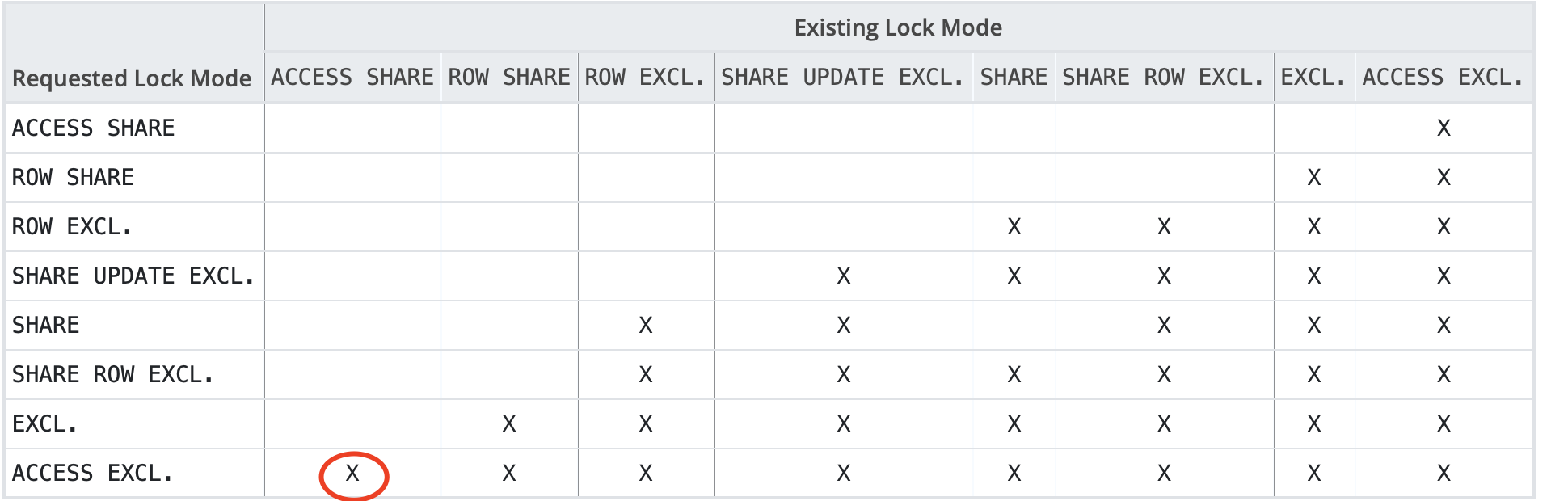
Although the PARTITION OF statement itself executes quickly, if there are long-running transactions on the parent table, all operations on the partitioned table will stall for an extended period. Without a maintenance window, using PARTITION OF to add partitions directly is not recommended.
- Dropping a partition via DROP TABLE
-- Session 1: Start another read-only transaction
-- Session 2: Drop a child partition of the partitioned table
=> drop table lzlpartition1_202305;
-- Waiting

-- Session 3: Check lock status
=>
select l.locktype,d.datname,r.relname,l.virtualxid,l.transactionid,l.pid,l.mode,l.granted from pg_locks l left join pg_database d on l.database=d.oid left join pg_class r on l.relation=r.oid
where relname like '%lzlpartition1%';
 locktype | datname |       relname        | virtualxid | transactionid |  pid   |        mode         | granted
----------+---------+----------------------+------------+---------------+--------+---------------------+---------
 relation | dbmgr   | lzlpartition1_202301 | [null]     |        [null] | 311449 | AccessShareLock     | t
 relation | dbmgr   | lzlpartition1        | [null]     |        [null] | 311449 | AccessShareLock     | t
 relation | dbmgr   | lzlpartition1        | [null]     |        [null] | 308525 | AccessExclusiveLock | f
Dropping a child partition with DROP TABLE requests an AccessExclusiveLock on the parent table, waiting for all and blocking all. Similarly, this must be used with caution in production environments.
- ATTACH — adding a partition ATTACH attaches an existing regular table to a partitioned table. Although both ATTACH and PARTITION OF can add partitions, note that ATTACH does not automatically create indexes, constraints, default values, or row-level triggers — this differs from PARTITION OF. First, create a table:
-- To reduce tedious DDL, use LIKE to create the table
CREATE TABLE lzlpartition1_202305
  (LIKE lzlpartition1 INCLUDING DEFAULTS INCLUDING CONSTRAINTS);
Now observe whether ATTACH is blocked:
-- Session 1: Start a read-write transaction
=>begin;
BEGIN
=> insert into lzlpartition1 values('1234','abcd','2023-01-01 01:00:00');
INSERT 0 1
-- Session 3: Check lock status
=>
select l.locktype,d.datname,r.relname,l.virtualxid,l.transactionid,l.pid,l.mode,l.granted from pg_locks l left join pg_database d on l.database=d.oid left join pg_class r on l.relation=r.oid
where relname like '%lzlpartition1%';
 locktype | datname |       relname        | virtualxid | transactionid |  pid   |       mode       | granted
----------+---------+----------------------+------------+---------------+--------+------------------+---------
 relation | dbmgr   | lzlpartition1_202301 | [null]     |        [null] | 311449 | RowExclusiveLock | t
 relation | dbmgr   | lzlpartition1        | [null]     |        [null] | 311449 | AccessShareLock  | t
 relation | dbmgr   | lzlpartition1        | [null]     |        [null] | 311449 | RowExclusiveLock | t
-- DML statements acquire RowExclusiveLock on the partition parent table and the corresponding partition child table

-- Session 2: ATTACH the newly created table to the partition parent table
=> alter table  lzlpartition1 attach partition  lzlpartition1_202305 for values from ('2023-05-01 00:00:00') to ('2023-06-01 00:00:00');
ALTER TABLE
ATTACH only requests a SHARE UPDATE EXCLUSIVE lock, which is much lighter than ACCESS EXCLUSIVE.
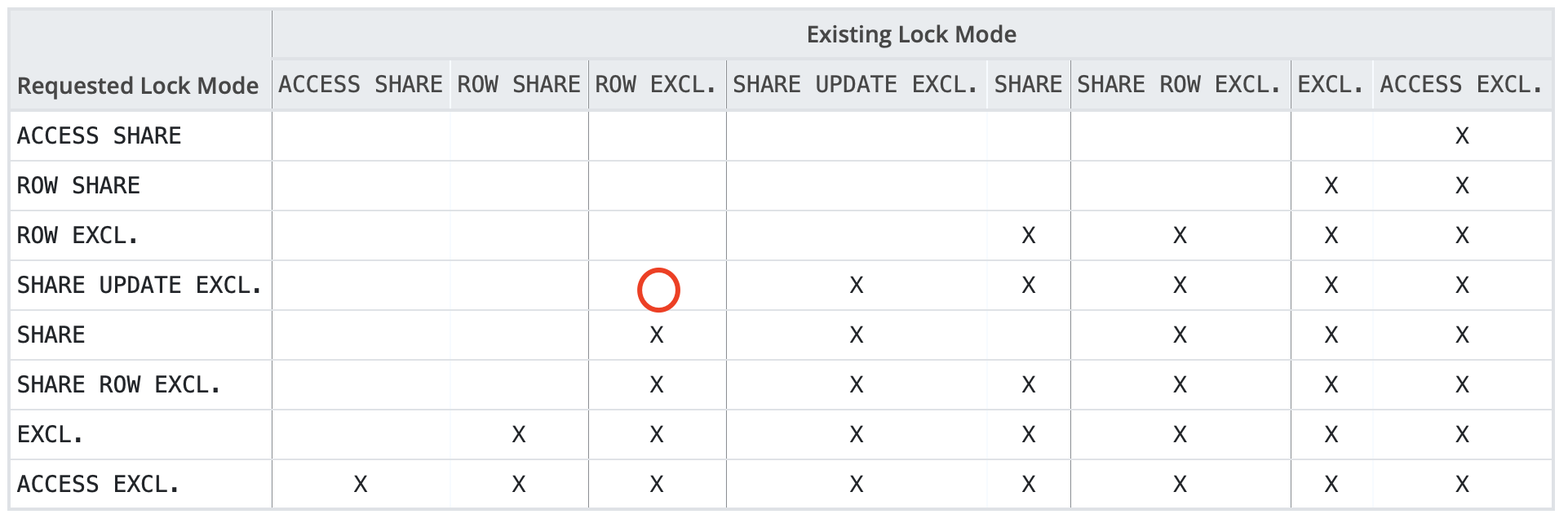
ATTACH does not block reads or writes, so ATTACH is recommended for adding partitions — it does not affect business operations and can be executed online.
- DETACH — removing a partition
DETACH removes a partition from the partitioned table, turning it into a regular table:
-- Session 1: Keep the DML transaction uncommitted
-- Session 2: DETACH a partition
 alter table lzlpartition1 detach partition lzlpartition1_202305;
 -- Waiting

-- Session 3: Check lock status
 =>  select l.locktype,d.datname,r.relname,l.virtualxid,l.transactionid,l.pid,l.mode,l.granted from pg_locks l left join pg_database d on l.database=d.oid left join pg_class r on l.relation=r.oid
where relname like '%lzlpartition1%';
 locktype | datname |       relname        | virtualxid | transactionid |  pid   |        mode         | granted
----------+---------+----------------------+------------+---------------+--------+---------------------+---------
 relation | dbmgr   | lzlpartition1_202301 | [null]     |        [null] | 311449 | RowExclusiveLock    | t
 relation | dbmgr   | lzlpartition1        | [null]     |        [null] | 311449 | RowExclusiveLock    | t
 relation | dbmgr   | lzlpartition1        | [null]     |        [null] | 308525 | AccessShareLock     | t
 relation | dbmgr   | lzlpartition1        | [null]     |        [null] | 308525 | AccessExclusiveLock | f
Unlike ATTACH, DETACH requests an AccessExclusiveLock on the parent table, waiting for all and blocking all.
DETACH CONCURRENTLY
Starting from PostgreSQL 14, DETACH gained two new syntax variants: CONCURRENTLY and FINALIZE.
ALTER TABLE [ IF EXISTS ]
nameDETACH PARTITIONpartition_name[ CONCURRENTLY | FINALIZE ]
DETACH CONCURRENTLY internally starts two transactions. The first transaction requests a SHARE UPDATE EXCLUSIVE lock on both the parent and child tables, marking the partition as being in a detaching state, at which point it waits for all transactions on the partitioned table to commit. Once all those transactions have committed, the second transaction requests a SHARE UPDATE EXCLUSIVE lock on the parent table and an ACCESS EXCLUSIVE lock on that child table, after which DETACH CONCURRENTLY completes.
Additionally, after DETACH CONCURRENTLY, the detached child table retains its constraint — the partition constraint is converted into a CHECK constraint on the detached table.
DETACH CONCURRENTLY limitations:
- DETACH CONCURRENTLY cannot be placed inside a transaction block.
- The partitioned table cannot have a DEFAULT partition.
Locking behavior of CONCURRENTLY:
-- Session 1
lzldb=> begin;
BEGIN
lzldb=*>  insert into lzlpartition1 values('1234','abcd','2023-01-01 01:00:00');
INSERT 0 1

-- Session 2: DETACH CONCURRENTLY
lzldb=> alter table lzlpartition1 detach partition lzlpartition1_202301 concurrently;
-- Waiting

-- Session 3: Check locks
 3691 | insert into lzlpartition1 values('1234','abcd','2023-01-01 01:00:00');        | Client          | ClientRead
 3940 | alter table lzlpartition1 detach partition lzlpartition1_202301 concurrently; | Lock            | virtualxid
 3947 | select pid,query,wait_event_type,wait_event  from pg_stat_activity;           |                 |
-- The DETACH session is 3940. Interestingly, the DETACH wait event is virtualxid, and the wait event type is Lock.

-- Check lock details
lzldb=>  select locktype,database,relation,virtualtransaction,pid,mode,granted from pg_locks where pid in (3691,3940);
   locktype    | database | relation | virtualtransaction | pid  |       mode       | granted
---------------+----------+----------+--------------------+------+------------------+---------
 virtualxid    |          |          | 6/9                | 3940 | ExclusiveLock    | t
 relation      |    16387 |    40969 | 5/179              | 3691 | RowExclusiveLock | t
 relation      |    16387 |    40963 | 5/179              | 3691 | RowExclusiveLock | t
 virtualxid    |          |          | 5/179              | 3691 | ExclusiveLock    | t
 virtualxid    |          |          | 6/9                | 3940 | ShareLock        | f
 transactionid |          |          | 5/179              | 3691 | ExclusiveLock    | t
-- At this point, DETACH is not yet waiting for a table-level lock; it is waiting for a ShareLock on virtualxid

-- Session 4: Try an insert
lzldb=> insert into lzlpartition1 values('12345','abcd','2023-01-01 01:00:00');
ERROR:  no partition of relation "lzlpartition1" found for row
DETAIL:  Partition key of the failing row contains (date_created) = (2023-01-01 01:00:00).
lzldb=>  insert into lzlpartition1 values('12345','abcd','2023-02-01 01:00:00');
INSERT 0 1
-- The detaching partition can no longer accept inserts, but other partitions can.
-- What if we insert directly into the partition? It works fine.
lzldb=> insert into  lzlpartition1_202301  values('12345','abcd','2023-01-01 01:00:00');
INSERT 0 1
-- Note: at this point it is still a partition of the partitioned table, not yet a regular table, but it has been marked as unavailable.

-- \d+ shows the partition in DETACH PENDING state
Partitions: lzlpartition1_202301 FOR VALUES FROM ('2023-01-01 00:00:00') TO ('2023-02-01 00:00:00') (DETACH PENDING),
            lzlpartition1_202302 FOR VALUES FROM ('2023-02-01 00:00:00') TO ('2023-03-01 00:00:00')


-- Commit/rollback the insert session (Session 1)
lzldb=> rollback;
ROLLBACK

-- Session 2 completes immediately
lzldb=> alter table lzlpartition1 detach partition lzlpartition1_202301 concurrently;
ALTER TABLE
FINALIZE:
-- Session 1
lzldb=> begin;
BEGIN
lzldb=*>  insert into lzlpartition1 values('1234','abcd','2023-01-01 01:00:00');
INSERT 0 1

-- Session 2: DETACH CONCURRENTLY, manually canceled
lzldb=> alter table lzlpartition1 detach partition lzlpartition1_202301 concurrently;
^CCancel request sent
ERROR:  canceling statement due to user request

-- \d+ shows the partition in DETACH PENDING state
Partitions: lzlpartition1_202301 FOR VALUES FROM ('2023-01-01 00:00:00') TO ('2023-02-01 00:00:00') (DETACH PENDING),
            lzlpartition1_202302 FOR VALUES FROM ('2023-02-01 00:00:00') TO ('2023-03-01 00:00:00')

-- In DETACH PENDING state, SQL no longer accesses this partition
lzldb=> explain select * from lzlpartition1;
                                       QUERY PLAN
-----------------------------------------------------------------------------------------
 Seq Scan on lzlpartition1_202302 lzlpartition1  (cost=0.00..752.81 rows=38881 width=45)

-- Use FINALIZE to complete the detach
lzldb=>  alter table lzlpartition1 detach partition lzlpartition1_202301 finalize;
-- Waiting

-- Check lock status
lzldb=> select l.locktype,d.datname,r.relname,l.virtualxid,l.transactionid,l.pid,l.mode,l.granted from pg_locks l left join pg_database d on l.database=d.oid left join pg_class r on l.relation=r.oid
where relname like '%lzlpartition1%';lzldb-#
 locktype | datname |       relname        | virtualxid | transactionid | pid  |           mode           | granted
----------+---------+----------------------+------------+---------------+------+--------------------------+---------
 relation | lzldb   | lzlpartition1        |            |               | 3691 | RowExclusiveLock         | t
 relation | lzldb   | lzlpartition1_202301 |            |               | 3940 | AccessExclusiveLock      | f
 relation | lzldb   | lzlpartition1        |            |               | 3940 | ShareUpdateExclusiveLock | t
 relation | lzldb   | lzlpartition1_202301 |            |               | 3691 | RowExclusiveLock         | t
-- 3940, FINALIZE requests ShareUpdateExclusiveLock on the parent table and AccessExclusiveLock on the child table
-- Since the inserted data happened to be in the detaching partition, it is waiting

-- Session 1 ends
lzldb=!> rollback;
ROLLBACK
-- Session 2 completes immediately
lzldb=>  alter table lzlpartition1 detach partition lzlpartition1_202301 finalize;
ALTER TABLE
Although DETACH requests an 8-level lock on the partition, generally business operations don’t write directly through child partitions, so you only need to ensure that long-running transactions on the partitioned table complete quickly. Usually, there’s no need to worry about subsequent blocking on that partition’s child table.
Online DETACH summary:
- The blocking behavior of DETACH CONCURRENTLY is somewhat similar to CIC (CREATE INDEX CONCURRENTLY) — it does not block other transactions, but it itself waits for existing transactions to complete. This is not easily visible from lock information alone.
- During DETACH CONCURRENTLY, the partition enters a DETACH PENDING intermediate state. This state is somewhat like INVISIBLE — SQL will not find this partition.
- If DETACH PENDING is caused by long-running transactions, promptly end those transactions; if it’s caused by interruption, use FINALIZE to complete the detach.
Using Constraints to Reduce ATTACH Time#
- Partition data overview — prepare to ATTACH a relatively large partition:
=>  SELECT tableoid::regclass AS partition, count(*) FROM lzlpartition1 group by partition;
      partition       |  count
----------------------+---------
 lzlpartition1_202301 | 2592001
 lzlpartition1_202302 |   38881
Note: this 202301 partition has a PARTITION CONSTRAINT:
=>  \d+ lzlpartition1_202301
                                        Table "public.lzlpartition1_202301"
   Column    |            Type             | Collation | Nullable | Default | Storage  | Stats target | Description
--------------+-----------------------------+-----------+----------+---------+----------+--------------+-------------
id           | integer                     |           | not null |         | plain    |              |
name         | character varying(50)       |           |          |         | extended |              |
date_created | timestamp without time zone |           | not null | now()   | plain    |              |
Partition of: lzlpartition1 FOR VALUES FROM ('2023-01-01 00:00:00') TO ('2023-02-01 00:00:00')
Partition constraint: ((date_created IS NOT NULL) AND (date_created >= '2023-01-01 00:00:00'::timestamp without time zone) AND (date_created < '2023-02-01 00:00:00'::timestamp without t
Indexes:
   "lzlpartition1_202301_pkey" PRIMARY KEY, btree (id, date_created)
Access method: heap- DETACH the partition:
alter table lzlpartition1 detach partition lzlpartition1_202301;-- After DETACH, the PARTITION CONSTRAINT is gone
=> \d+ lzlpartition1_202301
Table "public.lzlpartition1_202301"
Column | Type | Collation | Nullable | Default | Storage | Stats target | Description
--------------+-----------------------------+-----------+----------+---------+----------+--------------+-------------
id | integer | | not null | | plain | |
name | character varying(50) | | | | extended | |
date_created | timestamp without time zone | | not null | now() | plain | |
Indexes:
"lzlpartition1_202301_pkey" PRIMARY KEY, btree (id, date_created)
Access method: heap- ATTACH without adding a CHECK constraint:
=> alter table lzlpartition1 attach partition lzlpartition1_202301 for values  from ('2023-01-01 00:00:00') to ('2023-02-01 00:00:00');
ALTER TABLE
Time: 343.498 ms
Because it must scan the partition data to verify it satisfies the partition range, ATTACH took 300+ ms.
- Add a CHECK constraint first, then ATTACH:
=>  alter table lzlpartition1 detach partition lzlpartition1_202301;
=> alter table lzlpartition1_202301 add constraint chk_202301 CHECK
-> ((date_created IS NOT NULL) AND (date_created >= '2023-01-01 00:00:00'::timestamp without time zone) AND (date_created < '2023-02-01 00:00:00'::timestamp without time zone));
ALTER TABLE
Time: 355.458 ms
The time taken to add the CHECK constraint is roughly the same as the ATTACH operation without a CHECK — because adding a CHECK constraint also needs to scan and validate all data. Once the CHECK constraint is added, the subsequent ATTACH completes very quickly:
=>  alter table lzlpartition1 attach partition lzlpartition1_202301 for values  from ('2023-01-01 00:00:00') to ('2023-02-01 00:00:00');
ALTER TABLE
Time: 1.480 ms- Drop the CHECK constraint:
=> \d+ lzlpartition1_202301;
                                         Table "public.lzlpartition1_202301"
    Column    |            Type             | Collation | Nullable | Default | Storage  | Stats target | Description
--------------+-----------------------------+-----------+----------+---------+----------+--------------+-------------
 id           | integer                     |           | not null |         | plain    |              |
 name         | character varying(50)       |           |          |         | extended |              |
 date_created | timestamp without time zone |           | not null | now()   | plain    |              |
Partition of: lzlpartition1 FOR VALUES FROM ('2023-01-01 00:00:00') TO ('2023-02-01 00:00:00')
Partition constraint: ((date_created IS NOT NULL) AND (date_created >= '2023-01-01 00:00:00'::timestamp without time zone) AND (date_created < '2023-02-01 00:00:00'::timestamp without t
Indexes:
    "lzlpartition1_202301_pkey" PRIMARY KEY, btree (id, date_created)
Check constraints:
    "chk_202301" CHECK (date_created IS NOT NULL AND date_created >= '2023-01-01 00:00:00'::timestamp without time zone AND date_created < '2023-02-01 00:00:00'::timestamp without time
Access method: heap
Note: CHECK CONSTRAINT and PARTITION CONSTRAINT are different concepts, even though their constraint content can be identical. ATTACH uses the CHECK constraint but does not merge it. You can explicitly drop this redundant CHECK:
=> alter table lzlpartition1_202301 drop constraint  chk_202301;
ALTER TABLE
Additionally, note that DROP CONSTRAINT requests an AccessExclusiveLock on the current child partition — this is the highest-level lock and blocks all operations. So, if there are transactions on that child partition, be cautious with DROP CONSTRAINT.
=> select l.locktype,d.datname,r.relname,l.virtualxid,l.transactionid,l.pid,l.mode,l.granted from pg_locks l left join pg_database d on l.database=d.oid left join pg_class r on l.relation=r.oid
where relname like '%lzlpartition1%';
 locktype | datname |       relname        | virtualxid | transactionid |  pid   |        mode         | granted
----------+---------+----------------------+------------+---------------+--------+---------------------+---------
 relation | dbmgr   | lzlpartition1        | [null]     |        [null] | 448243 | AccessShareLock     | t
 relation | dbmgr   | lzlpartition1        | [null]     |        [null] | 448243 | RowExclusiveLock    | t
 relation | dbmgr   | lzlpartition1_202301 | [null]     |        [null] | 444399 | AccessShareLock     | t
 relation | dbmgr   | lzlpartition1_202301 | [null]     |        [null] | 444399 | AccessExclusiveLock | f  -- This is the DROP CONSTRAINT session
 relation | dbmgr   | lzlpartition1_202301 | [null]     |        [null] | 448243 | RowExclusiveLock    | t
So, When ATTACH-ing a partition, adding a CHECK constraint beforehand is useful — it reduces ATTACH execution time. The data validation just needs to be completed before ATTACH.
The Correct Way to Add Partitions to a Partitioned Table#
We now know that ATTACH can be executed online, while PARTITION OF / DROP TABLE / DETACH all request an AccessExclusiveLock that waits for and blocks everything. So, It is recommended to use ATTACH to create new partitions. PARTITION OF / DETACH both wait for and block all transactions, while ATTACH is not blocked by read-only/DML transactions. Therefore, adding partitions should use ATTACH, and a CHECK constraint should be created beforehand. When dropping constraints, be mindful of long-running transactions. The correct way to add a partition to a partitioned table:
-- To reduce tedious DDL, use LIKE to create the table
CREATE TABLE lzlpartition1_202303
  (LIKE lzlpartition1 INCLUDING DEFAULTS INCLUDING CONSTRAINTS);
-- Refer to the PARTITION CONSTRAINT of other partitions, add a CHECK constraint on the table to reduce ATTACH constraint validation time
alter table lzlpartition1_202303 add constraint chk_202303 CHECK ((date_created IS NOT NULL) AND (date_created >= '2023-03-01 00:00:00'::timestamp without time zone) AND (date_created < '2023-04-01 00:00:00'::timestamp without time zone));
-- Add partition using ATTACH
alter table LZLPARTITION1 attach partition LZLPARTITION1_202303 for values from ('2023-03-01 00:00:00') to ('2023-04-01 00:00:00');
-- Optional. Drop the redundant CHECK constraint before transactions start on the new partition
alter table lzlpartition1_202303 drop constraint  chk_202303;
Locks on Partition Indexes#
- Creating/dropping partition indexes during read-only transactions
When a partition has a shared lock (AccessShareLock), meaning there is a query transaction on the partitioned table: CREATE INDEX ON lzlpartition1 succeeds (note: without CONCURRENTLY); DROP INDEX lzlpartition1 fails:
-- Session 1: Start a transaction, read data from the partitioned table
=> begin;
BEGIN
=> select count(*) from lzlpartition1 where date_created>='2023-01-01 00:00:00' and date_created<='2023-01-02 00:00:00';
 count
-------
 86401
(1 row)
-- Session 2: Create index, succeeds
=> create index idx_datecreated on lzlpartition1(date_created);;
CREATE INDEX
-- Session 2: Drop index, waits
=> drop index idx_datecreated;
-- Session 3: Check locks
=> select l.locktype,d.datname,r.relname,l.virtualxid,l.transactionid,l.pid,l.mode,l.granted from pg_locks l left join pg_database d on l.database=d.oid left join pg_class r on l.relation=r.oid
where relname like '%lzlpartition1%';
locktype | datname | relname | virtualxid | transactionid | pid | mode | granted
----------+---------+---------------------------+------------+---------------+--------+---------------------+---------
relation | dbmgr | lzlpartition1_202301_pkey | [null] | [null] | 300371 | AccessShareLock | t
relation | dbmgr | lzlpartition1 | [null] | [null] | 99598 | AccessExclusiveLock | f
relation | dbmgr | lzlpartition1_202301 | [null] | [null] | 300371 | AccessShareLock | t
relation | dbmgr | lzlpartition1 | [null] | [null] | 300371 | AccessShareLock | tCREATE INDEX does not request an AccessExclusiveLock on the table, but DROP INDEX does. From this example we can conclude: Read-only transactions do not block CREATE INDEX, but they do block DROP INDEX.
- Creating/dropping partition indexes during update transactions
-- Session 1: Start an update transaction
=> begin;
BEGIN
=> update lzlpartition1 set name='abc' where date_created='2023-01-01 10:00:00';
UPDATE 1
-- Session 2: Create partition index, waits
=> create index idx_datecreated on lzlpartition1(date_created);

-- Session 3: Check lock status
=>select l.locktype,d.datname,r.relname,l.virtualxid,l.transactionid,l.pid,l.mode,l.granted from pg_locks l left join pg_database d on l.database=d.oid left join pg_class r on l.relation=r.oid
-> where relname like '%lzlpartition1%';
 locktype | datname |          relname          | virtualxid | transactionid |  pid   |       mode       | granted
----------+---------+---------------------------+------------+---------------+--------+------------------+---------
 relation | dbmgr   | lzlpartition1_202301_pkey | [null]     |        [null] | 300371 | RowExclusiveLock | t
 relation | dbmgr   | lzlpartition1             | [null]     |        [null] |  99598 | ShareLock        | f
 relation | dbmgr   | lzlpartition1_202301      | [null]     |        [null] | 300371 | RowExclusiveLock | t
 relation | dbmgr   | lzlpartition1             | [null]     |        [null] | 300371 | AccessShareLock  | t
 relation | dbmgr   | lzlpartition1             | [null]     |        [null] | 300371 | RowExclusiveLock | t
The CREATE INDEX session (99598) requests a ShareLock on the partition parent table; the DML transaction session (300371) holds RowExclusiveLock on the child partition and parent table.
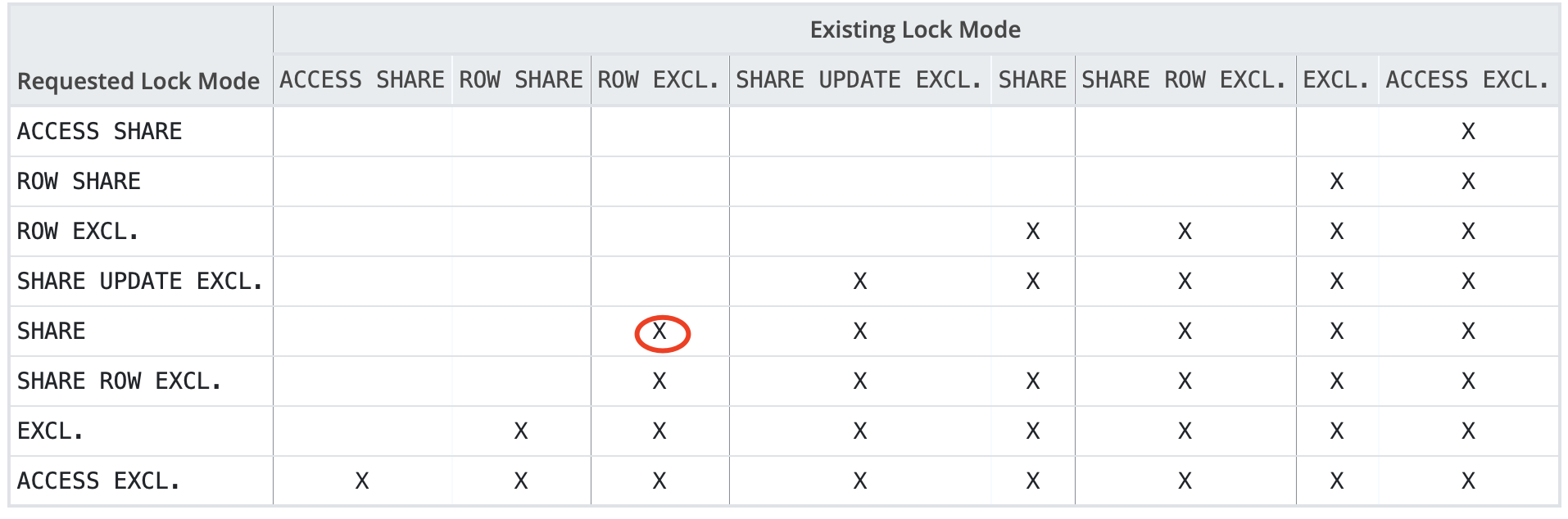
CREATE INDEX (without CONCURRENTLY) requests ShareLock on the parent table; Read-only transactions request AccessShareLock on the parent and child tables; Update transactions request RowExclusiveLock on the parent and child tables; ==> AccessShareLock does not block ShareLock, so queries do not block CREATE INDEX (without CONCURRENTLY); RowExclusiveLock blocks ShareLock, so DML blocks CREATE INDEX (without CONCURRENTLY);
- Creating partitioned indexes with CONCURRENTLY
Note: You cannot create indexes with CONCURRENTLY on a partitioned table.
=> create index concurrently idx_datecreated on lzlpartition1(date_created);
ERROR:  0A000: cannot create index on partitioned table "lzlpartition1" concurrently
LOCATION:  DefineIndex, indexcmds.c:665
There is a patch at https://commitfest.postgresql.org/35/2815/ working on solving this issue.
Currently, you can create indexes with CONCURRENTLY on individual partition child tables:
-- Session 1: Still using the previous DML transaction
-- Session 2: Create index with CONCURRENTLY on a child table, waits
=> create index concurrently idx_datecreated_202301 on lzlpartition1_202301(date_created);

-- Session 3: Check lock status
=> select l.locktype,d.datname,r.relname,l.virtualxid,l.transactionid,l.pid,l.mode,l.granted from pg_locks l left join pg_database d on l.database=d.oid left join pg_class r on l.relation=r.oid
where relname like '%lzlpartition1%';
 locktype | datname |          relname          | virtualxid | transactionid |  pid   |           mode           | granted
----------+---------+---------------------------+------------+---------------+--------+--------------------------+---------
 relation | dbmgr   | lzlpartition1_202301_pkey | [null]     |        [null] | 300371 | RowExclusiveLock         | t
 relation | dbmgr   | lzlpartition1_202301      | [null]     |        [null] |  99598 | ShareUpdateExclusiveLock | t
 relation | dbmgr   | lzlpartition1_202301      | [null]     |        [null] | 300371 | RowExclusiveLock         | t
 relation | dbmgr   | lzlpartition1             | [null]     |        [null] | 300371 | AccessShareLock          | t
 relation | dbmgr   | lzlpartition1             | [null]     |        [null] | 300371 | RowExclusiveLock         | t
With CONCURRENTLY, the requested lock is one level lower and no longer conflicts with ROW EXCL. The locks don’t conflict, so why is CONCURRENTLY itself still blocked?
it must wait for all existing transactions that could potentially modify or use the index to terminate.
The official documentation explains that CONCURRENTLY needs to wait for transactions that could potentially modify or use the index to terminate. In our case, the UPDATE statement modified the indexed column, so CONCURRENTLY needs to wait for it to complete. Although CONCURRENTLY itself hasn’t completed due to the prior DML statement, there’s a benefit: CONCURRENTLY does not block subsequent DML statements.
-- While CONCURRENTLY has not yet completed
-- Session 4: Update a record
=>  update lzlpartition1 set name='abc' where date_created='2023-01-01 12:00:00';
UPDATE 1
Summary of partition index locking issues:
- Locking for read-only/read-write/index creation on partitioned tables is similar to regular tables. Just note that transactions acquire locks on both the partition parent table and child tables, so when subsequent blocking chains involve heavier locks, all partitions are affected.
- Read-only transactions do not block CREATE INDEX, but they do block DROP INDEX.
- DML blocks CREATE INDEX and also blocks CREATE INDEX CONCURRENTLY, but CONCURRENTLY does not block DML.
- Although CREATE INDEX on a partitioned table automatically creates indexes on all existing and future partitions, it is not recommended for direct use in production due to blocking issues.
- You cannot use CONCURRENTLY directly on the partition parent table, so you need to create indexes with CONCURRENTLY on each partition child table.
- CONCURRENTLY does not block subsequent transactions but itself gets blocked by prior long-running transactions and may cause the created index to be invalid. Attention must be paid to long-running transactions.
The Correct Way to Create Partition Indexes#
Although you cannot create indexes with CONCURRENTLY on a partitioned table, you can create indexes with CONCURRENTLY on partition child tables using the following syntax:
CREATE INDEX ON ONLY : Creates an invalid index on the parent table; does not automatically create indexes on child partitions.
CREATE INDEX CONCURRENTLY : Creates an index with CONCURRENTLY on a child partition.
ALTER INDEX .. ATTACH PARTITION : Attaches the partition index to the parent index. After all child partition indexes have been attached, the partition parent table index is automatically marked as valid.
However, when executing these commands, you still need to pay attention to locking behavior.
Below, observe the lock requests and blocking for the above two statements: (DML explicit transaction in Session 1 is kept open throughout)
- Blocking behavior of CREATE INDEX ON ONLY:
=> CREATE INDEX IDX_DATECREATED ON ONLY lzlpartition1(date_created);
-- Waiting

-- Check lock status
 locktype | datname |       relname        | virtualxid | transactionid |  pid   |       mode       | granted
----------+---------+----------------------+------------+---------------+--------+------------------+---------
 relation | dbmgr   | lzlpartition1_202301 | [null]     |        [null] | 448243 | RowExclusiveLock | t
 relation | dbmgr   | lzlpartition1        | [null]     |        [null] | 448243 | RowExclusiveLock | t
 relation | dbmgr   | lzlpartition1        | [null]     |        [null] | 444399 | ShareLock        | f
CREATE INDEX ON ONLY requests a ShareLock. ShareLock and RowExclusiveLock block each other. So, although ONLY itself executes very quickly, CREATE INDEX ON ONLY should not be used casually either.
-- After the DML transaction ends, CREATE INDEX ON ONLY completes
    "idx_datecreated" btree (date_created) INVALID
CREATE INDEX ON ONLY creates an invalid index on the partition parent table and does not create indexes on child partitions.
- Blocking behavior of ATTACH index:
-- After ONLY index creation completes, start another DML explicit transaction in Session 1
=> begin;
BEGIN
=> insert into lzlpartition1 values('1111','abc','2023-01-01 00:00:00');
INSERT 0 1

-- Session 2: Create index with CONCURRENTLY on child partition
=> create index concurrently idx_datecreated_202302 on  lzlpartition1_202302(date_created);
CREATE INDEX  -- 202302 partition index created
=> create index concurrently idx_datecreated_202304 on  lzlpartition1_202304(date_created);
CREATE INDEX -- 202304 partition index created
=> create index concurrently idx_datecreated_202301 on  lzlpartition1_202301(date_created);
---- Creating 202301 partition index, waiting
CONCURRENTLY waits for transactions that might use the index to complete. Our explicit transaction only inserted into the 202301 partition, so only this partition’s CONCURRENTLY index creation hasn’t completed.
-- Complete the DML explicit transaction in Session 1, wait for the index to finish, then start another transaction
=> commit;
COMMIT
=> begin;
BEGIN
=> insert into lzlpartition1 values('1111','abc','2023-01-01 00:00:01');
INSERT 0 1
-- Session 2: ATTACH index
 => ALTER INDEX  idx_datecreated ATTACH PARTITION idx_datecreated_202302;
ALTER INDEX  -- ATTACH successful
=> \d+ idx_datecreated
                        Partitioned index "public.idx_datecreated"
    Column    |            Type             | Key? |  Definition  | Storage | Stats target
--------------+-----------------------------+------+--------------+---------+--------------
 date_created | timestamp without time zone | yes  | date_created | plain   |
btree, for table "public.lzlpartition1", invalid
Partitions: idx_datecreated_202302     -- 202302 child partition index has been attached, index still invalid
Access method: btree
-- Attach the remaining child partition indexes
=> ALTER INDEX  idx_datecreated ATTACH PARTITION idx_datecreated_202301;
ALTER INDEX  -- ATTACH successful
=> ALTER INDEX  idx_datecreated ATTACH PARTITION idx_datecreated_202304;
ALTER INDEX  -- ATTACH successful
-- After all child partition indexes are attached, the parent table index automatically becomes valid
=> \d+ idx_datecreated
                        Partitioned index "public.idx_datecreated"
    Column    |            Type             | Key? |  Definition  | Storage | Stats target
--------------+-----------------------------+------+--------------+---------+--------------
 date_created | timestamp without time zone | yes  | date_created | plain   |
btree, for table "public.lzlpartition1"
Partitions: idx_datecreated_202301,
            idx_datecreated_202302,
            idx_datecreated_202304
Access method: btree
ATTACH is not blocked by DML and completes immediately. At this point, new partitions created via PARTITION OF will also automatically get the child partition index.
In summary,
CREATE INDEX ON ONLYrequests aShareLock, which mutually blocks with theRowExclusiveLockrequested by DML.CREATE INDEX CONCURRENTLYrequests aShareUpdateExclusiveLock, which does not block theRowExclusiveLockrequested by DML. However,CREATE INDEX CONCURRENTLYneeds to wait for DML transactions to complete before it can finish (CONCURRENTLY can acquire the lock but cannot complete).ALTER INDEX .. ATTACH PARTITIONrequests anAccessShareLock, which is the lightest lock and does not block theRowExclusiveLockrequested by DML.- Queries request
AccessShareLock, the lightest lock. Unless DDL requestsAccessExclusiveLock(the heaviest lock), blocking does not occur.
Therefore, directly running CREATE INDEX on a partition blocks DML and is not acceptable. The correct way to create partition indexes:
-- Use ONLY to create an invalid index on the partition parent table. Fast, but blocks subsequent DML, affects business — watch for long-running transactions.
CREATE INDEX IDX_DATECREATED ON ONLY lzlpartition1(date_created);
-- Use CONCURRENTLY to create indexes on each partition child table. Slow, does not block subsequent DML, does not affect business, but watch for long-running DML transactions to prevent failure.
create index concurrently idx_datecreated_202302 on  lzlpartition1_202302(date_created);
-- ATTACH all indexes. Fast, does not cause business blocking.
 ALTER INDEX idx_datecreated ATTACH PARTITION idx_datecreated_202302;
Adding Primary Keys and Unique Indexes to Partitioned Tables#
A “primary key index” is functionally equivalent to “unique index + NOT NULL constraint” (but there can only be one primary key). Creating unique indexes on partitioned tables can follow the index creation best practices above: ONLY on parent, CONCURRENTLY on children, ATTACH. However, while primary keys on regular tables support the USING INDEX syntax, partitioned tables currently do not support this:
=> ALTER TABLE lzlpartition1 ADD CONSTRAINT pk_id_date_created PRIMARY KEY USING INDEX idx_uniq;
ERROR:  0A000: ALTER TABLE / ADD CONSTRAINT USING INDEX is not supported on partitioned tables
LOCATION:  ATExecAddIndexConstraint, tablecmds.c:8032
In other words, you can create a NOT NULL unique index by pre-creating a NOT NULL constraint + ATTACH-ing indexes, but the final step of USING INDEX to add the primary key does not work.
Now let’s look at the blocking behavior of directly adding/dropping primary keys:
- Directly dropping a primary key:
-- Session 1
=> begin;
BEGIN
Time: 0.318 ms
=>  select * from lzlpartition1 where date_created='2023-01-01 22:00:00';
  id  |               name               |    date_created
------+----------------------------------+---------------------
 7715 | beee680a86e1d12790489e9ab4a4351b | 2023-01-01 22:00:00
 -- Session 2: Drop primary key, waits
 => alter table lzlpartition1 drop constraint lzlpartition1_pkey;

 -- Session 3: Observe
 => select l.locktype,d.datname,r.relname,l.virtualxid,l.transactionid,l.pid,l.mode,l.granted from pg_locks l left join pg_database d on l.database=d.oid left join pg_class r on l.relation=r.oid
where relname like '%lzlpartition1%';
 locktype | datname |          relname          | virtualxid | transactionid |  pid  |        mode         | granted
----------+---------+---------------------------+------------+---------------+-------+---------------------+---------
 relation | dbmgr   | lzlpartition1_202301_pkey | [null]     |        [null] | 21659 | AccessShareLock     | t
 relation | dbmgr   | lzlpartition1_202301      | [null]     |        [null] | 21659 | AccessShareLock     | t
 relation | dbmgr   | lzlpartition1             | [null]     |        [null] | 95016 | AccessShareLock     | t
 relation | dbmgr   | lzlpartition1             | [null]     |        [null] | 95016 | AccessExclusiveLock | f
 relation | dbmgr   | lzlpartition1             | [null]     |        [null] | 21659 | AccessShareLock     | t
Dropping a primary key requests an AccessExclusiveLock, blocking everything.
- Directly adding a primary key:
-- Session 1 transaction ends; Session 2's drop primary key completes
-- Session 1 starts another read-only transaction
-- Session 2: Add a primary key on the partitioned table, waits
=> ALTER TABLE lzlpartition1 ADD PRIMARY KEY(id, date_created);

-- Session 3: Observe locks
=> select l.locktype,d.datname,r.relname,l.virtualxid,l.transactionid,l.pid,l.mode,l.granted from pg_locks l left join pg_database d on l.database=d.oid left join pg_class r on l.relation=r.oid
where relname like '%lzlpartition1%';
 locktype | datname |       relname        | virtualxid | transactionid |  pid  |        mode         | granted
----------+---------+----------------------+------------+---------------+-------+---------------------+---------
 relation | dbmgr   | lzlpartition1_202301 | [null]     |        [null] | 21659 | AccessShareLock     | t
 relation | dbmgr   | lzlpartition1        | [null]     |        [null] | 95016 | AccessShareLock     | t
 relation | dbmgr   | lzlpartition1        | [null]     |        [null] | 95016 | AccessExclusiveLock | f  -- Session adding primary key
 relation | dbmgr   | lzlpartition1        | [null]     |        [null] | 21659 | AccessShareLock     | t
Adding a primary key requests an AccessExclusiveLock on the parent table, blocking everything. Adding an index on a partitioned table is very slow, and a primary key causes subsequent blocking. Currently, there is no low-impact way to add a primary key on a partitioned table. As a workaround, you can consider using the “ATTACH unique index + NOT NULL constraint” approach; or you may have to schedule a long maintenance window for the partitioned table business and wait for index creation to complete; or use a third-party sync tool to insert data into a partitioned table that already has the primary key.
Adding Partitions to HASH Partitioned Tables#
If the new number of partitions is an integer multiple of the old number, we can know which old partition the data in the new partition came from. For example, expanding a 3-partition HASH partitioned table to 6 partitions, we can determine the data source:
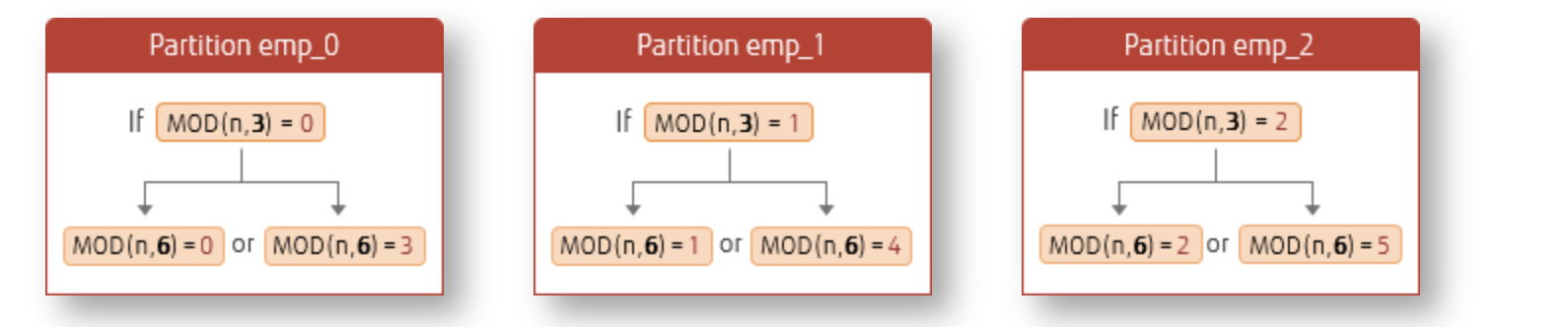
Although understanding this simple data characteristic is helpful, in practice it may not be very useful, because new HASH partitions are always populated by brute-force INSERT. In terms of operations, going from “3→4” partitions is no different from “3→6”. Mature data sync tools are now widely available. For example, using DTS to insert the table into a new table and then performing a table switch — this results in very short downtime and should be the preferred approach in production. Below is primarily testing and observing the manual addition of integer-multiple partitions to a HASH partitioned table:
- Partition info:
SELECT tableoid::regclass,count(*) FROM orders group by tableoid::regclass;
 tableoid  | count
-----------+-------
 orders_p1 |  3377
 orders_p3 |  3354
 orders_p2 |  3369
2. DETACH partitions:
Adding 3 more partitions to a 3-partition HASH native partitioned table:
ALTER TABLE orders DETACH PARTITION orders_p1;
ALTER TABLE orders DETACH PARTITION orders_p2;
ALTER TABLE orders DETACH PARTITION orders_p3;- RENAME partitions:
ALTER TABLE orders_p1 RENAME TO bak_orders_p1;
ALTER TABLE orders_p2 RENAME TO bak_orders_p2;
ALTER TABLE orders_p3 RENAME TO bak_orders_p3;- Create 6 HASH partitions on the old table:
CREATE TABLE orders_p1 PARTITION OF orders FOR VALUES WITH (MODULUS 6, REMAINDER 0);
CREATE TABLE orders_p2 PARTITION OF orders FOR VALUES WITH (MODULUS 6, REMAINDER 1);
CREATE TABLE orders_p3 PARTITION OF orders FOR VALUES WITH (MODULUS 6, REMAINDER 2);
CREATE TABLE orders_p4 PARTITION OF orders FOR VALUES WITH (MODULUS 6, REMAINDER 3);
CREATE TABLE orders_p5 PARTITION OF orders FOR VALUES WITH (MODULUS 6, REMAINDER 4);
CREATE TABLE orders_p6 PARTITION OF orders FOR VALUES WITH (MODULUS 6, REMAINDER 5);- View partition info: Note the function used in the partition constraint:
\d+ orders_p1
                                         Table "public.orders_p1"
  Column  |         Type          | Collation | Nullable | Default | Storage  | Stats target | Description
----------+-----------------------+-----------+----------+---------+----------+--------------+-------------
 order_id | integer               |           |          |         | plain    |              |
 name     | character varying(10) |           |          |         | extended |              |
Partition of: orders FOR VALUES WITH (modulus 6, remainder 0)
Partition constraint: satisfies_hash_partition('412053'::oid, 6, 0, order_id)
Access method: heap
Calculate which new partition old partition data should be inserted into. For example, the old modulus 3, remainder 0 partition’s data needs to be split into the modulus 6, remainder 0 and remainder 3 partitions:
 select count(*) from bak_orders_p1 where satisfies_hash_partition('412053'::oid, 6, 0, order_id)=true;
 count
-------
  1776
  select count(*) from bak_orders_p1 where satisfies_hash_partition('412053'::oid, 6, 3, order_id)=true;
 count
-------
  1601
  select count(*) from bak_orders_p1;
 count
-------
3377- Insert data directly into partition child tables: You can insert data directly into the corresponding partition child tables rather than through the partition parent table:
INSERT INTO orders_p1 SELECT * FROM bak_orders_p1 where satisfies_hash_partition('412053'::oid, 6, 0, order_id)=true;
INSERT INTO orders_p2 SELECT * FROM bak_orders_p2 where satisfies_hash_partition('412053'::oid, 6, 1, order_id)=true;
INSERT INTO orders_p3 SELECT * FROM bak_orders_p3 where satisfies_hash_partition('412053'::oid, 6, 2, order_id)=true;
INSERT INTO orders_p4 SELECT * FROM bak_orders_p1 where satisfies_hash_partition('412053'::oid, 6, 3, order_id)=true;
INSERT INTO orders_p5 SELECT * FROM bak_orders_p2 where satisfies_hash_partition('412053'::oid, 6, 4, order_id)=true;
INSERT INTO orders_p6 SELECT * FROM bak_orders_p3 where satisfies_hash_partition('412053'::oid, 6, 5, order_id)=true;- Verify data from 3 old partitions has been inserted into 6 new partitions:
SELECT tableoid::regclass,count(*) FROM orders group by tableoid::regclass;
tableoid  | count
-----------+-------
orders_p3 |  1665
orders_p5 |  1678
orders_p1 |  1776
orders_p6 |  1689
orders_p4 |  1601
orders_p2 |  1691
Changing Column Length on Partitioned Tables Rebuilds Indexes#
Modifying a column involves three considerations: table rewrite, index rebuild, and statistics loss.
- Changing column type or reducing column length rewrites the table.
- Increasing column length only causes statistics loss; an exception is reducing the length (or changing int4 to int8), which rewrites the table.
- Increasing column length does not rebuild indexes, with one exception: increasing column length on a partitioned table rebuilds indexes (if the column has an index).
For column modifications, refer to the PostgreSQL apprentice.
Here we mainly test the scenario of increasing column length on a partitioned table. If an index exists, it may cause transaction blocking on the partitioned table. Regular table, increasing the length of an indexed column:
-- Create regular table and index
=> create table t111(id int,name varchar(50));
CREATE TABLE
=> insert into t111 values(1001,'abc');
INSERT 0 1
=> create index idx111 on t111(name);
CREATE INDEX

-- Index file relfilenode is 417728
 select pg_relation_filepath('idx111');
 pg_relation_filepath
----------------------
 base/16398/417728
(1 row)

-- Increase column length
=>  alter table t111  alter column name type varchar(60);
ALTER TABLE
-- Index file relfilenode is still 417728, unchanged. Regular table index was NOT rebuilt.
=>  select pg_relation_filepath('idx111');
 pg_relation_filepath
----------------------
 base/16398/417728
Partitioned table, increasing the length of an indexed column:
-- Create an index on the partitioned table
=> create index idx_name on lzlpartition1(name);
CREATE INDEX
-- Check the index on one partition
=> \d+ lzlpartition1_202301
                                         Table "dbmgr.lzlpartition1_202301"
    Column    |            Type             | Collation | Nullable | Default | Storage  | Stats target | Description
--------------+-----------------------------+-----------+----------+---------+----------+--------------+-------------
 id           | integer                     |           |          |         | plain    |              |
 name         | character varying(50)       |           |          |         | extended |              |
 date_created | timestamp without time zone |           | not null | now()   | plain    |              |
Partition of: lzlpartition1 FOR VALUES FROM ('2023-01-01 00:00:00') TO ('2023-02-01 00:00:00')
Partition constraint: ((date_created IS NOT NULL) AND (date_created >= '2023-01-01 00:00:00'::timestamp without time zone) AND (date_created < '2023-02-01 00:00:00'::timestamp without time zone))
Indexes:
    "lzlpartition1_202301_name_idx" btree (name)
Access method: heap

=>  select pg_relation_filepath('lzlpartition1_202301_name_idx') idx,pg_relation_filepath('lzlpartition1_202301') tbl;
        idx        |        tbl
-------------------+-------------------
 base/16398/417810 | base/16398/417800
(1 row)

-- Increase the indexed column length — partitioned table index is rebuilt
=>  alter table lzlpartition1  alter column name type varchar(60);
ALTER TABLE
=> select pg_relation_filepath('lzlpartition1_202301_name_idx') idx,pg_relation_filepath('lzlpartition1_202301') tbl;
        idx        |        tbl
-------------------+-------------------
 base/16398/417814 | base/16398/417800

-- Reduce the indexed column length — partitioned table is rewritten
=>  alter table lzlpartition1  alter column name type varchar(40);
ALTER TABLE
Time: 609.585 ms
=> select pg_relation_filepath('lzlpartition1_202301_name_idx') idx,pg_relation_filepath('lzlpartition1_202301') tbl;
        idx        |        tbl
-------------------+-------------------
 base/16398/417828 | base/16398/417825

-- Keep the indexed column length the same — partitioned table index is still rebuilt
=>  alter table lzlpartition1  alter column name type varchar(40);
ALTER TABLE
=> select pg_relation_filepath('lzlpartition1_202301_name_idx') idx,pg_relation_filepath('lzlpartition1_202301') tbl;
        idx        |        tbl
-------------------+-------------------
 base/16398/417834 | base/16398/417825
For regular tables, increasing column length only requires attention to statistics loss (except int to bigint). However, for partitioned tables, when increasing column length, if the column has an index, not only are statistics lost but the index is also rebuilt. Since ALTER COLUMN is an 8-level lock, the index rebuild period causes extended blocking. Recommendation: first drop the index, modify the column, then rebuild the index using the “parent table ONLY + child tables CIC + ATTACH” approach.
Partition Table Maintenance Summary#
- PARTITION OF / DROP TABLE / DETACH require ACCESS EXCLUSIVE locks. ATTACH / DETACH CONCURRENTLY are recommended — they do not cause blocking. For DETACH CONCURRENTLY, watch for existing long-running transactions.
- Before ATTACH-ing a partition, you can pre-create a constraint on the partition. This eliminates the time spent scanning partition data during ATTACH.
- Currently, CIC (CREATE INDEX CONCURRENTLY) is not supported on partitioned tables. You can create partition indexes using the “ONLY on parent + CONCURRENTLY on children + ATTACH index” approach to reduce business blocking time.
- Partitioned tables do not support the USING INDEX method for creating primary keys.
- Pay attention to the exceptional case of modifying column length on partitioned tables.
Partition Table Optimization#
Partition Pruning#
Partition Pruning can improve performance for declarative partitioning and is a very important feature for partitioned table optimization. Without partition pruning, queries would scan all partitions. With partition pruning, the optimizer can filter out partitions that don’t need to be accessed through the WHERE condition.
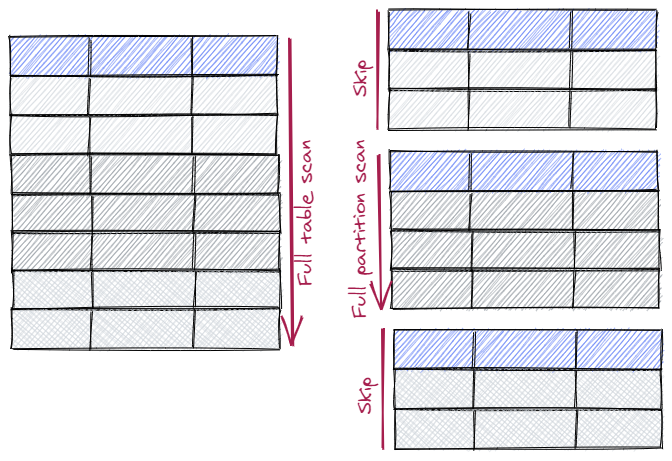 Partition pruning relies on the PARTITION CONSTRAINT (visible with \d+), which means queries must include partition key conditions for pruning to occur. This constraint differs from regular CHECK constraints — it is automatically created when the partition is created.
Partition pruning is controlled by the
Partition pruning relies on the PARTITION CONSTRAINT (visible with \d+), which means queries must include partition key conditions for pruning to occur. This constraint differs from regular CHECK constraints — it is automatically created when the partition is created.
Partition pruning is controlled by the enable_partition_pruning parameter, which defaults to on.
-- Without partition pruning, all partitions are accessed
=> set enable_partition_pruning=off;
SET

=> explain select count(*) from lzlpartition1 where date_created='2023-01-01';
                                            QUERY PLAN
--------------------------------------------------------------------------------------------------
 Aggregate  (cost=1872.08..1872.09 rows=1 width=8)
   ->  Append  (cost=0.00..1872.07 rows=4 width=0)
         ->  Seq Scan on lzlpartition1_202301 lzlpartition1_1  (cost=0.00..992.30 rows=1 width=0)
               Filter: (date_created = '2023-01-01 00:00:00'::timestamp without time zone)
         ->  Seq Scan on lzlpartition1_202302 lzlpartition1_2  (cost=0.00..864.12 rows=1 width=0)
               Filter: (date_created = '2023-01-01 00:00:00'::timestamp without time zone)
         ->  Seq Scan on lzlpartition1_202304 lzlpartition1_3  (cost=0.00..15.62 rows=2 width=0)
               Filter: (date_created = '2023-01-01 00:00:00'::timestamp without time zone)

-- With partition pruning enabled, partitions that don't need to be accessed are excluded
=> set enable_partition_pruning=on;
SET

=> explain select count(*) from lzlpartition1 where date_created='2023-01-01';
                                        QUERY PLAN
------------------------------------------------------------------------------------------
 Aggregate  (cost=992.30..992.31 rows=1 width=8)
   ->  Seq Scan on lzlpartition1_202301 lzlpartition1  (cost=0.00..992.30 rows=1 width=0)
         Filter: (date_created = '2023-01-01 00:00:00'::timestamp without time zone)
(3 rows)
(The official documentation says pruning happens during execution plan generation, and EXPLAIN would show “Subplans Removed.” In testing, this isn’t always the case, as in the EXPLAIN example above.) Partition pruning can occur at two stages: during execution plan generation, and during actual execution. Why does this happen? Because sometimes only at execution time can we know which partitions can be pruned. There are two scenarios:
Parameterized Nested Loop Joins: The parameter from the outer side of the join can be used to determine the minimum set of inner side partitions to scan.
Initplans: Once an initplan has been executed we can then determine which partitions match the value from the initplan.
Simulating runtime pruning: When fetching data from another table, the optimizer certainly doesn’t know what the data is, so it cannot use that as a basis for partition pruning during plan generation:
-- Create another table
=> create table x(date_created timestamp);
CREATE TABLE

=> insert into x values('2023-01-01 09:00:00');
INSERT 0 1

-- Generate execution plan only, don't execute — no pruning occurred
=> explain select count(*) from lzlpartition1 where date_created=(select date_created from x);
                                            QUERY PLAN
--------------------------------------------------------------------------------------------------
 Aggregate  (cost=1904.68..1904.69 rows=1 width=8)
   InitPlan 1 (returns $0)
     ->  Seq Scan on x  (cost=0.00..32.60 rows=2260 width=8)
   ->  Append  (cost=0.00..1872.07 rows=4 width=0)
         ->  Seq Scan on lzlpartition1_202301 lzlpartition1_1  (cost=0.00..992.30 rows=1 width=0)
               Filter: (date_created = $0)
         ->  Seq Scan on lzlpartition1_202302 lzlpartition1_2  (cost=0.00..864.12 rows=1 width=0)
               Filter: (date_created = $0)
         ->  Seq Scan on lzlpartition1_202304 lzlpartition1_3  (cost=0.00..15.62 rows=2 width=0)
               Filter: (date_created = $0)
(10 rows)

-- Execute the SQL — pruning occurred. Notice the "never executed" keyword.
=> explain analyze select count(*) from lzlpartition1 where date_created=(select date_created from x);
                                                                 QUERY PLAN
--------------------------------------------------------------------------------------------------------------------------------------------
 Aggregate  (cost=1904.68..1904.69 rows=1 width=8) (actual time=5.680..5.682 rows=1 loops=1)
   InitPlan 1 (returns $0)
     ->  Seq Scan on x  (cost=0.00..32.60 rows=2260 width=8) (actual time=0.013..0.014 rows=1 loops=1)
   ->  Append  (cost=0.00..1872.07 rows=4 width=0) (actual time=0.029..5.676 rows=2 loops=1)
         ->  Seq Scan on lzlpartition1_202301 lzlpartition1_1  (cost=0.00..992.30 rows=1 width=0) (actual time=0.008..5.652 rows=2 loops=1)
               Filter: (date_created = $0)
               Rows Removed by Filter: 45382
         ->  Seq Scan on lzlpartition1_202302 lzlpartition1_2  (cost=0.00..864.12 rows=1 width=0) (never executed)
               Filter: (date_created = $0)
         ->  Seq Scan on lzlpartition1_202304 lzlpartition1_3  (cost=0.00..15.62 rows=2 width=0) (never executed)
               Filter: (date_created = $0)
 Planning Time: 0.157 ms
 Execution Time: 5.732 ms
(13 rows)
Partition Wise Join#
Partition wise join can reduce the cost of partition joins. Suppose there are two partitioned tables t1 and t2, both with 3 partitions (p1, p2, p3) with identical partition definitions. t1 has 10 rows per partition, t2 has 20 rows per partition:
| t1 | t2 | |
|---|---|---|
| p1 | 10 rows | 20 rows |
| p2 | 10 rows | 20 rows |
| p3 | 10 rows | 20 rows |
| When t1 and t2 join, |
- Normally, all data from both partitioned tables needs to be extracted for joining. The number of row comparison operations would be: (10+10+10)*(20+20+20)=180
- With partition wise join, since the structures are similar, only corresponding partitions need to be joined, e.g.: t1.p1<=>t2.p1, t1.p2<=>t2.p2, t1.p3<=>t2.p3, The number of row comparison operations becomes: (10*20)*3=90
When there are many partitions, the cost savings of partition wise join are significant.
Parameter enable_partitionwise_join: whether to enable partition wise join, default is off.
The prerequisites for partition wise join are very strict:
- The join condition must include the partition key.
- The partition keys must be of the same data type.
- Partitions must correspond one-to-one.
While these conditions seem strict, it’s relatively rare for tables with different purposes to produce partition wise join scenarios. A common case would be both tables using RANGE time partitioning. Another scenario: a partitioned table self-joining also meets partition wise join prerequisites:
-- Without partition wise join enabled
=> explain select p1.*,p2.name from lzlpartition1 p1,lzlpartition1 p2 where p1.date_created=p2.date_created and p2.name='256ac66bb53d31bc6124294238d6410c';
                                                   QUERY PLAN
----------------------------------------------------------------------------------------------------------------
 Hash Join  (cost=546.64..9256.34 rows=182252 width=288)
   Hash Cond: (p1.date_created = p2.date_created)
   ->  Append  (cost=0.00..2085.46 rows=85364 width=150)
         ->  Seq Scan on lzlpartition1_202301 p1_1  (cost=0.00..878.84 rows=45384 width=150)
         ->  Seq Scan on lzlpartition1_202302 p1_2  (cost=0.00..765.30 rows=39530 width=150)
         ->  Seq Scan on lzlpartition1_202304 p1_3  (cost=0.00..14.50 rows=450 width=150)
   ->  Hash  (cost=541.30..541.30 rows=427 width=146)
         ->  Append  (cost=7.17..541.30 rows=427 width=146)
               ->  Bitmap Heap Scan on lzlpartition1_202301 p2_1  (cost=7.17..284.30 rows=227 width=146)
                     Recheck Cond: ((name)::text = '256ac66bb53d31bc6124294238d6410c'::text)
                     ->  Bitmap Index Scan on lzlpartition1_202301_name_idx  (cost=0.00..7.12 rows=227 width=0)
                           Index Cond: ((name)::text = '256ac66bb53d31bc6124294238d6410c'::text)
               ->  Bitmap Heap Scan on lzlpartition1_202302 p2_2  (cost=6.95..248.52 rows=198 width=146)
                     Recheck Cond: ((name)::text = '256ac66bb53d31bc6124294238d6410c'::text)
                     ->  Bitmap Index Scan on lzlpartition1_202302_name_idx  (cost=0.00..6.90 rows=198 width=0)
                           Index Cond: ((name)::text = '256ac66bb53d31bc6124294238d6410c'::text)
               ->  Bitmap Heap Scan on lzlpartition1_202304 p2_3  (cost=2.66..6.35 rows=2 width=146)
                     Recheck Cond: ((name)::text = '256ac66bb53d31bc6124294238d6410c'::text)
                     ->  Bitmap Index Scan on lzlpartition1_202304_name_idx  (cost=0.00..2.66 rows=2 width=0)
                           Index Cond: ((name)::text = '256ac66bb53d31bc6124294238d6410c'::text)
(20 rows)

-- With partition wise join enabled
=> set enable_partitionwise_join =on;
SET

M=> explain select p1.*,p2.name from lzlpartition1 p1,lzlpartition1 p2 where p1.date_created=p2.date_created and p2.name='256ac66bb53d31bc6124294238d6410c';
                                                   QUERY PLAN
----------------------------------------------------------------------------------------------------------------
 Append  (cost=287.14..2529.83 rows=438 width=288)
   ->  Hash Join  (cost=287.14..1338.49 rows=232 width=288)
         Hash Cond: (p1_1.date_created = p2_1.date_created)
         ->  Seq Scan on lzlpartition1_202301 p1_1  (cost=0.00..878.84 rows=45384 width=150)
         ->  Hash  (cost=284.30..284.30 rows=227 width=146)
               ->  Bitmap Heap Scan on lzlpartition1_202301 p2_1  (cost=7.17..284.30 rows=227 width=146)
                     Recheck Cond: ((name)::text = '256ac66bb53d31bc6124294238d6410c'::text)
                     ->  Bitmap Index Scan on lzlpartition1_202301_name_idx  (cost=0.00..7.12 rows=227 width=0)
                           Index Cond: ((name)::text = '256ac66bb53d31bc6124294238d6410c'::text)
   ->  Hash Join  (cost=250.99..1166.55 rows=202 width=288)
         Hash Cond: (p1_2.date_created = p2_2.date_created)
         ->  Seq Scan on lzlpartition1_202302 p1_2  (cost=0.00..765.30 rows=39530 width=150)
         ->  Hash  (cost=248.52..248.52 rows=198 width=146)
               ->  Bitmap Heap Scan on lzlpartition1_202302 p2_2  (cost=6.95..248.52 rows=198 width=146)
                     Recheck Cond: ((name)::text = '256ac66bb53d31bc6124294238d6410c'::text)
                     ->  Bitmap Index Scan on lzlpartition1_202302_name_idx  (cost=0.00..6.90 rows=198 width=0)
                           Index Cond: ((name)::text = '256ac66bb53d31bc6124294238d6410c'::text)
   ->  Hash Join  (cost=6.37..22.60 rows=4 width=288)
         Hash Cond: (p1_3.date_created = p2_3.date_created)
         ->  Seq Scan on lzlpartition1_202304 p1_3  (cost=0.00..14.50 rows=450 width=150)
         ->  Hash  (cost=6.35..6.35 rows=2 width=146)
               ->  Bitmap Heap Scan on lzlpartition1_202304 p2_3  (cost=2.66..6.35 rows=2 width=146)
                     Recheck Cond: ((name)::text = '256ac66bb53d31bc6124294238d6410c'::text)
                     ->  Bitmap Index Scan on lzlpartition1_202304_name_idx  (cost=0.00..2.66 rows=2 width=0)
                           Index Cond: ((name)::text = '256ac66bb53d31bc6124294238d6410c'::text)
(25 rows)
Without partition wise join enabled, the optimizer first accesses all partition data from p2 (matching the filter) and combines them (Append), then Hash Joins with all partition data from p1 through the partition key. With partition wise join enabled, the optimizer joins corresponding partitions from p1 and p2 (actually the same table accessed twice): p1_1<=>p2_1 Hash Join p1_2<=>p2_2 Hash Join p1_3<=>p2_3 Hash Join Then combines the data together (Append). If there are enough data partitions, combined with partition pruning, partition wise join can have very good optimization effects.
Partition Wise Grouping/Aggregation#
When performing aggregation on partitioned data, partitions can each compute independently — there is no need to scan all partition data for aggregation. Each partition computes its own aggregation, then the results are collected and returned. Without partition wise grouping, it’s essentially “scan all partitions first, then aggregate.” With partition wise grouping, it’s “aggregate per partition first, then combine results.”
Advantages of partition wise grouping:
- When partitions are on foreign servers, the aggregation operator can be pushed down to the foreign server.
- When aggregating into hash tables, each partition rather than the entire table uses the memory hash table space, reducing memory usage.
- Aggregation algorithms pushed down to individual partitions can better utilize features like indexes and parallelism.
- Fewer data comparisons. Although data scanning is the same, there are fewer data comparisons — for example, data from the last partition does not need to be compared with data from the first partition.
Parameter enable_partitionwise_aggregate: whether to enable partition wise grouping/aggregation, default is off.
Partition wise aggregate example:
=>   vacuum (analyze) lzlpartition1;

-- Without wise agg
=> set enable_partitionwise_aggregate =off;
SET
=> explain select date_created,min(id),count(*)  from lzlpartition1  group by date_created  order by 1,2,3;
                                                 QUERY PLAN
-------------------------------------------------------------------------------------------------------------
 Sort  (cost=10354.94..10562.89 rows=83180 width=20)
   Sort Key: lzlpartition1.date_created, (min(lzlpartition1.id)), (count(*))
   ->  HashAggregate  (cost=2725.69..3557.49 rows=83180 width=20)
         Group Key: lzlpartition1.date_created
         ->  Append  (cost=0.00..2085.46 rows=85364 width=12)
               ->  Seq Scan on lzlpartition1_202301 lzlpartition1_1  (cost=0.00..878.84 rows=45384 width=12)
               ->  Seq Scan on lzlpartition1_202302 lzlpartition1_2  (cost=0.00..765.30 rows=39530 width=12)
               ->  Seq Scan on lzlpartition1_202304 lzlpartition1_3  (cost=0.00..14.50 rows=450 width=12)


-- With wise agg enabled
=> set enable_partitionwise_aggregate =on;
SET
=> explain select date_created,min(id),count(*)  from lzlpartition1  group by date_created  order by 1,2,3;
                                                 QUERY PLAN
-------------------------------------------------------------------------------------------------------------
 Sort  (cost=10356.08..10564.32 rows=83296 width=20)
   Sort Key: lzlpartition1.date_created, (min(lzlpartition1.id)), (count(*))
   ->  Append  (cost=1219.22..3548.31 rows=83296 width=20)
         ->  HashAggregate  (cost=1219.22..1663.09 rows=44387 width=20)
               Group Key: lzlpartition1.date_created
               ->  Seq Scan on lzlpartition1_202301 lzlpartition1  (cost=0.00..878.84 rows=45384 width=12)
         ->  HashAggregate  (cost=1061.77..1448.86 rows=38709 width=20)
               Group Key: lzlpartition1_1.date_created
               ->  Seq Scan on lzlpartition1_202302 lzlpartition1_1  (cost=0.00..765.30 rows=39530 width=12)
         ->  HashAggregate  (cost=17.88..19.88 rows=200 width=20)
               Group Key: lzlpartition1_2.date_created
               ->  Seq Scan on lzlpartition1_202304 lzlpartition1_2  (cost=0.00..14.50 rows=450 width=12)
(12 rows)
Without partition wise aggregate: first scan all data then combine (Append), then aggregate (HashAggregate). With partition wise aggregate: first aggregate on each partition (HashAggregate), then combine results (Append).
Partial Aggregation The aggregation algorithm can be pushed down to partitions for computation. At this point, the aggregated results fall into two categories: non-duplicate aggregation data (GROUP BY includes the partition key), and duplicate aggregation data (GROUP BY does not include the partition key). When aggregation data is non-duplicate, simply appending the per-partition computed aggregation data is sufficient (as in the example above). When per-partition aggregation data has duplicates, an additional aggregation step (Finalize Aggregate) is needed. Aggregation that does not include the partition key is partial aggregation.
Partial aggregation example:
-- When GROUP BY is not the partition key
=> show enable_partitionwise_aggregate;
 enable_partitionwise_aggregate
--------------------------------
 on
=> explain select id,count(*)  from lzlpartition1  group by id ;
                                                 QUERY PLAN
------------------------------------------------------------------------------------------------------------
 Finalize HashAggregate  (cost=2474.80..2573.80 rows=9900 width=12)
   Group Key: lzlpartition1.id
   ->  Append  (cost=1105.76..2377.47 rows=19467 width=12)
         ->  Partial HashAggregate  (cost=1105.76..1202.28 rows=9652 width=12)
               Group Key: lzlpartition1.id
               ->  Seq Scan on lzlpartition1_202301 lzlpartition1  (cost=0.00..878.84 rows=45384 width=4)
         ->  Partial HashAggregate  (cost=962.95..1059.10 rows=9615 width=12)
               Group Key: lzlpartition1_1.id
               ->  Seq Scan on lzlpartition1_202302 lzlpartition1_1  (cost=0.00..765.30 rows=39530 width=4)
         ->  Partial HashAggregate  (cost=16.75..18.75 rows=200 width=12)
               Group Key: lzlpartition1_2.id
               ->  Seq Scan on lzlpartition1_202304 lzlpartition1_2  (cost=0.00..14.50 rows=450 width=4)
When GROUP BY does not include the partition key, aggregation can still be performed, but a subsequent Finalize HashAggregate is required.
Even without GROUP BY, Partial Aggregate can still occur:
=> show enable_partitionwise_aggregate;
 enable_partitionwise_aggregate
--------------------------------
 on
=> explain select  count(*)  from lzlpartition1;
                                                 QUERY PLAN
------------------------------------------------------------------------------------------------------------
 Finalize Aggregate  (cost=1872.10..1872.11 rows=1 width=8)
   ->  Append  (cost=992.30..1872.10 rows=3 width=8)
         ->  Partial Aggregate  (cost=992.30..992.31 rows=1 width=8)
               ->  Seq Scan on lzlpartition1_202301 lzlpartition1  (cost=0.00..878.84 rows=45384 width=0)
         ->  Partial Aggregate  (cost=864.12..864.13 rows=1 width=8)
               ->  Seq Scan on lzlpartition1_202302 lzlpartition1_1  (cost=0.00..765.30 rows=39530 width=0)
         ->  Partial Aggregate  (cost=15.62..15.63 rows=1 width=8)
               ->  Seq Scan on lzlpartition1_202304 lzlpartition1_2  (cost=0.00..14.50 rows=450 width=0)

=> explain select  max(date_created)  from lzlpartition1;
                                                 QUERY PLAN
------------------------------------------------------------------------------------------------------------
 Finalize Aggregate  (cost=1872.10..1872.11 rows=1 width=8)
   ->  Append  (cost=992.30..1872.10 rows=3 width=8)
         ->  Partial Aggregate  (cost=992.30..992.31 rows=1 width=8)
               ->  Seq Scan on lzlpartition1_202301 lzlpartition1  (cost=0.00..878.84 rows=45384 width=8)
         ->  Partial Aggregate  (cost=864.12..864.13 rows=1 width=8)
               ->  Seq Scan on lzlpartition1_202302 lzlpartition1_1  (cost=0.00..765.30 rows=39530 width=8)
         ->  Partial Aggregate  (cost=15.62..15.63 rows=1 width=8)
               ->  Seq Scan on lzlpartition1_202304 lzlpartition1_2  (cost=0.00..14.50 rows=450 width=8)
The precondition for triggering Partial Aggregate is not GROUP BY. We should think from the purpose of Partial Aggregate — it aims to push aggregation down to partitions. Aggregation without GROUP BY can also be done this way, as shown in the two examples above: they both compute aggregation on each partition first (Partial Aggregate), then combine and aggregate once more (Finalize Aggregate). Without the parameter enabled, these aggregations would occur after scanning all partitions.
History of Partitioned Tables#
Declarative partitioning has gone through many version enhancements and is now very mature. Here’s a summary of declarative partitioning feature enhancements across PostgreSQL versions:
Pre-PG9.6
- Only inheritance tables could implement partitioning functionality.
PG10
- Declarative partitioning supported.
- RANGE and LIST partitioning supported.
- ATTACH/DETACH table partitions supported.
- Partition pruning supported.
PG11
- Added HASH partition support.
- Support for creating primary keys, foreign keys, indexes, and triggers.
- Support for updating partition key; automatic creation of indexes on partitions.
- Support for DEFAULT partition.
- Support for ATTACH index.
- Support for FOR EACH ROW triggers, automatically created on existing and future child partitions.
- New
enable_partition_pruningparameter; pruning enhancements. - Support for partition wise join.
- Support for partition wise aggregation.
PG12
- Enhanced query, insert, pruning, and COPY performance.
- Support for foreign key constraints referencing partitioned tables.
- Support for non-blocking partition ATTACH:
ALTER TABLE ATTACH PARTITION.
PG13
- Enhanced pruning.
- Enhanced partition wise join.
- Support for BEFORE triggers.
- Support for publishing partitioned tables; support for subscribing and writing to partitioned tables.
PG14
- Enhanced UPDATE and DELETE performance.
- Support for non-blocking partition DETACH:
ALTER TABLE ... DETACH PARTITION ... CONCURRENTLY. - Support for REINDEX on partitioned table indexes.
PG15
- Enhanced execution plan generation, reducing generation time with many partitions.
- Enhanced sorting.
- Support for CLUSTER on partitioned tables.
PG16
- Enhanced GENERATED column restrictions: if the parent table has a generated column, child partitions must also include it.
- Enhanced lookup for RANGE and LIST partitions.
References#
The Way of PostgreSQL
https://mp.weixin.qq.com/s/NW8XOZNq0YlDZvx24H737Q https://www.postgresql.org/docs/current/ddl-partitioning.html https://www.postgresql.org/docs/current/ddl-inherit.html https://www.postgresql.org/docs/13/sql-altertable.html https://github.com/postgrespro/pg_pathman https://developer.aliyun.com/article/62314 https://hevodata.com/learn/postgresql-partitions https://www.postgresql.fastware.com/postgresql-insider-prt-ove https://www.buckenhofer.com/2021/01/postgresql-partitioning-guide/ https://www.depesz.com/2018/05/01/waiting-for-postgresql-11-support-partition-pruning-at-execution-time/ https://blog.csdn.net/horses/article/details/86164273