
Localization Concepts#
The purpose of localization is to support the language features and rules of different countries and regions. With localization support, you can use character sets that handle Chinese, French, Japanese, and more. Beyond character sets, there are also character sorting rules and other language-related rule support. For example, we know how to sort (‘a’, ‘b’), but how should (‘a’, ‘A’) and (‘啊’, ‘阿’) be sorted?
If you search Google for information about localization, character sets, and collation, you might end up with knowledge that feels both complex and distant. The best teacher is still
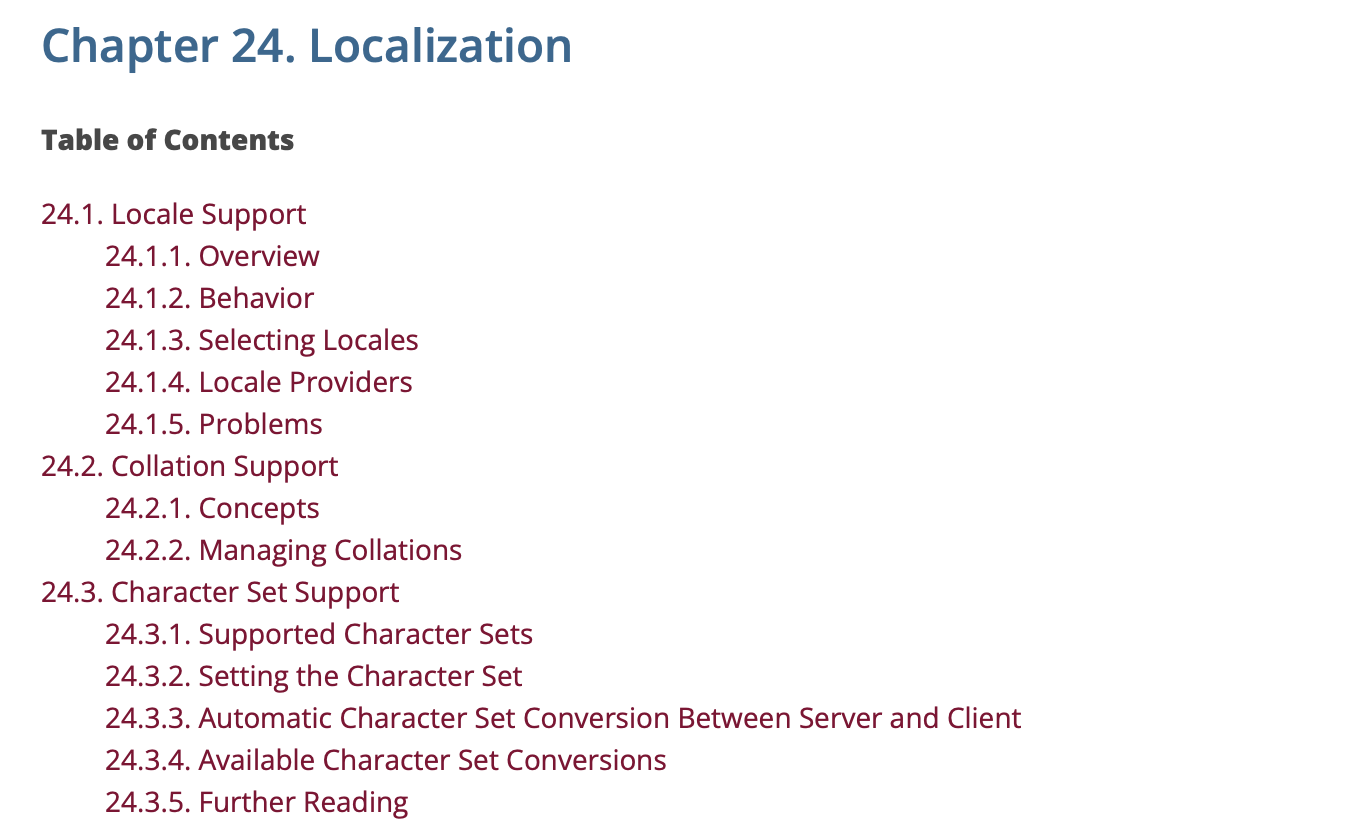
Localization knowledge is divided into three parts: locale support, collation, and character sets.
locale#
PostgreSQL’s localization is provided by the operating system. You need to check whether the OS supports it via locale -a. The locale can be specified when initializing the database:
initdb --locale=en_USYou can also set localization subcategories individually: string sort order, character classification, numeric formatting, date formatting, time formatting, currency formatting, etc.
initdb --locale=zh_CN --lc-monetary=en_USAll localization subcategories:
| Subcategory | Rule |
|---|---|
| LC_COLLATE | String sort order |
| LC_CTYPE | Character classification (What is a letter? Its upper-case equivalent?) |
| LC_MESSAGES | Language of messages |
| LC_MONETARY | Formatting of currency amounts |
| LC_NUMERIC | Formatting of numbers |
| LC_TIME | Formatting of dates and times |
These subcategories can be split into two groups. lc_messages, lc_monetary, lc_numeric, and lc_time can be adjusted via parameters after initialization. LC_COLLATE and LC_CTYPE belong to collation — see the collation section for adjustment details.
Locale settings affect the following behaviors:
- Sort order in queries using
ORDER BYor the standard comparison operators on textual data - The
upper,lower, andinitcapfunctions - Pattern matching operators (
LIKE,SIMILAR TO, and POSIX-style regular expressions); locales affect both case insensitive matching and the classification of characters by character-class regular expressions - The
to_charfamily of functions - The ability to use indexes with
LIKEclauses
COLLATION#
Collation defines the sort order of characters and character classification behavior. Some database operators depend on collation, such as ORDER BY, lower, upper, initcap, to_char, and others.
Use the following SQL to query the system table pg_collation to get LC_COLLATE and LC_CTYPE information for supported character sets:
 select pg_encoding_to_char(collencoding) as encoding,collname,collcollate,collctype from pg_collation where collname in ('default','C','POSIX','en_US.utf8','zh_CN.utf8','zh_CN.gb2312','zh_SG.gb2312') ;
 encoding |   collname   | collcollate  |  collctype
----------+--------------+--------------+--------------
          | default      |              |
          | C            | C            | C
          | POSIX        | POSIX        | POSIX
 UTF8     | en_US.utf8   | en_US.utf8   | en_US.utf8
 EUC_CN   | zh_CN.gb2312 | zh_CN.gb2312 | zh_CN.gb2312
 UTF8     | zh_CN.utf8   | zh_CN.utf8   | zh_CN.utf8
 EUC_CN   | zh_SG.gb2312 | zh_SG.gb2312 | zh_SG.gb2312
encoding is the character set, and collname is the collation name.
- When
encodingis empty, it means this collation supports all character sets. default,C,POSIXare collations supported on all platforms, provided bylibc. Other collations depend on whether the operating system supports them (locale -a).defaultmeans using the collation set at database creation time, which can be viewed via\l.Cis semantically equivalent toPOSIX, but PostgreSQL still considers them different collations. They both compare characters by ASCII code, strictly by byte order.
=> SELECT 'a' COLLATE "C" < 'b'  COLLATE "POSIX" ;
ERROR:  42P21: collation mismatch between explicit collations "C" and "POSIX"
LINE 1: SELECT 'a' COLLATE "C" < 'b'  COLLATE "POSIX" ;
LOCATION: merge_collation_state, parse_collate.c:834- UTF8 is the most common character set, and the most common language environments are
en_USandzh_CN. - You can create custom collations via
CREATE COLLATION .... However, cases whereLC_COLLATEandLC_CTYPEdiffer are very rare.
LC_COLLATE#
LC_COLLATE affects character comparison (sorting, character operations, etc.).
The COLLATE clause can transform the collation of an expression:
expr COLLATE collationNote that this specifies a collation, not lc_collate. If no collation is explicitly specified, the database uses the column’s collation by default. If the column has no collation specified, it uses the database’s default collation.
Sorting test with different collations:
 select col1 from (values ('a'), ('A'), ('啊'), ('阿'))
->  AS l(col1)
-> order by col1 collate "C";
 col1
------
 A
 a
 啊
 阿
 select col1 from (values ('a'), ('A'), ('啊'), ('阿'))
->  AS l(col1)
-> order by col1 collate "en_US.utf8";
 col1
------
 a
 A
 啊
 阿
  select col1 from (values ('a'), ('A'), ('啊'), ('阿'))
->  AS l(col1)
-> order by col1 collate "zh_CN.utf8";
 col1
------
 a
 A
 阿
 啊
These three different collations have different lc_collate values, and the sort methods are indeed different — we can see three distinct sort results from the output.
Why does collation C put ‘A’ before ‘a’?
Collation C uses ASCII encoding order. In ASCII, uppercase letters come before lowercase. Meanwhile, en_US.utf8 and zh_CN.utf8 clearly do not follow this order for English letters.
Order of Chinese characters
Even with the same UTF8 character set, the order of Chinese characters differs between Chinese and English locales. Different lc_collate values correspond to different alphabets for different localized languages. The sort order with lc_collate=C is always by byte order. Although ASCII does not include Chinese, C can still sort Chinese — (essentially) every Chinese character maps to a UTF8 encoding, and C sorts by byte order.
LC_CTYPE#
LC_CTYPE affects character operations (such as upper, initcap, etc.).
If the string is all English, e.g., 'abcD', initcap converts it to 'Abcd' under all three collations — nothing special to show here.
But when Chinese is introduced, the results differ:
select initcap('啊aAAa阿bBBb' collate "C");
   initcap
--------------
 啊Aaaa阿Bbbb

select initcap('啊aAAa阿aAAa' collate "en_US.utf8");
   initcap
--------------
 啊aaaa阿aaaa

select initcap('啊aAAa阿aAAa' collate "zh_CN.utf8");
   initcap
--------------
 啊aaaa阿aaaa
When LC_CTYPE=C, initcap capitalizes the first letter of every non-contiguous English character sequence, whereas en_US.utf8 and zh_CN.utf8 only capitalize the very first character (Chinese characters remain unchanged) and lowercase other English characters.
The behavior of initcap with Chinese may be an undefined requirement, but we can conclude: different LC_CTYPE settings lead to different results from character-sensitive functions like initcap.
Furthermore, Chinese is case-insensitive, but some other localized languages do have case distinctions — different LC_CTYPE settings lead to even more complex outcomes.
Character Sets#
Character Set Basics#
PostgreSQL supports different character sets (also called encodings). Character sets and collation are two separate concepts, but the character set must be compatible with LC_CTYPE and LC_COLLATE. As seen in pg_collation, C/POSIX support all character sets, while other collations only support one character set (on Linux systems).
Chinese-related character sets available in PostgreSQL: *(The C collation is provided by the libc library; some collations can be provided by the ICU library, requiring compilation in advance.)
| Name | Description | Language | Server-side support? | ICU support? | Bytes/Char | Aliases |
|---|---|---|---|---|---|---|
| BIG5 | Big Five | Traditional Chinese | No | No | 1–2 | WIN950, Windows950 |
| EUC_CN | Extended UNIX Code-CN | Simplified Chinese | Yes | Yes | 1–3 | GB2312 |
| GB18030 | National Standard | Chinese | No | No | 1–4 | |
| GBK | Extended National Standard | Simplified Chinese | No | No | 1–2 | WIN936, Windows936 |
| UTF8 | Unicode, 8-bit | all | Yes | Yes | 1–4 | Unicode |
Traditional Chinese: BIG5 is the most common character set standard for Traditional Chinese. It was once the industry standard and was later incorporated as a national standard.
Simplified Chinese: GB stands for “Guobiao” (national standard). GB2312, GB18030, and GBK are all Chinese national character set standards. Due to issues such as rare characters and years of development producing several historical versions, there appear to be multiple standards. EUC_CN stands for Extended UNIX Code-CN, which is essentially GB2312, but it cannot handle all rare characters either. Similarly named encodings include EUC_KR, EUC_JP, EUC_TW, and so on.
International Standards: The character sets above are all national standards — they support English and Chinese but not other languages. The international standard that supports all languages of the world is Unicode (which even includes emoji 👍). (There is also the well-known international standards organization ISO, which maintains character sets as well — there is some overlap, but we’ll set ISO aside for now.)
Due to different Unicode encoding schemes, there are three encoding formats: UTF-8, UTF-16, and UTF-32.
UTF-8 encoding format:
| Bytes | Format | Actual encoding bits | Code point range |
|---|---|---|---|
| 1 byte | 0xxxxxxx | 7 | 0 ~ 127 |
| 2 byte | 110xxxxx 10xxxxxx | 11 | 128 ~ 2047 |
| 3 byte | 1110xxxx 10xxxxxx 10xxxxxx | 16 | 2048 ~ 65535 |
| 4 byte | 11110xxx 10xxxxxx 10xxxxxx 10xxxxxx | 21 | 65536 ~ 2097151 |
UTF8 encoding is variable-length. For characters in the range 0x00-0x7F (1 byte), UTF-8 encoding is exactly identical to ASCII (American Standard Code for Information Interchange). Therefore, UTF-8 is fully backward-compatible with ASCII.
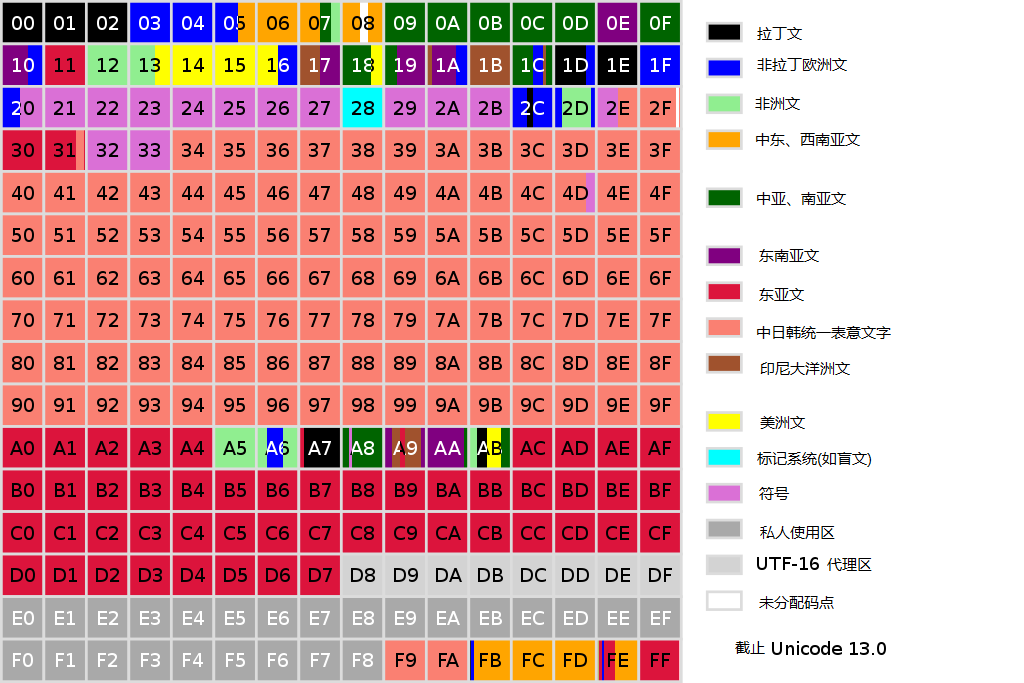
Due to shared origins, meanings, and similarities, Chinese, Japanese, Korean, and Vietnamese characters use a unified encoding in Unicode called CJK Unified Ideographs (CJKV Unified Ideographs). CJK Unified Ideographs encoding ranges: 3400-4DBF/4E00-9FFF/20000-3FFFF.
Character Set Conversion#
When server_encoding and client_encoding differ, automatic conversion of the character set returned by the server can occur. For setting server-side and client-side character sets, see the “Configuring Character Sets” section.
Chinese-related character sets — Server/Client convertible table:
| Server Character Set | Available Client Character Sets |
|---|---|
| BIG5 | not supported as a server encoding |
| EUC_CN (GB2312) | EUC_CN (GB2312), MULE_INTERNAL, UTF8 |
| GB18030 | not supported as a server encoding |
| GBK | not supported as a server encoding |
| UTF8 | all supported encodings |
| GB18030 and GBK are not supported on the server side, so in practice only EUC_CN (GB2312) and UTF8 can perform Server/Client conversion. |
The above lists the character sets that can be converted, but conversion still requires CONVERSION support. PostgreSQL has built-in conversion functions visible via pg_conversion:
| Conversion Name | Source Encoding | Destination Encoding |
|---|---|---|
| big5_to_utf8 | BIG5 | UTF8 |
| euc_cn_to_utf8 | EUC_CN | UTF8 |
| gb18030_to_utf8 | GB18030 | UTF8 |
| gbk_to_utf8 | GBK | UTF8 |
| utf8_to_big5 | UTF8 | BIG5 |
| utf8_to_euc_cn | UTF8 | EUC_CN |
| utf8_to_gb18030 | UTF8 | GB18030 |
| utf8_to_gbk | UTF8 | GBK |
You can create custom conversions via the CREATE CONVERSION statement, specifying the conversion function.
Some character sets appear to be interconvertible, but the server side doesn’t support storing them at all (such as BIG5, GB18030, GBK), so it’s not practically useful. All we need to know here is that euc_cn and utf8 can be converted to/from each other.
Without CONVERSION support, conversion cannot happen:
-- EUC_CN database
=> \encoding EUC_KR
EUC_KR: invalid encoding name or conversion procedure not found
Character set conversion test: Pay attention to the client-side character set settings (e.g., CRT’s “session” - “Appearance” - “Character encoding”)
There are at least three endpoints with character set concepts: database server, database client, and UI client. CONVERSION only controls: database server → database client.
- Server with UTF8 conversion test:
create table zh(col1 varchar(20));
insert into zh values('>'),('阿'),('〇');  -- 〇 (líng) is a Chinese character
-- If CRT is not set to UTF8, Chinese characters are all garbled; only set CRT to UTF8 for insertion

=> show server_encoding;
 server_encoding
-----------------
 UTF8
=> show client_encoding;
 client_encoding
-----------------
 UTF8
-- With no conversion at all, UTF8 displays correctly. Currently three endpoints: UTF8 - UTF8 - UTF8
=> select * from  zh;
 col1
------
 >
 阿
 〇

-- Switch database client character set. Now three endpoints: UTF8 - EUC_CN - UTF8
=> \encoding EUC_CN;  -- Set client character set

=> select * from zh where col1 in ('阿');
ERROR:  22021: invalid byte sequence for encoding "EUC_CN": 0xe9 0x98
LOCATION:  report_invalid_encoding, mbutils.c:1597
Time: 0.112 ms
=>  select * from zh where col1 in ('〇');
ERROR:  22021: invalid byte sequence for encoding "EUC_CN": 0xe3 0x80
ERROR:  22021: invalid byte sequence for encoding "EUC_CN": 0xe3 0x80
-- It looks like "阿" and "〇" cannot be converted to EUC_CN, but that's not the whole story

=>  select * from zh limit 2;
 col1
------
 >
 <B0><A2>
(2 rows)
-- The second row is "阿". The database server/client appears to have converted the character set from UTF8 to EUC_CN.
-- However, it may not display correctly due to UI client issues (currently CRT is set to UTF8)

-- Even changing CRT to GB2312 still won't display correctly
select * from zh limit 2;
 col1
------
 >
 <B0><A2>
(2 rows)

-- When querying 〇, the database throws an error directly, indicating 〇 cannot be converted from UTF8 to EUC_CN
select * from zh ;
ERROR:  22P05: character with byte sequence 0xe3 0x80 0x87 in encoding "UTF8" has no equivalent in encoding "EUC_CN"
LOCATION: report_untranslatable_char, mbutils.c:1631- Server with EUC_CN conversion test:
=> show server_encoding; -- Database has EUC_CN character set
 server_encoding
-----------------
 EUC_CN

-- Create the same zh table under the EUC_CN database, but inserting already has issues
=> insert into zh values('〇');
ERROR:  22P05: character with byte sequence 0xe3 0x80 0x87 in encoding "UTF8" has no equivalent in encoding "EUC_CN"
LOCATION:  report_untranslatable_char, mbutils.c:1631
Again, the error says 〇 cannot be converted from UTF8 to EUC_CN. EUC_CN (GB2312) Chinese encoding is not fully identical to UTF8 — EUC_CN (GB2312) does not include all Chinese characters, especially rare ones.
Configuring locale, collation, and character set#
Now that we’ve covered localization and character sets, here’s a summary.
Database cluster locale, collation, character set#
At initialization time, you can set the database cluster’s locale and character set:
initdb -D $DATADIR -E UTF8 --locale=en_US.UTF8
initdb -D $DATADIR -E UTF8 --locale=en_US.UTF8 --lc_collate=C --lc_ctype=C
initdb -D $DATADIR -E UTF8 --locale=en_US.UTF8 --lc_collate=C --lc_ctype=C --lc-messages=en_US.UTF8 --lc-monetary=en_US.UTF8 --lc-numeric=en_US.UTF8 --lc-time=en_US.UTF8
initdb creates three databases: postgres, template1, and template0. The CREATE DATABASE statement defaults to using template1 to create databases.
encodingsets the character set;localesetsLC_COLLATE,LC_CTYPE,LC_MESSAGES,LC_MONETARY,LC_NUMERIC, andLC_TIME, unless specifically overridden (e.g., via--lc_collate).LC_COLLATEandLC_CTYPEare called collation and can also be set at the database, column, and index levels.LC_MESSAGES,LC_MONETARY,LC_NUMERIC, andLC_TIMEare instance parameters that can be changed at any time.encodingcan only be set at initialization or at database creation — once set, it cannot be changed.
Database collation and character set#
When creating a database, you can set the database’s character set, lc_collate, and lc_ctype.
Both CREATE DATABASE and createdb can specify the character set at database creation time. Once created, the database character set cannot be changed. Both commands use a template database to create the new database.
There are two templates: template0 and template1. The official documentation states:
Another common reason for copying
template0instead oftemplate1is that new encoding and locale settings can be specified when copyingtemplate0, whereas a copy oftemplate1must use the same settings it does. This is becausetemplate1might contain encoding-specific or locale-specific data, whiletemplate0is known not to.
template1 is a writable template database that may contain localized data, while template0 cannot be written to. Therefore, to create a database with different localization settings, you should use template0.
And you must explicitly use template0, because the default is template1. Attempting to create a database without specifying template1 and with a different character set will result in an error:
=> create database db_GB2312 ENCODING 'EUC_CN'  LC_COLLATE 'zh_CN.gb2312' LC_CTYPE 'zh_CN.gb2312';
ERROR:  22023: new encoding (EUC_CN) is incompatible with the encoding of the template database (UTF8)
HINT:  Use the same encoding as in the template database, or use template0 as template.
Additionally, you cannot set the character set by specifying locale when creating a database:
=> create database db_GB2312 locale 'zh_CN.gb2312' template 'template0';
ERROR:  22023: encoding "UTF8" does not match locale "zh_CN.gb2312"
DETAIL:  The chosen LC_CTYPE setting requires encoding "EUC_CN".
LOCATION:  check_encoding_locale_matches, dbcommands.c:773
The error indicates you need to specify the LC_CTYPE sub-option. Adding all collation-related sub-options still produces an error:
=> create database db_GB2312 LOCALE 'EUC_CN'  LC_COLLATE 'zh_CN.gb2312' LC_CTYPE 'zh_CN.gb2312';
ERROR:  42601: conflicting or redundant options
DETAIL:  LOCALE cannot be specified together with LC_COLLATE or LC_CTYPE.
LOCALE cannot be used together with LC_CTYPE and other sub-options.
Removing locale and setting via character set, LC_COLLATE, and LC_CTYPE works successfully.
The correct way to create a database with a specific character set:
CREATE DATABASE:
create database db_GB2312 ENCODING 'EUC_CN' LC_COLLATE 'zh_CN.gb2312' LC_CTYPE 'zh_CN.gb2312' template 'template0';createdb: Use the CLI commandcreatedb, which wrapsCREATE DATABASE— they are equivalent:
createdb -E EUC_CN -T template0 --lc-collate=zh_CN.gb2312 --lc-ctype=zh_CN.gb2312 db_GB2312Viewing database character set:
\lpg_database
select datname,pg_encoding_to_char(encoding),datcollate,datctype,datlocprovider,daticulocale from pg_database;SHOWparameters
SERVER_ENCODING, LC_COLLATE, and LC_CTYPE are all immutable parameters that display the current database’s server-side character set, LC_COLLATE, and LC_CTYPE, respectively.
Column collation#
Collation is only related to character sorting and character functions — it is not related to encoding. Without indexes, changing a column’s collation is essentially just adjusting the default sort output for that column. With indexes, it will rebuild the index. If no collation is specified for a column, it defaults to the database’s collation.
Specifying collation when creating a table (note: some data types are un-collatable, such as int):
create table t1(col1 varchar(10) collate "en_US.utf8");
alter table t1 alter column col1 type varchar(10) collate "C";
Note: ALTER TABLE without changing the length will not rewrite the table, but it will definitely rebuild the index.
Viewing a column’s default collation:
1. \d+ t1

2. information_schema.columns
select table_catalog,table_schema,table_name,column_name,collation_name from  information_schema.columns where table_name='t1';

3. pg_attribute
select a.attrelid::regclass,a.attname,a.attcollation,c.collname,c.collcollate,c.collctype from pg_attribute a left join pg_collation c on a.attcollation=c.oid  where a.attrelid::regclass='tlzl'::regclass and a.attcollation<>0;
Method 3 is recommended. While \d+ and information_schema.columns can show collname, collname is not unique. Only method 3 reveals collate and ctype.
Test: specifying collate and viewing pg_attribute:
create table tlzl(
  col1 varchar(10) ,
  col2 varchar(10) collate "C",
  col3 varchar(10) collate "zh_CN",
  col4 varchar(10) collate "en_US.utf8"
);
-- Column collation is like tagging the column with a default sort order; you can't see the specific collate and ctype
db_utf8_c=> Table "public.tlzl"
Column | Type | Collation | Nullable | Default | Storage | Compression | Stats target | Description
--------+-----------------------+------------+----------+---------+----------+-------------+--------------+-------------
col1 | character varying(10) | | | | extended | | |
col2 | character varying(10) | C | | | extended | | |
col3 | character varying(10) | zh_CN | | | extended | | |
col4 | character varying(10) | en_US.utf8 | | | extended | | |
-- collname and collate/ctype are not one-to-one; col3's zh_CN alone doesn't reveal which collate is used
db_utf8_c=> select pg_encoding_to_char(collencoding) as encoding,collname,collcollate,collctype from pg_collation where collname like 'zh_CN%';
encoding | collname | collcollate | collctype
----------+--------------+--------------+--------------
EUC_CN | zh_CN | zh_CN | zh_CN
EUC_CN | zh_CN.gb2312 | zh_CN.gb2312 | zh_CN.gb2312
UTF8 | zh_CN.utf8 | zh_CN.utf8 | zh_CN.utf8
UTF8 | zh_CN | zh_CN.utf8 | zh_CN.utf8
-- pg_attribute shows more precisely than \d+
db_utf8_c=> select a.attrelid::regclass,a.attname,a.attcollation,c.collname,c.collcollate,c.collctype from pg_attribute a left join pg_collation c on a.attcollation=c.oid where a.attrelid::regclass='tlzl'::regclass and a.attcollation<>0;
attrelid | attname | attcollation | collname | collcollate | collctype
----------+---------+--------------+------------+-------------+------------
tlzl | col1 | 100 | default | |
tlzl | col2 | 950 | C | C | C
tlzl | col4 | 12562 | en_US.utf8 | en_US.utf8 | en_US.utf8
tlzl | col3 | 13200 | zh_CN | zh_CN.utf8 | zh_CN.utf8
-- Now we know that col3 zh_CN's collate is zh_CN.utf8 Test: table rewrite when modifying column collate:
-- Add an index to the column and check rewrite behavior
db_utf8_c=> create index idxcol4 on tlzl(col4);
CREATE INDEX

db_utf8_c=>  select pg_relation_filepath('tlzl') TableRelid, pg_relation_filepath('idxcol4') IndexRelid;
    tablerelid    |    indexrelid
------------------+------------------
 base/40996/41006 | base/40996/41015

db_utf8_c=> alter table tlzl alter column col4 type varchar(10) collate "C";
ALTER TABLE
db_utf8_c=> select pg_relation_filepath('tlzl') TableRelid, pg_relation_filepath('idxcol4') IndexRelid;
    tablerelid    |    indexrelid
------------------+------------------
 base/40996/41006 | base/40996/41016
-- Table was not rewritten; index was rewritten
A column’s collation is merely a marker. Modifying the column’s collation does not rewrite the table, but if there is an index on it, the index will be rewritten (sometimes not — see the next section).
Index collation#
When creating an index, if the index’s collation is not explicitly specified, the index uses the collation declared on the column.
Explicitly specifying collation when creating an index:
create index idx_C on tlzl(col3 collate "C"); Additionally, indexes can be created with text_pattern_ops, varchar_pattern_ops, bpchar_pattern_ops — in this case, the index does not depend on collation rules but compares character by character:
The difference from the default operator classes is that the values are compared strictly character by character rather than according to the locale-specific collation rules.
CREATE INDEX test_index ON test_table (col varchar_pattern_ops);In fact, this type of index is not entirely unrelated to collation — an index always has a sort order. This type of index’s sort order appears to be consistent with C. See the “LIKE not using index” section.
Viewing an index’s collation:
\d+ -- \d+ shows indexes with explicitly specified collate; if not specified, the column's default collation is used
db_utf8_c=> \d+ tlzl
                                                  Table "public.tlzl"
 Column |         Type          | Collation  | Nullable | Default | Storage  | Compression | Stats target | Description
--------+-----------------------+------------+----------+---------+----------+-------------+--------------+-------------
 col1   | character varying(10) |            |          |         | extended |             |              |
 col2   | character varying(10) | C          |          |         | extended |             |              |
 col3   | character varying(10) | zh_CN      |          |         | extended |             |              |
 col4   | character varying(10) | en_US.utf8 |          |         | extended |             |              |
Indexes:
    "idx_c" btree (col3 COLLATE "C")
    "idxcol4" btree (col4)
Access method: heap
Viewing via pg_index is clearer (the indcollation type in pg_index is oidvector and cannot be directly cast to oid, making queries a bit cumbersome):
db_utf8_c=>  select indcollation,indexrelid::regclass from pg_index where indexrelid::regclass ='idx_C'::regclass;
 indcollation | indexrelid
--------------+------------
 950          | idx_c

db_utf8_c=> select oid,pg_encoding_to_char(collencoding) as encoding,collname,collcollate,collctype from pg_collation where oid=950;
 oid | encoding | collname | collcollate | collctype
-----+----------+----------+-------------+-----------
 950 |          | C        | C           | C
Also, you cannot change an index’s collation via ALTER INDEX — you must drop and recreate it.
Test: After specifying an index collate, does modifying the column’s collate rewrite the index?
db_utf8_c=> select pg_relation_filepath('tlzl') TableRelid, pg_relation_filepath('idxcol4') IndexRelid4,pg_relation_filepath('idx_c') IndexRelidC;
    tablerelid    |   indexrelid4    |   indexrelidc
------------------+------------------+------------------
 base/40996/41020 | base/40996/41023 | base/40996/41024
(1 row)

db_utf8_c=> alter table tlzl alter column col3 type varchar(10) collate "en_US.utf8";
ALTER TABLE
db_utf8_c=> select pg_relation_filepath('tlzl') TableRelid, pg_relation_filepath('idxcol4') IndexRelid4,pg_relation_filepath('idx_c') IndexRelidC;
    tablerelid    |   indexrelid4    |   indexrelidc
------------------+------------------+------------------
 base/40996/41020 | base/40996/41023 | base/40996/41024   -- idx_c's relfileid did not change
If an index’s collate has been explicitly specified, modifying the column’s default collate will not rewrite that index.
Client character set#
When the client sets a character set different from the database, character set conversion occurs — though conversion may not always succeed. See the “Character Set Conversion” section for details.
The server-side character set cannot be changed after database creation, but the client character set can be adjusted at any time.
There are many ways to set the client character set:
- Set directly on the client:
\encoding UTF8  -- psql only
SET CLIENT_ENCODING TO UTF8;  -- session-level parameter change
SET NAMES UTF8; -- SQL standard- Set the
PGCLIENTENCODINGenvironment variable - Set the
client_encodingserver configuration parameter
Priority: client-side setting > PGCLIENTENCODING environment variable > client_encoding server configuration parameter
Viewing the client character set:
\encoding   -- psql only
SHOW client_encoding;
Expression collate#
Adding COLLATE to an expression overrides the expression’s original collation, effectively specifying a sort collation.
Add the COLLATE keyword at the end of the expression:
expr COLLATE collation

-- For example
select * from tab1 order by name COLLATE "C";
For details on sorting and collate index selection, see the “Sort Result Issues” section.
MORE#
Concept Summary#
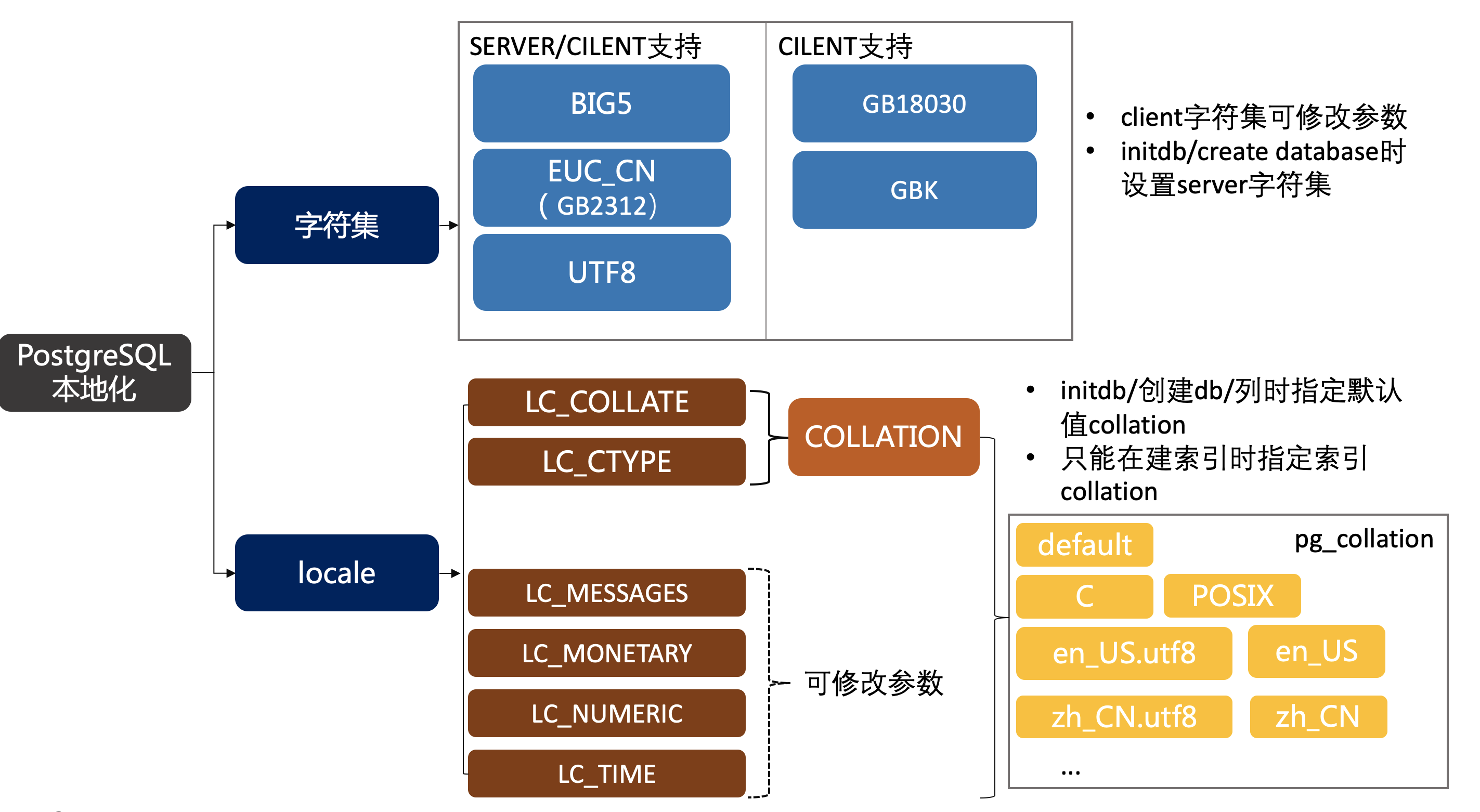
PostgreSQL localization has three important concepts: character set, locale, and collation — it’s essential to understand their relationships.
The server-side character set setting is very important: it can only be specified at initialization and database creation time, and cannot be modified after the database is created. The character set choice directly affects the encoding method. Collation does not, but there is a dependency between the two. Locale can likewise be specified at initialization, and among them, collation can be set at database creation time or individually on columns — note that these are merely defaults. Only when specifying collation at index creation does it affect the actual storage order. Different collations cannot use the same index, even if they share the same origin.
Client character set and the four parameters (LC_MESSAGES, etc.) are relatively simple — they can be modified directly via parameters and are unrelated to data storage.
Sort Result Issues#
Since UTF8 is the most common character set, we’ll test sorting with UTF-related collations:
create database db_UTF8 ENCODING 'UTF8'  template 'template0';  -- Create a UTF8 database; collation doesn't matter
use db_UTF8;
create table tzlz(name varchar(10));
insert into tzlz values('a'),('aa'),('A'),('AA'),('啊'),('阿'),('〇');
ORDER BY results with different collations:
select name from tzlz where name in ('a','aa','A','AA','啊','阿','〇') order by name;
select name from tzlz where name in ('a','aa','A','AA','啊','阿','〇') order by name collate "C";
select name from tzlz where name in ('a','aa','A','AA','啊','阿','〇') order by name collate "en_US";
select name from tzlz where name in ('a','aa','A','AA','啊','阿','〇') order by name collate "en_US.utf8";
select name from tzlz where name in ('a','aa','A','AA','啊','阿','〇') order by name collate "zh_CN";
select name from tzlz where name in ('a','aa','A','AA','啊','阿','〇') order by name collate "zh_CN.utf8";| Order | default | C | en_US | en_US.utf8 | zh_CN | zh_CN.utf8 |
|---|---|---|---|---|---|---|
| 1 | 〇 | A | 〇 | 〇 | a | a |
| 2 | a | AA | a | a | A | A |
| 3 | A | a | A | A | aa | aa |
| 4 | aa | aa | aa | aa | AA | AA |
| 5 | AA | 〇 | AA | AA | 阿 | 阿 |
| 6 | 啊 | 啊 | 啊 | 啊 | 啊 | 啊 |
| 7 | 阿 | 阿 | 阿 | 阿 | 〇 | 〇 |
Here, default is en_US.utf8 (column collation(default) → database collation(en_US.utf8))
🌟 C, en_US.utf8, and zh_CN.utf8 all produce different sort results!
Collate and index scan test:
insert into tzlz values(generate_series(1,10000));
create index idxzlz_default on tzlz(name);
create index idxzlz_C on tzlz(name collate "C");
create index idxzlz_enUS_utf8 on tzlz(name collate "en_US.utf8");
Using collate for index optimization:
-- Without any collate keyword, a simple index scan; no extra sorting
db_utf8_c=> explain select name from tzlz where name in ('a','aa','A','AA','啊','阿','〇') order by name;
                                   QUERY PLAN
---------------------------------------------------------------------------------
 Index Only Scan using idxzlz_default on tzlz  (cost=0.29..30.13 rows=8 width=4)
   Index Cond: (name = ANY ('{a,aa,A,AA,啊,阿,〇}'::text[]))

-- Adding collate conversion to the predicate hits the correct index
db_utf8=> explain select name  from tzlz  where name collate "C" in ('a','aa','A','AA','啊','阿','〇');
                                QUERY PLAN
---------------------------------------------------------------------------
 Index Only Scan using idxzlz_c on tzlz  (cost=0.29..30.12 rows=7 width=4)
   Index Cond: (name = ANY ('{a,aa,A,AA,啊,阿,〇}'::text[]))

db_utf8=>  explain select name  from tzlz  where name collate "en_US.utf8" in ('a','aa','A','AA','啊','阿','〇');
                                    QUERY PLAN
-----------------------------------------------------------------------------------
 Index Only Scan using idxzlz_enus_utf8 on tzlz  (cost=0.29..30.12 rows=7 width=4)
   Index Cond: (name = ANY ('{a,aa,A,AA,啊,阿,〇}'::text[]))

-- However, the collation name must match exactly
db_utf8=> explain select name  from tzlz  where name collate "en_US" in ('a','aa','A','AA','啊','阿','〇');
                           QUERY PLAN
-----------------------------------------------------------------
 Seq Scan on tzlz  (cost=0.00..232.63 rows=7 width=4)
   Filter: ((name)::text = ANY ('{a,aa,A,AA,啊,阿,〇}'::text[]))

-- ORDER BY also needs the collate conversion expression
-- Here, the correct index is used, but ORDER BY treats them as different collations (even though they are the same)
db_utf8=>  explain select name  from tzlz  where name collate "en_US.utf8" in ('a','aa','A','AA','啊','阿','〇') order by name;
                                       QUERY PLAN
-----------------------------------------------------------------------------------------
 Sort  (cost=30.22..30.23 rows=7 width=4)
   Sort Key: name
   ->  Index Only Scan using idxzlz_enus_utf8 on tzlz  (cost=0.29..30.12 rows=7 width=4)
         Index Cond: (name = ANY ('{a,aa,A,AA,啊,阿,〇}'::text[]))

-- Adding collate conversion to both WHERE and ORDER BY selects the right index and avoids extra sorting
db_utf8=> explain select name  from tzlz  where name collate "en_US.utf8" in ('a','aa','A','AA','啊','阿','〇') order by name  collate "en_US.utf8";
                                     QUERY PLAN
------------------------------------------------------------------------------------
 Index Only Scan using idxzlz_enus_utf8 on tzlz  (cost=0.29..30.12 rows=7 width=42)
   Index Cond: (name = ANY ('{a,aa,A,AA,啊,阿,〇}'::text[]))
After specifying a collation on an index, the SQL must explicitly use the COLLATE keyword to convert the expression. Even if the default is the same as the current collation, PostgreSQL will not use the index.
LIKE not using index#
The drawback of using locales other than
CorPOSIXin PostgreSQL is its performance impact. It slows character handling and prevents ordinary indexes from being used byLIKE
PostgreSQL’s own words: using non-C or non-POSIX prevents ordinary indexes from being used!
db_utf8=>  explain select name  from tzlz  where name  like 'a%';

                                QUERY PLAN
--------------------------------------------------------------------------

 Index Only Scan using idxzlz_c on tzlz  (cost=0.29..4.31 rows=1 width=4)
   Index Cond: ((name >= 'a'::text) AND (name < 'b'::text))
   Filter: ((name)::text ~~ 'a%'::text)
(3 rows)

db_utf8=>  explain select name  from tzlz  where name collate "en_US.utf8" like 'a%';

                                QUERY PLAN
--------------------------------------------------------------------------

 Index Only Scan using idxzlz_c on tzlz  (cost=0.29..4.31 rows=1 width=4)
   Index Cond: ((name >= 'a'::text) AND (name < 'b'::text))
   Filter: ((name)::text ~~ 'a%'::text)
PostgreSQL converts LIKE to >= and < during index scans, where < adds a “one step greater” value. This is where the problem lies: collation is strongly tied to sorting order. In ASCII, a+1 is b, but what about Chinese characters?
db_utf8=> explain select name  from tzlz  where name collate "en_US.utf8" like '阿%';
                                QUERY PLAN
--------------------------------------------------------------------------
 Index Only Scan using idxzlz_c on tzlz  (cost=0.29..6.49 rows=1 width=4)
   Index Cond: ((name >= '阿'::text) AND (name < '陿'::text))
   Filter: ((name)::text ~~ '阿%'::text)
Sure enough, another Chinese character appears!
If it’s a sequential scan, the >= and < won’t appear:
db_utf8=> drop index idxzlz_c;
DROP INDEX
db_utf8=>  explain select name  from tzlz  where name collate "en_US.utf8" like '阿%';
                      QUERY PLAN
------------------------------------------------------
 Seq Scan on tzlz  (cost=0.00..170.09 rows=1 width=4)
   Filter: ((name)::text ~~ '阿%'::text)
You can create an index that is (claimed by the PostgreSQL docs to be) unrelated to collation rules:
CREATE INDEX idx_pattern ON tzlz (name varchar_pattern_ops);Let’s look at its execution plan:
db_utf8=> explain select name  from tzlz  where name like '阿%';

                                 QUERY PLAN
-----------------------------------------------------------------------------

 Index Only Scan using idx_pattern on tzlz  (cost=0.29..6.49 rows=1 width=4)
   Index Cond: ((name ~>=~ '阿'::text) AND (name ~<~ '陿'::text))
   Filter: ((name)::text ~~ '阿%'::text)
It still auto-generates the “one greater” string — this is definitely related to collation. It appears to be using C.
So we can conclude:
When PostgreSQL uses a regular index for LIKE, it needs to convert it to >= and <, which requires a “one greater” value relative to the current string. Since collation is strongly tied to ordering, only an index using the same collation can guarantee data correctness. PostgreSQL chooses the non-localized C collation for this.
The quickest workaround is to create a C collation index or a pattern index:
create index idxzlz_C on tzlz(name collate "C");
CREATE INDEX idx_pattern ON tzlz (name varchar_pattern_ops);
For other adjustments to default collation at various levels, refer to the sections above.
Developers typically don’t specify collation when creating indexes. If it’s not C or pattern, LIKE won’t use the index. Combined with the common choice of the international character set UTF8, this leaves very few localization options in database operations. The recommended setup: character set UTF8, collation C.
References#
https://dbafix.com/what-is-the-impact-of-lc_ctype-on-a-postgresql-database/#:~:text=Having%20LC_CTYPE%20set%20to%20%E2%80%98C%E2%80%99%20implies%20that%20C,Postgres%20on%20top%20of%20these%20libc%20functions%2C%20they%E2%80%99re https://www.postgresql.org/docs/current/charset.html https://www.bookstack.cn/read/rds-best-pratice/bfc0037fe00d87dc.md https://help.aliyun.com/zh/rds/apsaradb-rds-for-postgresql/configure-the-collation-of-a-database-on-an-apsaradb-rds-for-postgresql-instance https://baike.baidu.com/item/%E7%BB%9F%E4%B8%80%E7%A0%81/2985798?fromModule=lemma_inlink&fromtitle=Unicode&fromid=750500 https://baike.baidu.com/item/%E4%B8%AD%E6%97%A5%E9%9F%A9%E8%B6%8A%E7%BB%9F%E4%B8%80%E8%A1%A8%E6%84%8F%E6%96%87%E5%AD%97/1301611?fromModule=lemma_inlink
https://blog.csdn.net/songyundong1993/article/details/128739919
Original article (Chinese): PostgreSQL Localization