
Problem Description#
PostgreSQL DELETE was failing with attempted to delete invisible tuple, but SELECT with the same conditions worked fine.
delete from lzltab1;
select count(*) from  lzltab1;
Results of full-table delete and full-table select:
M=# delete from lzltab1;
ERROR:  55000: attempted to delete invisible tuple
LOCATION:  heap_delete, heapam.c:2500
Time: 511.050 msM=# select count(*) from lzltab1;
count
--------
231187DELETE found an invisible tuple, but SELECT was fine.
This seemed very strange at first. PG visibility is determined by the tuple’s xmin, xmax, cid and the snapshot’s xmin, xmax, xip_list. Although the transaction state and timing of the tuple deletion can affect visibility, if the table data is stable (no ongoing DML), any subsequent snapshot should yield a stable visibility set. There shouldn’t be a case where the current transaction’s visibility differs from others — DML transaction tuple visibility should be consistent. In other words, in this scenario, the SELECT snapshot and DELETE snapshot shouldn’t produce different results.
Analysis#
Finding the Source Code#
Note the error location: heapam.c:2500
Find the source at src/backend/access/heap/heapam.c.
Line 2500 is blank; nearby code is:
	/*
	 * Before locking the buffer, pin the visibility map page if it appears to
	 * be necessary.  Since we haven't got the lock yet, someone else might be
	 * in the middle of changing this, so we'll need to recheck after we have
	 * the lock.
	 */

	if (PageIsAllVisible(page))
		visibilitymap_pin(relation, block, &vmbuffer);

	LockBuffer(buffer, BUFFER_LOCK_EXCLUSIVE);
From the source, it’s trying to acquire a lock on the VM, so the problem appears related to the VM file.
The VM File#
What is the VM file?
The VM (Visibility Map) file exists to reduce the time vacuum spends scanning pages. If a page doesn’t need vacuuming, it can be skipped, greatly reducing the time spent finding pages that need cleaning. This is the original purpose of the VM file. (It’s also sometimes used by index-only scans, but that doesn’t apply here since we’re doing a sequential scan.)
The VM file stores two pieces of information:
- Whether all tuples on a page are visible. This means the page has no dead tuples needing vacuum.
- Whether all tuples on a page are frozen. This means vacuum freeze doesn’t need to visit this page.
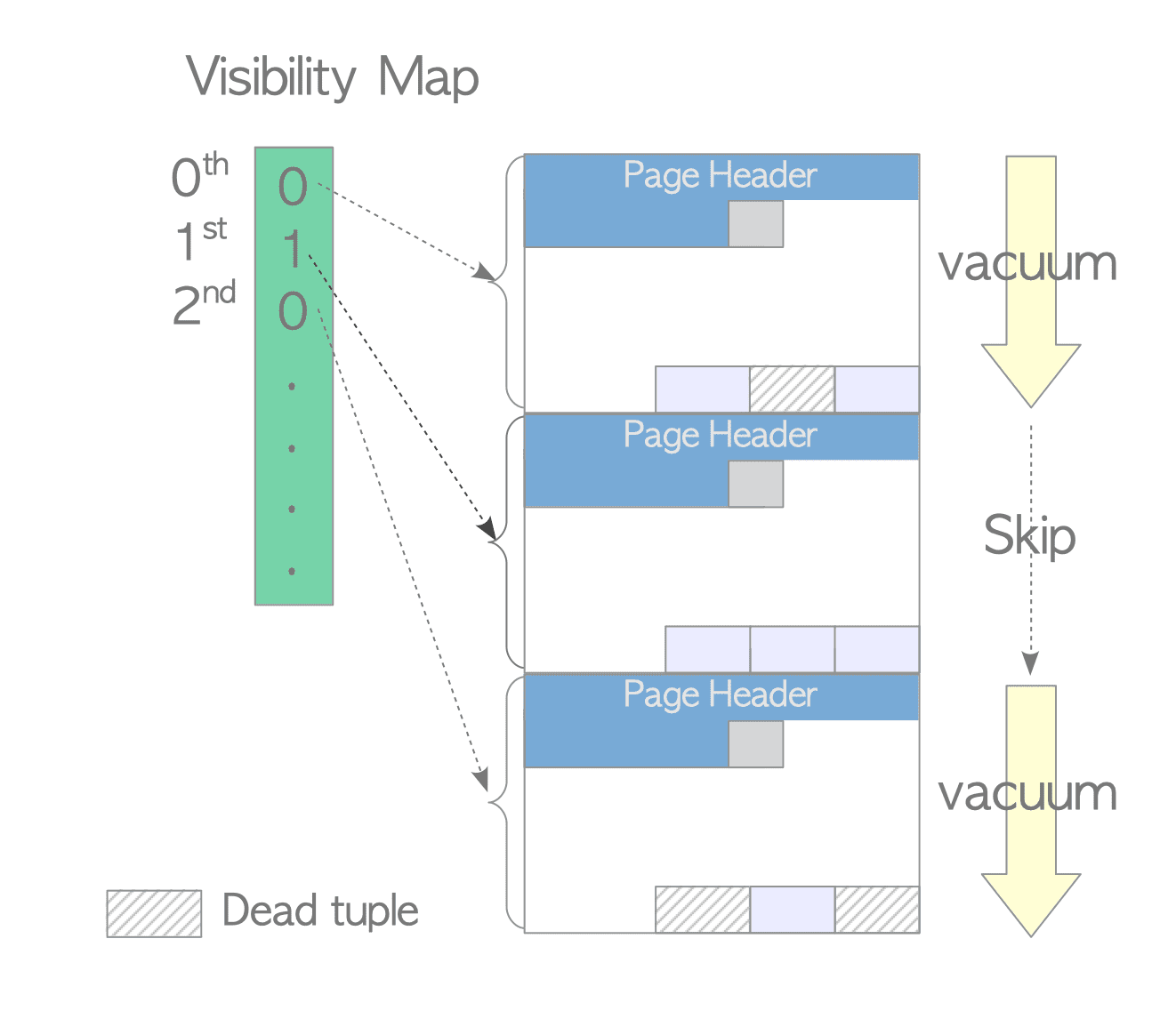
The VM helps vacuum find dead tuples while reducing the number of pages scanned. For example, in the diagram above (interdb ftw!), the first page contains no dead tuples, so vacuum can skip it.
Finding the VM File
Every table has a Visibility Map (VM) file (indexes don’t have VM files), stored alongside the table file. If a table’s filenode is 12345, its VM file is 12345_vm.
First, cd to the data directory:
M=# show data_directory;
    data_directory
----------------------
 /pg/pg6666/data
Find the file storage location using the database OID and table OID:
=# select oid,datname from pg_database where datname='sdp';
-------+----------------------
  oid  |  datname
 17075 | sdp
=# select  oid,relname from pg_class where relname='lzltab1';
-------+----------------------
 17362 | lzltab1
Or:
#  select pg_relation_filepath('lzltab1');
 pg_relation_filepath
----------------------
 base/17075/17362
Find the data file and VM:
$ cd  /pg/pg6666/data/base/17075
$ ll 17362*
-rw------- 1 postgres postgres 86761472 Jun 15 17:43 17362
-rw------- 1 postgres postgres    40960 Jun  9 21:09 17362_fsm
-rw------- 1 postgres postgres     8192 Nov 14  2022 17362_vm
The pg_visibility Extension#
pg_visibility provides page-level visibility information by inspecting VM files, and can detect VM corruption. Since the VM stores “are all tuples on this page visible; are all tuples on this page frozen” information, pg_visibility can identify which pages are all-frozen and which are all-visible.
pg_visibility extension reference: https://www.postgresql.org/docs/current/pgvisibility.html
Useful pg_visibility Functions#
pg_visibility_map_summary(): Shows the count of all-visible and all-frozen pages in the VM.
pg_check_frozen(): Returns rows where a tuple is not frozen but its page is marked all-frozen in the VM. If this function returns results, the VM file is corrupt.
pg_check_visible(): Returns rows where a tuple is not visible but its page is marked all-visible in the VM. If this function returns results, the VM file is corrupt.
pg_truncate_visibility_map(): Clears the VM file. After clearing, the next vacuum on the table will scan all pages and rebuild the VM.
Repairing the VM File#
Check for VM corruption:
M=# select pg_visibility_map_summary('lzltab1');
 pg_visibility_map_summary
---------------------------
 (472,0)
472 all-visible pages, 0 all-frozen pages.
M=# select pg_check_frozen('lzltab1');
 pg_check_frozen
-----------------
(0 rows)
M=#  select pg_check_visible('lzltab1');
 pg_check_visible
------------------
 (6839,1)
 (6839,2)
 ...
  (7296,15)
(1423 rows)
pg_check_visible() returning results means the VM is corrupted.
Now use pg_truncate_visibility_map() to clear the VM:
M=# select   pg_truncate_visibility_map('lzltab1');
 pg_truncate_visibility_map
----------------------------
On disk, you can see the VM was cleared:
   ll 17362*
-rw------- 1 postgres postgres 86761472 Jun 27 10:39 17362
-rw------- 1 postgres postgres    40960 Jun  9 21:09 17362_fsm
-rw------- 1 postgres postgres        0 Jun 27 18:18 17362_vm
Now verify by vacuuming the table to regenerate the VM file and check it’s not corrupted:
M=# vacuum lzltab1;
VACUUM
Time: 3692.402 ms (00:03.692)
M=# \q
$ ll 17362*
-rw------- 1 postgres postgres 86761472 Jun 28 03:37 17362
-rw------- 1 postgres postgres    40960 Jun  9 21:09 17362_fsm
-rw------- 1 postgres postgres     8192 Jun 28 10:21 17362_vm
After manual vacuum, the VM was regenerated correctly:
M=# select pg_check_visible('lzltab1');
 pg_check_visible
------------------
(0 rows)

M=# select pg_check_frozen('lzltab1');
 pg_check_frozen
-----------------
(0 rows)
Both checks return empty — VM file is healthy. Repair complete.
Finally, re-run the SQL:
## delete from lzltab1;
DELETE 229766
DELETE executes normally. Problem resolved.
Checking the Entire Database for VM Corruption#
Although we fixed one corrupted VM file, we should check the entire database for other VM corruption (requires the pg_visibility extension installed):
SELECT oid::regclass AS relname
FROM pg_class
WHERE relkind IN ('r', 'm', 't') AND (
  EXISTS (SELECT * FROM pg_check_visible(oid))
  OR EXISTS (SELECT * FROM pg_check_frozen(oid)));
If results are returned, there’s VM corruption. Use pg_truncate_visibility_map() to clear the VM, then vacuum to regenerate it, as shown above.
For versions before 9.6 (which lack the pg_visibility extension), you’d need to stop the database, manually delete the VM files, restart, then vacuum to regenerate them.
Why Does VM Corruption Happen?#
We traced the issue step by step to VM file corruption, but why did it corrupt?
- PostgreSQL bugs. PG has had some bugs causing VM corruption (see Visibility Map Problems wiki), but these were all before PG 9.6.1.
- Operating system or hardware issues.
Our version was PG13, so the cause can only be broadly attributed to OS or hardware problems.
Why Did SELECT Succeed But DELETE Fail?#
A full-table SELECT working while a full-table DELETE errors out seems bizarre. The root cause is VM file corruption.
As mentioned, the VM file exists to speed up vacuum. Even though we weren’t running vacuum, the VM file still needs to be updated — DML operations always update (or at least check) the VM, while SELECT does not change VM state. So in this case, SELECT executed normally, but DELETE errored during VM processing.
In our case, DELETE scanned the VM and found pages marked all-visible, but the VM was wrong — those pages still contained invisible tuples. This is exactly the attempted to delete invisible tuple error. Invisible tuples may have already been deleted, and trying to delete them again naturally errors out, violating transaction visibility rules.
Additionally, index-only scans also use the VM file, so they would also be affected. However, this case involved a sequential scan, so SELECT was unaffected.
VM Corruption Causing Incorrect Index-Only Scan Results#
As mentioned earlier, besides vacuum, index-only scans also use the VM file. Even though our case didn’t involve index-only scans, let’s dig deeper for completeness.
What Is an Index-Only Scan?#
As the name suggests, an index-only scan accesses only the index structure to get results, without touching the table. Almost all relational databases support index-only scans because B+tree index structures store key values — if the query only needs key values, an index-only scan is possible.
However, PostgreSQL’s transaction implementation differs significantly from other databases (Oracle, MySQL), giving its index-only scans some unique characteristics.
PostgreSQL checks tuple visibility via xmin, xmax, and other information in tuple headers, but indexes don’t contain this information. This means PG’s index-only scans must visit data blocks to check visibility. This is where the VM comes in: since the VM stores all-visible and all-frozen information, pages marked as such don’t need visibility checks — the VM has already confirmed their visibility.
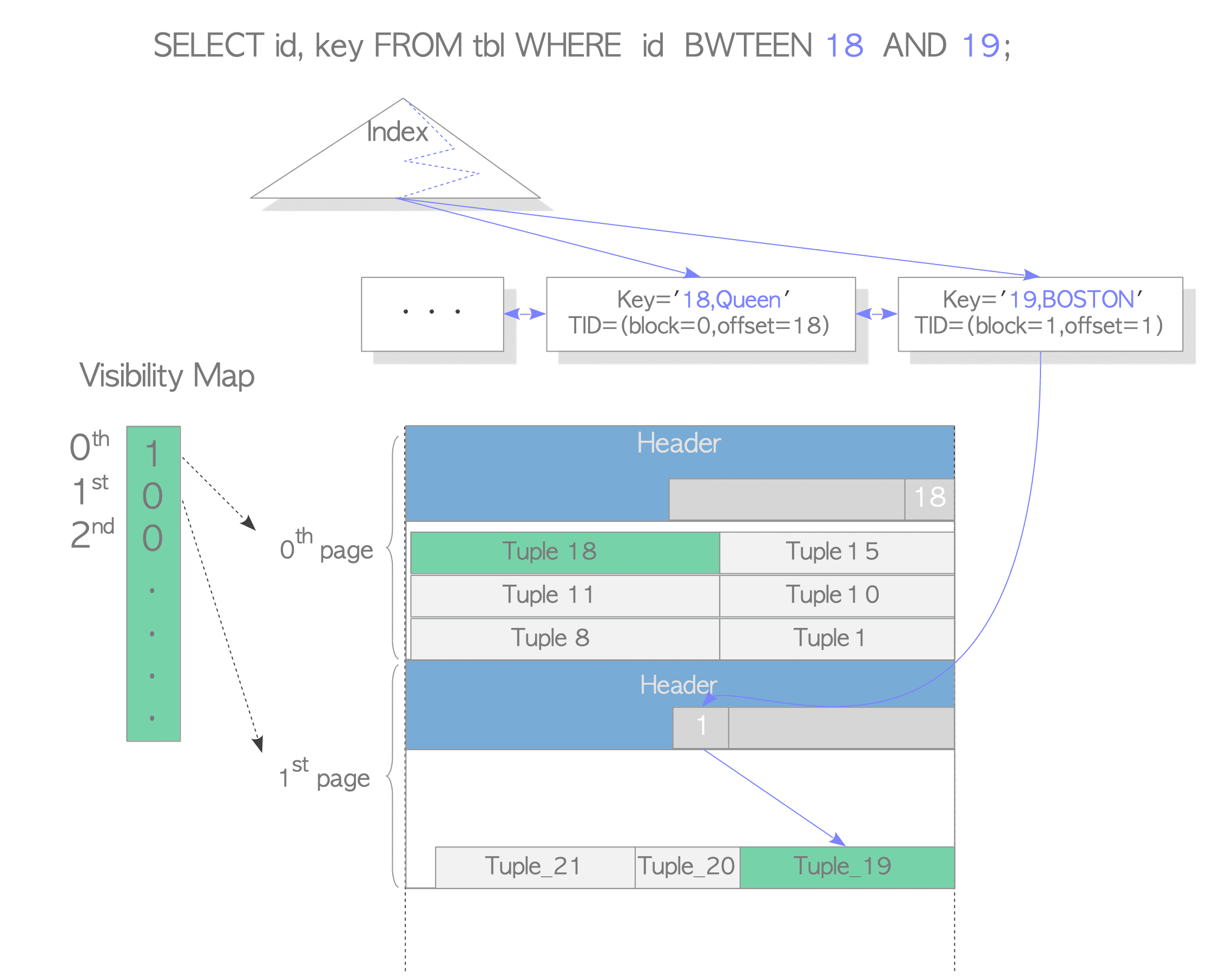
Another interdb diagram (interdb ftw!). When a query looks up tuples with keys 18 and 19: the page containing key=18 is marked all-visible in the VM, so accessing this tuple only requires the index page and VM file. The page containing key=19 is not marked all-visible, so the index-only scan still needs to visit the data page to check visibility.
Index-Only Scan Returning Incorrect Results#
Because index-only scans consult the VM, and a corrupted VM stores wrong information — e.g., a page’s tuples aren’t all visible (some may have been deleted), but the page is still marked all-visible — the index-only scan skips the data page visibility check and directly returns index key values that should be invisible.
You can set enable_indexonlyscan=off to disable index-only scans and guarantee correct results. Or, as shown above, repair the VM file — which is probably the better choice.
Summary#
The journey had some twists: at first glance the error seemed like a transaction visibility rule problem, which would have been serious — but it was actually much simpler.
We traced the attempted to delete invisible tuple error to the source code, identified it as a VM issue, used the pg_visibility extension to detect and fix the VM corruption, resolved the DELETE error, and finally explored the relationship between index-only scans and the VM.
Key takeaways:
- The
pg_visibilityextension can read, check, and clear VM files - Without VM information, vacuum will generate a new VM
- DML reads/updates VM files; SELECT does not (non-index-only-scan)
- The VM file exists to improve vacuum efficiency, and sometimes index-only scan efficiency
- The
attempted to delete invisible tupleerror warrants checking the VM file for corruption - VM file corruption can cause DML failures and incorrect index-only scan results
References#
https://www.postgresql.org/docs/13/pgvisibility.html
https://wiki.postgresql.org/wiki/Visibility_Map_Problems