
A Brief Introduction to HikariCP#
“Hikari” means “light” in Japanese — HikariCP aims to be a Connection Pool as light and fast as light. This nearly Java-only middleware connection pool is extremely lightweight and performance-focused. HikariCP is now the default connection pool for Spring Boot, and with the proliferation of Spring Boot and microservices, HikariCP usage continues to grow.
On the HikariCP GitHub homepage, there’s a performance comparison:
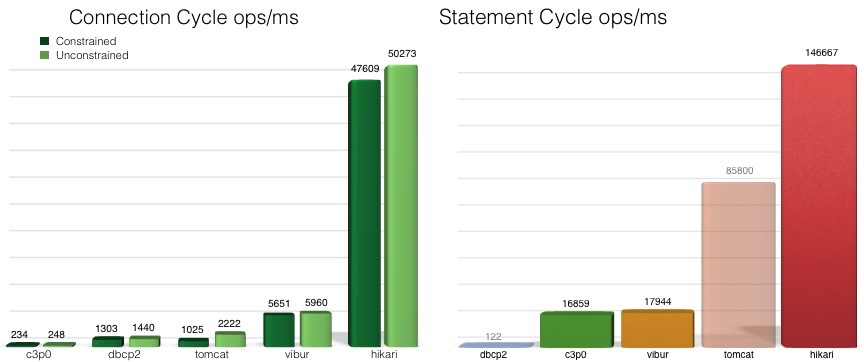 (https://github.com/brettwooldridge/HikariCP-benchmark)
It appears to crush all other database connection pool middleware. However, this performance comparison is somewhat dated and lacks a comparison with Alibaba’s homegrown pinnacle connection pool, Druid. I briefly checked Druid’s GitHub page — it actually has slightly more stars than HikariCP. Druid is clearly stronger in terms of functionality. As for which has better performance, it even sparked a spat between experts, and I haven’t seen any rigorous performance comparison report yet. But that’s not the focus of this article… this article is just to get a basic understanding of HikariCP.
Key Connection Pool Parameters#
There aren’t that many parameters. Let’s pick the important ones:
| Parameter | Meaning |
|---|---|
| minimumIdle | This property controls the minimum number of idle connections HikariCP tries to maintain in the pool. If the number of idle connections drops below this value and the total number of connections in the pool is less than maximumPoolSize, HikariCP will do its best to quickly and efficiently add additional connections. However, for maximum performance and responsiveness to peak demand, we recommend not setting this value and instead letting HikariCP act as a fixed-size connection pool. Default: same as maximumPoolSize. |
| maximumPoolSize | This property controls the maximum size the pool can reach, including both idle and in-use connections. Basically, this value determines the upper limit of actual connections to the database backend. A reasonable value is best determined by your execution environment. When the pool reaches this size and no idle connections are available, calls to getConnection() will block until timeout after connectionTimeout milliseconds. Default: 10 |
| maxLifetime | This property controls the maximum lifetime of connections in the pool. A connection in use will never be retired — it is only removed when closed. To avoid mass connection eviction in the pool, this property applies a slight negative attenuation to each connection. We strongly recommend setting this value, and it should be a few seconds shorter than any database or infrastructure-imposed connection time limit. A value of 0 means no maximum lifetime (infinite lifetime), subject to idleTimeout constraints. Minimum allowed: 30000ms (30 seconds). Default: 1800000 (30 minutes). |
| idleTimeout | This property controls the maximum time a connection is allowed to sit idle in the pool. This setting only applies when minimumIdle is defined as less than maximumPoolSize. Once the pool reaches minimumIdle connections, idle connections are not retired. Whether a connection is considered idle and retired has a maximum variation of +30 seconds, with an average variation of +15 seconds. A connection is never considered idle and retired before this timeout. A value of 0 means idle connections are never removed from the pool. Minimum allowed: 10000ms (10 seconds). Default: 600000 (10 minutes). |
| keepaliveTime | This property controls how frequently HikariCP will attempt to keep a connection alive to prevent it from timing out due to database or network infrastructure. This value must be less than maxLifetime. The “keepalive” operation only occurs on idle connections. Minimum allowed: 30000ms (30 seconds), but the ideal value is in the range of a few minutes. Default: 0 (disabled). |
The keepaliveTime parameter should be set lower than the database idle connection timeout, TCP idle connection timeout, and all other infrastructure idle timeouts. For PostgreSQL, HikariCP’s keepaliveTime should be set to less than PG’s idle_in_transaction_session_timeout.
Clearly, maximumPoolSize represents the maximum number of connections to the database. Of course, in general, the actual number of connections in the database won’t always stay at maximumPoolSize because the application can’t run at peak load from start to finish. Even after a request peak passes, those idle connections should be released after some time according to idleTimeout or maxLifetime settings. To ensure database availability, this value should be set somewhat lower than the database’s maximum connections. For PostgreSQL, maximumPoolSize should be set to less than PG’s max_connections. There’s room for tuning this parameter, which we’ll discuss below.
minimumIdle is the minimum number of idle connections. For example, if minimumIdle=100 and the database has 10 active sessions, theoretically the total connections in the database should be 100+10. Due to possible connection storms, the actual database connections might be slightly more than active+minimumIdle, but certainly less than maximumPoolSize.
Why are database connections far greater than minimumIdle?
Theoretically, total database connections should only be slightly more than minimumIdle. However, from my actual observation of multi-node connection pool scenarios, even with only 10+ active connections, total database connections far exceed minimumIdle. Observing min(backend_start) and min(state_change) in pg_stat_activity, they stay around maxLifetime, indicating that connection recycling is working. It seems new requests always prefer to establish new connections rather than reuse existing idle ones. Personally, I suspect multi-node deployment is one reason — each node has a low minimumIdle, and some component nodes may have more requests, with instantaneous request counts exceeding minimumIdle, thus creating new connections. Second, it’s related to the maxLifetime parameter — maxLifetime’s purpose is to rotate connections, releasing those constantly in use. This means used connections need time to be released and ideally shouldn’t be reused to avoid extending the release cycle.
Connection Pool Sizing#
Impact of Excessive Connections#
In the database world, “as the number of database connections increases, database performance always degrades to some extent.”
For example, Oracle’s connection count impact on performance — refer to this video. With unchanged resource configuration and JDBC concurrency, reducing connections from 2048 to 1024 halved the request response time; reducing to 96 connections dropped response time by tens of times!
What’s the Right Number of Connections?#
Unless you have a database server that has 1000 cores, it is very unlikely that you really want a maximumPoolSize of 2000.
Unless your database has 1000 cores, you shouldn’t have 2000 connections.
At the most basic level, the database connection count should be set to the number of CPU cores — this achieves maximum CPU performance mode. But this isn’t the full picture. Database consumption isn’t just on CPU, but also on disk and network (memory too, but with relatively less impact). For example, disk reads/writes also take time, and the CPU must wait for disk data to return before proceeding. During I/O wait periods (which can be quite long), it’s better for the CPU not to be idle but to serve other processes. Therefore, based on waiting times for disk and other devices, the database connection count should ideally be higher than the number of CPU cores.
Due to SSD and other disk performance improvements, disk access is now very fast — meaning I/O wait times have decreased, implying connection counts should be tuned even lower.
Tuning too low fails to fully utilize CPU; tuning too high degrades database performance. So what’s the right number? HikariCP provides this formula:
connections = ((core_count * 2) + effective_spindle_count)
Where core_count should not count hyperthreading; effective_spindle_count is the spindle count — if the active dataset is fully cached, effective_spindle_count is zero; as cache hit rate decreases, it should approach the actual spindle count. There’s no established formula for SSDs yet, but it’s certainly less than the above maximum. Of course, these are all theoretical values — real-world situations are more complex, e.g., long connection issues. See About Pool Sizing for details.
Even with 10,000 frontend users, the connection pool cannot be 10,000 — even 1,000 is too many. A smaller connection count, with remaining requests waiting in the pool queue, is the best way to maximize database and CPU performance. See the formula above for connection count settings.
Fixed Pool#
Fixed pool is a concept advocated by HikariCP’s author Brett Wooldridge to solve the connection storm problem. The concept is already mentioned in the minimumIdle parameter description:
For maximum performance and responsiveness to peak demand, we recommend not setting minimumIdle and instead letting HikariCP act as a fixed-size connection pool. Default: same as maximumPoolSize.
Setting minimumIdle=maximumPoolSize creates a fixed-size connection pool. minimumIdle’s default value equals maximumPoolSize.
As early as 2014, Brett Wooldridge mentioned this concept — see the PG community mailing list. This passage is important, so I’ll translate it verbatim:
In my experience, even pools that maintain a minimum number of idle connections are problematic in responding to burst demand. If you have a pool with a maximum of 30 connections and a target of 10 minimum idle connections, a burst demand requiring 20 connections means the pool can immediately satisfy 10, but then must try to establish another 10 connections before the application’s connection request reaches connectionTimeout. This in turn creates burst demand on the database, slowing down not just connection establishment itself but also transactions that might actually be returning connections to the pool.
Now, if your peak is 100 connections and your median is 50, this doesn’t matter. But I know many workloads where the peak is 1000 and the median is 25 — in such cases you’d want to gradually reduce idle connections.
Ultimately, we adopted a maxPoolSize + minIdle model, where by default they are equal (fixed pool).
While I don’t doubt that such workloads (1000 active connections) exist, if someone is actually doing this, I’d love to hear their reasoning. Unless they have over 128 CPU cores and solid-state storage, they’re basically wasting effort.
This also means that even if the pool size is fixed, you want to rotate actual sessions in and out so they don’t hang onto maximum virtual memory indefinitely.
We do this with a maxLifeTime setting to rotate these connections.
In real scenarios, fixed pool’s protection against connection storm impact is visible. Under fixed pool, when the database’s instantaneous active connections spike, the idle connection count drops but the total connection count remains unchanged, and request response time is minimally affected. If maximumPoolSize is set to a value higher than minimumIdle, a connection storm can cause many new sessions to be created instantly, and new session creation is very resource-intensive — this significantly increases request response time.
Connection Leak Case Study#
Since I’m not a connection pool expert, I’ll just summarize some recently found connection leak information here.
Connection leaks exhibit the following symptoms:
- “Connection is not available” exception. Connection leaks, pool saturation, or the database being overwhelmed by excessive active sessions — new requests error out after exceeding
connectionTimeout. - Growth of active connections. Database monitoring clearly shows an increase in active sessions.
- Application logs. Application logs also show many connection requests, including active session information.
- Database views and logs.
pg_stat_activityshows all session states and specific SQL, and logs show new connection authentication information. - HikariCP leak detection. Requires enabling
leakDetectionThreshold. HikariCP can detect connection leaks — this parameter is off by default.
For locating connection leaks, you should:
- Check application logs, especially around the time the problem first occurred.
- Have a proper monitoring system.
- Be proficient with debug, trace, and other HikariCP settings.
- Set the
leakDetectionThresholdparameter.
Possible causes:
- Misuse of streaming responses;
- Misuse of raw connections;
- Prolonged operations within
@Transactionalmethod (such as network invocation). - Configuration errors, reference
- Virtual threads, reference
References#
https://github.com/brettwooldridge/HikariCP
https://github.com/brettwooldridge/HikariCP/issues/2148
https://github.com/brettwooldridge/HikariCP/wiki/About-Pool-Sizing
https://blogs.oracle.com/opal/post/always-use-connection-pools
https://mkyong.com/jdbc/hikaripool-1-connection-is-not-available-request-timed-out-after-30002ms/
https://medium.com/@eremeykin/how-to-deal-with-hikaricp-connection-leaks-part-1-1eddc135b464
https://medium.com/@eremeykin/how-to-deal-with-hikaricp-connection-leaks-part-2-847a9629627f