
FDW Basic Concepts#
What is SQL/MED?#
SQL/MED aims to unify access methods for heterogeneous data sources. In 2003, SQL/MED was added to the ISO/IEC 9075-9 standard, defined as a SQL standard extension for managing external data via foreign-data wrappers (FDW) or datalink (such as Oracle or PG’s dblink). In short, SQL/MED is an international SQL extension standard. Many databases already support SQL/MED, such as DB2, MariaDB, PG, and more.
Without SQL/MED, applications must access required data sources themselves and process data at the application layer:
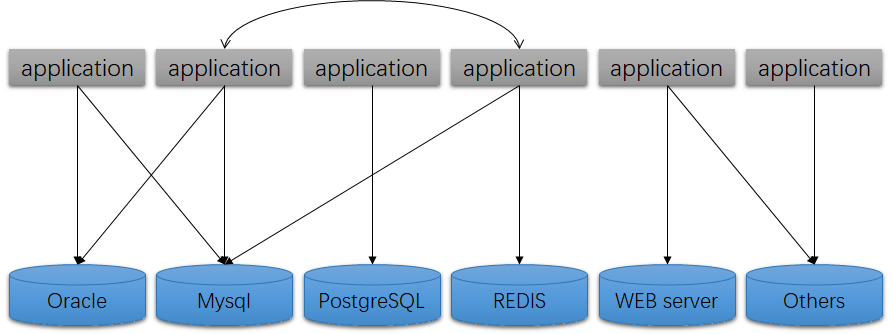
With SQL/MED, the data access architecture becomes clearer:
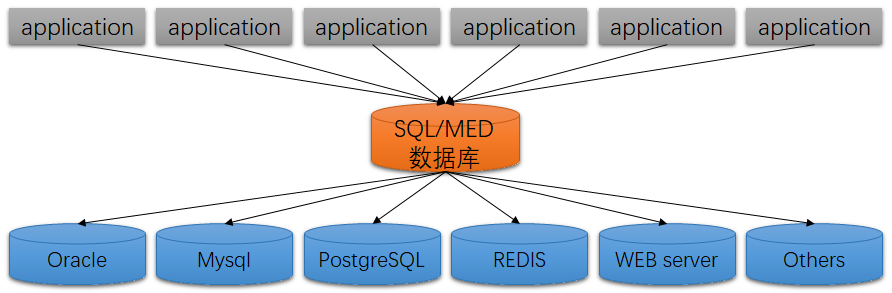
However, while this architecture diagram appears simpler, it increases the database’s IO and computation pressure. This goes against the modern trend of decoupling computation from the database to the application layer.
Of course, both approaches have their pros and cons, and SQL/MED is still used in certain scenarios.
SQL/MED exists as a standard, and PostgreSQL supports the SQL/MED standard excellently through FDW.
What is FDW?#
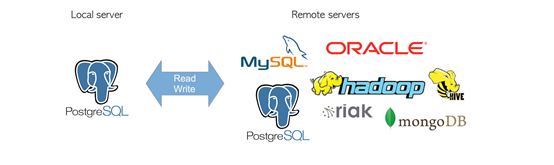
PostgreSQL has supported FDW since version 9.1. Users can access external data (foreign data) through regular SQL statements. Foreign data is accessed via a foreign data wrapper (FDW). The FDW in PostgreSQL is itself a library — because different external data sources correspond to different FDW extensions, we often call it an FDW plugin.
PG’s FDW functionality is extremely powerful: it not only supports multiple data sources but also optimizes data access, and can even be used for “beyond expectations” purposes, such as implementing cluster functionality.
Installation and Download#
Basically every type of database and data format has its own FDW plugin: oracle_fdw for Oracle databases, mysql_fdw for MySQL databases, and so on. FDW plugins can be installed directly or downloaded:
- FDWs already included as extensions: file_fdw, postgres_fdw, cstore_fdw
- Other FDW plugins can be downloaded from PGXN or the wiki, such as: oracle_fdw, mysql_fdw, json_fdw. Be sure to read the README carefully to understand each FDW’s limitations and usage rules.
- FDW plugin download: https://pgxn.org/tag/fdw/
- More FDWs (mostly beta): https://wiki.postgresql.org/wiki/Foreign_data_wrappers
- Write your own FDW: https://www.postgresql.org/docs/current/fdwhandler.html
Advantages of FDW over dblink in PG#
PG also has dblink. FDW and dblink are functionally similar — both access external tables. But FDW has more advantages:
- FDW supports many more data sources (a LOT more). dblink only supports PostgreSQL databases, equivalent to just one FDW plugin — postgres_fdw (which is actually much more powerful).
- Transparent to developers. External tables can be accessed just like regular tables.
- More compliant with standard SQL syntax.
- Better performance in many scenarios.
The functionality provided by this module overlaps substantially with the functionality of the older dblink module. But
postgres_fdwprovides more transparent and standards-compliant syntax for accessing remote tables, and can give better performance in many cases.
In summary, FDW is stronger than the dblink plugin — you can basically forget about dblink.
FDW’s Four Objects#
Different FDWs have different usage patterns, but generally all require creating 4 objects: foreign data wrapper, server, user mapping, foreign table. Some objects are not mandatory — for example, file_fdw doesn’t need a user mapping, while relational database FDWs generally require one.
foreign data wrapper#
After creating the corresponding FDW extension with CREATE EXTENSION, the foreign data wrapper is automatically created.
For example, creating a file_fdw extension:
=# create extension file_fdw;
CREATE EXTENSION

=# \dx
        Name        | Version |   Schema   |                              Description
--------------------+---------+------------+------------------------------------------------------------------------
 file_fdw           | 1.0     | public     | foreign-data wrapper for flat file access

##  select * from information_schema.foreign_data_wrappers;
 foreign_data_wrapper_catalog | foreign_data_wrapper_name | authorization_identifier | library_name | foreign_data_wrapper_language
------------------------------+---------------------------+--------------------------+--------------+-------------------------------
 postgres                     | file_fdw                  | postgres                 | [null]       | c
You can also create a foreign data wrapper manually without using an extension. See CREATE FOREIGN DATA WRAPPER.
server#
CREATE SERVER creates an external service, essentially specifying the data source. The OPTIONS syntax varies by foreign-data wrapper — for example, the OPTION syntax for file_fdw and postgres_fdw is definitely different. At this point, you need to read the FDW plugin’s README or official documentation. For example:
Create a file_fdw external service named fileserver:
CREATE SERVER fileserver FOREIGN DATA WRAPPER file_fdw;Create a postgres_fdw external service named pgserver, pointing to the lzldb database on a PG instance at 172.0.0.1:5432:
CREATE SERVER pgserver FOREIGN DATA WRAPPER postgres_fdw OPTIONS (host '172.0.0.1', dbname 'lzldb', port '5432');View servers:
=#  select * from information_schema.foreign_servers;
 foreign_server_catalog | foreign_server_name | foreign_data_wrapper_catalog | foreign_data_wrapper_name | foreign_server_type | foreign_server_version | authorization_identifier
------------------------+---------------------+------------------------------+---------------------------+---------------------+------------------------+--------------------------
 postgres               | pgserver            | postgres                     | postgres_fdw              | [null]              | [null]                 | postgres
 postgres               | fileserver          | postgres                     | file_fdw                  | [null]              | [null]                 | postgres
user mapping#
User mapping defines the correspondence between external service users and local users. Therefore, relational database FDWs generally have user mappings, while file-type FDWs without user definitions don’t need them.
For example, create a user mapping using the pgserver from above:
CREATE USER MAPPING FOR localuser SERVER pgserver OPTIONS (user 'remoteuser', password 'mypasswd');View user mappings:
=# select * from information_schema.user_mappings;
 authorization_identifier | foreign_server_catalog | foreign_server_name
--------------------------+------------------------+---------------------
 localuser                  | lzldb                    | pgserver
foreign table#
Foreign tables map remote tables locally, allowing them to be accessed like regular tables. Since local objects are involved and there are many OPTIONS, the full syntax is somewhat complex. See CREATE FOREIGN TABLE. Simply put, you create a locally corresponding remote table.
Two common ways to create foreign tables: creation and import.
Create a foreign table:
CREATE FOREIGN TABLE localtable (
    id        char(5) NOT NULL,
    name       varchar(40) NOT NULL
)
SERVER pgserver OPTIONS (table_name 'remotetable');
Creating foreign tables one by one is tedious — you can import all tables from a remote schema at once:
IMPORT FOREIGN SCHEMA remoteschema FROM SERVER pgserver INTO localschema;View foreign tables:
 information_schema.foreign_tables; -- Intuitive view of foreign tables
 pg_foreign_server;  -- Less intuitive, but shows OPTION settings
Using FDW#
Viewing Foreign Table Information#
psql’s built-in shortcuts are quite clear for viewing the 4 objects of foreign tables, but pay attention to search_path settings:
| psql command | Meaning |
|---|---|
| \des | list foreign servers |
| \deu | list user mappings |
| \det | list foreign tables |
| \dtE | list both local and foreign tables |
Foreign table object views/tables can be messy — here’s a quick organization:
| foreign data wrapper tables/views | Meaning |
|---|---|
| information_schema._pg_foreign_data_wrappers | More complete information |
| information_schema.foreign_data_wrappers | Less information |
| information_schema.foreign_data_wrapper_options | Targeted query of foreign data wrapper options |
| pg_foreign_data_wrapper | Slightly less info, but has permission info that other views lack |
| foreign server tables/views | Meaning |
|---|---|
| information_schema._pg_foreign_servers | More complete information |
| information_schema.foreign_servers | Less information |
| information_schema.foreign_server_options | Targeted option query — one record per option, not per server |
| pg_foreign_server | Less information, base table |
| user mapping tables/views | Meaning |
|---|---|
| information_schema._pg_user_mappings | Fairly complete user mapping information |
| information_schema.user_mappings | Less information |
| information_schema.user_mapping_options | Targeted query of UM options |
| pg_user_mappings | Slightly less than _pg_user_mappings. Viewable by unprivileged users — passwords show as null |
| pg_user_mapping | Less information, base table, mainly options. Inaccessible to unprivileged users |
| foreign table tables/views | Meaning |
|---|---|
| information_schema._pg_foreign_tables | More complete, shows all foreign tables |
| information_schema._pg_foreign_table_columns | Shows column-to-column mappings |
| information_schema.foreign_table_options | Targeted display of foreign table options |
| foreign_tables | Less information, base table |
These views/tables look messy but actually have a clear structure. The 4 object types all follow the same data dictionary pattern:
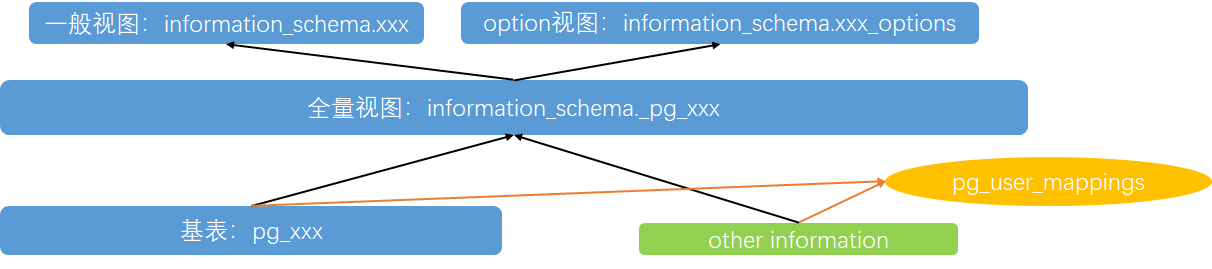
- pg_xxx are base tables, the foundational information source for the 4 objects
- information_schema._pg_xxx joins pg_xxx base tables with other info — it’s a summary view with comprehensive information
- information_schema.xxx is a view on information_schema._pg_xxx, with less information
- information_schema.xxx_options provides targeted option information, sourced only from the full view information_schema._pg_xxx
- A special view: pg_user_mappings, usable even by unprivileged users
Permission Considerations#
If you use the postgres superuser throughout to create foreign tables, you’ll rarely encounter issues. But in production, application users are typically not superusers. Therefore, permissions are extremely important — not only important but also quite troublesome. Using a regular user for testing is crucial (as with any testing). PG’s permission system is like a boss battle — missing any link won’t work.
Key permission points:
- Foreign data wrapper, server, and user mapping owners are their creators. Users must be granted USAGE privilege or be the owner themselves to use them.
- Accessing remote data sources requires users with appropriate permissions — specified in the user mapping step with suitable remote login credentials.
- After creating/importing foreign tables locally, these objects are treated as local objects (only the data dictionary is local). So PG’s local object access permission system must also be properly configured.
FDW Usage Examples#
There are hundreds of FDW implementations for various data sources worldwide — relational databases, NoSQL databases, various file types, Web Services, columnar storage, big data, and more. Here are a few common FDWs.
Using postgres_fdw#
This is probably the most commonly used and most powerful FDW. It allows accessing external PostgreSQL databases from a local database. It can also be used for self-access — this is important because: PostgreSQL cannot access across databases internally! To solve this problem, a good approach is using FDW for cross-database access within the same instance — accessing yourself through an external connection.
Here’s an example of cross-database access using postgres_fdw:
An instance has two databases: aka and bkb. You can’t query both databases in a single SQL statement — databases in PG are logically isolated, somewhat like Oracle 12c PDBs.
[lzl@postgres]=# \l
 aka       | postgres | UTF8     | en_US.UTF-8 | en_US.UTF-8 | =Tc/postgres         +
           |          |          |             |             | postgres=CTc/postgres
 bkb       | postgres | UTF8     | en_US.UTF-8 | en_US.UTF-8 | =Tc/postgres         +
           |          |          |             |             | postgres=CTc/postgres
Although both databases are local, when using FDW we still need the local/remote database concept. Here we treat aka as the local database and bkb as the remote database, enabling access to bkb’s tables from aka while handling permission issues.
1. Install FDW plugin
\c aka
create extension postgres_fdw;
Note: Extensions are database-level — switch to the local database first.
2. Grant user permissions
grant usage on foreign data wrapper postgres_fdw to akadata;3. Create server
\c aka akadata
CREATE SERVER bkb_server FOREIGN DATA WRAPPER postgres_fdw OPTIONS (host '127.0.0.1', port '5432', dbname 'bkb');
4. Create user mapping
CREATE USER MAPPING FOR akadata SERVER bkb_server OPTIONS (user 'bkbdata', password 'bkbpasswd');5. Create schema in aka database, grant to akadata user
\c aka postgres
create schema bkb;
grant usage on schema bkb TO akadata;
--GRANT select ON ALL TABLES IN SCHEMA bkb TO akadata;
grant all privileges on schema bkb TO akadata;
6. Import bkb tables
\c aka akadataImport entire schema:
IMPORT FOREIGN SCHEMA public FROM SERVER bkb_server INTO bkb;Import a single table:
IMPORT FOREIGN SCHEMA public LIMIT TO (tab1) FROM SERVER bkb_server INTO bkb7. View foreign tables
=# select * from information_schema.foreign_tables;
 foreign_table_catalog | foreign_table_schema |         foreign_table_name          | foreign_server_catalog | foreign_server_name
-----------------------+----------------------+-------------------------------------+------------------------+---------------------
 aka                   | bkb                  | tab1                                | aka                    | bkb_server
Using file_fdw#
The file_fdw extension provides PG with read-only access to external files. file_fdw is already in contrib and can be installed with CREATE EXTENSION. External files must conform to COPY rules.
Here’s a classic example of mapping PG output logs to a foreign table, script from the official documentation:
1. Create file_fdw extension
CREATE EXTENSION file_fdw;2. Create external server
CREATE SERVER fileserver FOREIGN DATA WRAPPER file_fdw;3. Create foreign table
CREATE FOREIGN TABLE pglog (
  log_time timestamp(3) with time zone,
  user_name text,
  database_name text,
  process_id integer,
  connection_from text,
  session_id text,
  session_line_num bigint,
  command_tag text,
  session_start_time timestamp with time zone,
  virtual_transaction_id text,
  transaction_id bigint,
  error_severity text,
  sql_state_code text,
  message text,
  detail text,
  hint text,
  internal_query text,
  internal_query_pos integer,
  context text,
  query text,
  query_pos integer,
  location text,
  application_name text
) SERVER fileserver
OPTIONS ( filename 'pg_log/postgresql-07-06.csv', format 'csv' );
4. Query the log table
=#  select user_name,database_name,process_id,error_severity,message from pglog where error_severity<>'LOG';
 user_name | database_name | process_id | error_severity |                    message
-----------+---------------+------------+----------------+-----------------------------------------------
 appuser1  | db1           |     102349 | ERROR          | value too long for type character varying(20)
 appuser1  | db1           |      55378 | ERROR          | value too long for type character varying(20)
 appuser2  | db2           |     219377 | ERROR          | relation "dual" does not exist
Deep Dive into postgres_fdw#
postgres_fdw Performance Optimization#
Unlike most FDW plugins, postgres_fdw is an official plugin maintained by the PostgreSQL Global Development Group, with its source code in contrib. Because external services differ in functionality and structure, some features — such as obtaining remote database access costs or aggregate pushdown in certain scenarios — are difficult to implement in other FDWs. But in postgres_fdw they’re achievable. The official team has done extensive optimization for postgres_fdw, making it extremely powerful.
SQL Execution Process#
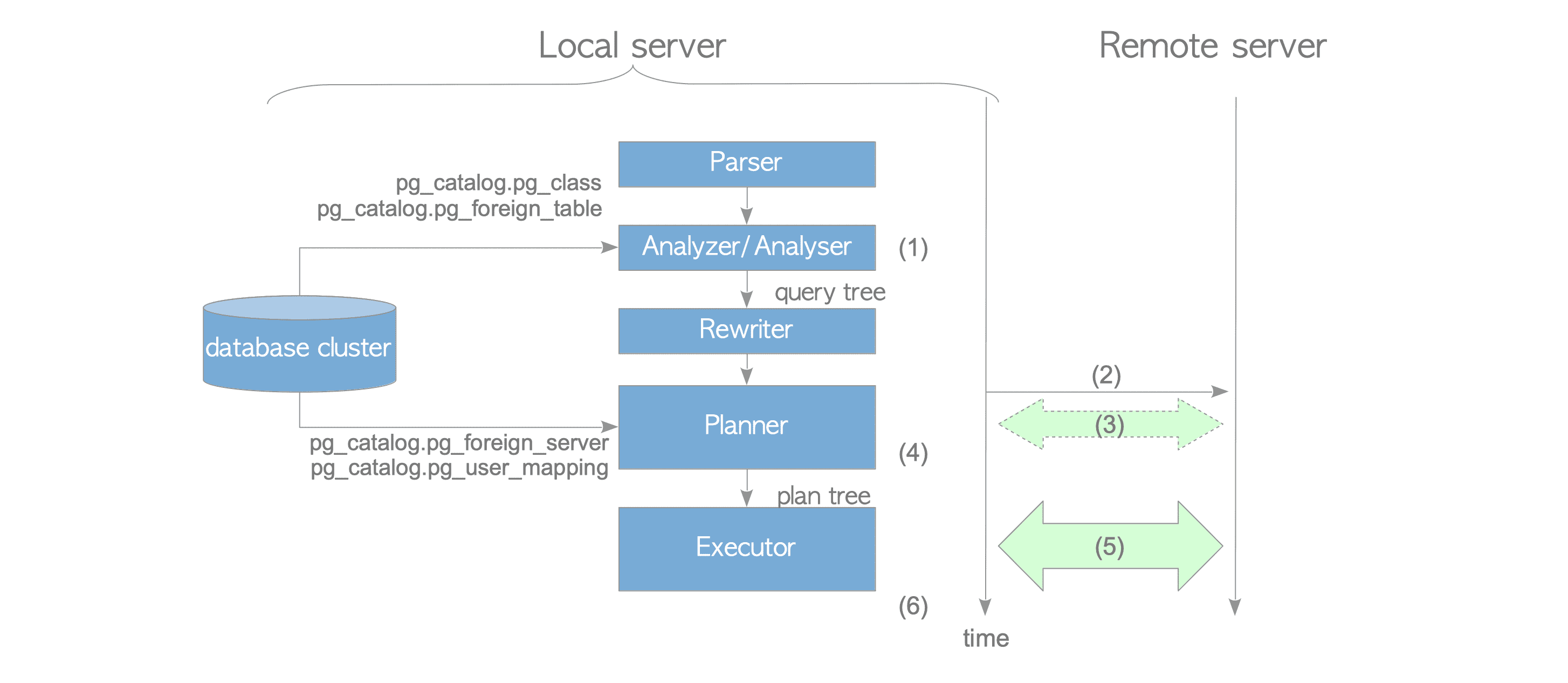
- The parser generates a query tree from the foreign table definition.
- The planner connects to the foreign server.
- Obtain cost information. If
use_remote_estimateis true (default), the planner executes EXPLAIN on the remote database to get access costs (step 3); if false, it calculates locally instead. - Deparse generates remote SQL text. FDW accesses remote database objects by sending SQL text — the planner generates SQL text for remote execution. The
Remote SQLpart of the execution plan directly shows the deparsed SQL:
=>   explain (verbose) select a from  bkb.tab1 where a=1;
                           QUERY PLAN
-----------------------------------------------------------------
 Foreign Scan on bkb.tab1  (cost=100.00..146.86 rows=15 width=4)
   Output: a
Remote SQL: SELECT a FROM public.tab1 WHERE ((a = 1))- Send SQL statement and receive data. The remote database executes the SQL independently and returns results to the local database based on fetch_size (default 100 rows).
Cost Estimation#
postgres_fdw can pass remote database object access costs to the local database for calculating the overall SQL execution plan cost. However, simply returning the remote estimated cost isn’t enough — the cost of remote access itself must also be considered. postgres_fdw provides 3 OPTIONS to adjust foreign table cost estimation:
use_remote_estimate: When set to true, the planner runs EXPLAIN on the remote database to get estimated costs, adding fdw_startup_cost and fdw_tuple_cost. When false (default), the planner calculates locally and adds fdw_startup_cost and fdw_tuple_cost. Local foreign table statistics may differ from actual values.
fdw_startup_cost: Startup cost for foreign tables, default 100. Represents the cost of establishing a connection, parsing, and generating a plan on the external service.
fdw_tuple_cost: Additional cost per tuple scanned from a foreign table, default 0.01. Represents data transfer cost — higher latency should mean higher settings.
Aggregate Pushdown#
Aggregate pushdown executes computations on the remote database, with the local database directly receiving the remote execution results. Without aggregate pushdown, all data must be returned to the local database for computation, increasing data transfer’s impact on SQL execution efficiency and the local database’s computational burden.
(In this environment, bkb. are all foreign tables, local tables are public.)
Predicate Pushdown: postgres_fdw supports WHERE pushdown — no need to return all data to the local database.
=> explain (verbose,costs off) select f1.a  from bkb.tab1 f1 where f1.a=1;
                       QUERY PLAN
---------------------------------------------------------
 Foreign Scan on bkb.tab1 f1
   Output: a
   Remote SQL: SELECT a FROM public.tab1 WHERE ((a = 1))
Sort Pushdown: postgres_fdw supports sort pushdown, sending sorts to the remote database.
=>  explain (verbose,costs off) select f1.a  from bkb.tab1 f1 order by 1 desc nulls first;
                             QUERY PLAN
---------------------------------------------------------------------
 Foreign Scan on bkb.tab1 f1
   Output: a
   Remote SQL: SELECT a FROM public.tab1 ORDER BY a DESC NULLS FIRST
Join Pushdown: Some joins cannot be pushed down, like local table JOIN foreign table — only the foreign table results can be brought locally for joining.
=>  explain (verbose,costs off) select f1.a,l2.a from bkb.tab1 f1,tab1 l2 where f1.a=l2.a;
                     QUERY PLAN
-----------------------------------------------------
 Hash Join
   Output: f1.a, l2.a
   Hash Cond: (l2.a = f1.a)
   ->  Seq Scan on public.tab1 l2
         Output: l2.a, l2.b
   ->  Hash
         Output: f1.a
         ->  Foreign Scan on bkb.tab1 f1
               Output: f1.a
               Remote SQL: SELECT a FROM public.tab1
When both tables are foreign tables, joins can be pushed down to the remote database:
=> explain (verbose,costs off) select f1.a,f1.b from bkb.tab1 f1 left join bkb.tab2 f2 on f1.a=f2.a;
                                             QUERY PLAN
-----------------------------------------------------------------------------------------------------
 Foreign Scan
   Output: f1.a, f1.b
   Relations: (bkb.tab1 f1) LEFT JOIN (bkb.tab2 f2)
   Remote SQL: SELECT r1.a, r1.b FROM (public.tab1 r1 LEFT JOIN public.tab2 r2 ON (((r1.a = r2.a))))
Aggregate Function Pushdown: Supports pushing down aggregate functions — functions must be IMMUTABLE.
=> explain (verbose,costs off) select b,count(*),avg(a) from bkb.tab1  group by b;
                                 QUERY PLAN
----------------------------------------------------------------------------
 GroupAggregate
   Output: b, count(*), avg(a)
   Group Key: tab1.b
   ->  Foreign Scan on bkb.tab1
         Output: a, b
         Remote SQL: SELECT a, b FROM public.tab1 ORDER BY b ASC NULLS LAST
Some scenarios aren’t supported, such as HAVING clauses that can only filter locally:
=> explain (verbose,costs off) select b,count(*) from bkb.tab1  group by b having count(*)>=2;
                               QUERY PLAN
-------------------------------------------------------------------------
 GroupAggregate
   Output: b, count(*)
   Group Key: tab1.b
   Filter: (count(*) >= 2)
   ->  Foreign Scan on bkb.tab1
         Output: a, b
         Remote SQL: SELECT b FROM public.tab1 ORDER BY b ASC NULLS LAST
Other Features#
Remote Execution OPTION Settings#
extensions: User-specified FDW extensions that can use “remote computation”. Can only be set at the server level.
fetch_size: Number of rows fetched per batch from the remote database, default 100. Can be set at server or table level.
updatable: By default, postgres_fdw foreign tables are updatable. The updatable option can control this. If a foreign table is inherently non-updatable, setting updatable to false at the table level causes errors directly locally.
truncatable: Starting from PG14, postgres_fdw supports truncating foreign tables, controlled by the truncatable option, defaulting to true.
Connection Management#
On the first foreign table access in a session, a connection to the remote database is established. As long as the local session hasn’t disconnected, this connection is reused. If multiple user mappings are used, a connection is established for each user mapping.
Starting from PG14, the keep_connections option controls this behavior. Defaults to on, meaning the session can reuse this connection later; when off, the connection is closed at transaction end.
PG14+: postgres_fdw_get_connections() can view connection status.
Transaction Management#
Important FDW transaction characteristics:
- The remote database executes SQL based on the text sent by the local database.
- When the local database has SERIALIZABLE isolation level, the remote also uses SERIALIZABLE; otherwise, the remote uses REPEATABLE READ.
- When the local transaction commits or rolls back, the remote transaction also commits or rolls back.
- FDW does not support 2PC transactions.
Without distributed 2PC transaction support, partial commits may occur. For example, even if a remote update fails, the local update can still complete:
=> select * from tab1;
 a |  b
---+-----
 1 | abc
=> begin;
BEGIN
=> update tab1 set b='123' ;
UPDATE 6
=> update bkb.tab1 set b='a' where c=1;
ERROR:  42703: column "c" does not exist
LINE 1: update  bkb.tab1 set b='a' where c=1;
=> commit;
COMMIT
=> select * from tab1;
 a |  b
---+-----
 1 | 123
No Distributed Lock Management#
FDW has no distributed lock management, hence no distributed deadlock detection mechanism.
Deadlock detection works for local tables but not for foreign tables.
Asynchronous Execution#
Starting from PG14, postgres_fdw supports asynchronous execution. When there are multiple Append nodes in the execution plan, they can execute in parallel, improving performance when accessing multiple foreign tables.
Asynchronous execution only occurs with multiple sessions — i.e., multiple user mappings. The async_capable option controls this, defaulting to false. The enable_async_append parameter must also be enabled (default on).
Parallel Commit#
Starting from PG15, postgres_fdw supports parallel commit. Remote transactions commit alongside local transactions. Without parallel commit/rollback, PG can only commit/rollback remote transactions serially.
postgres_fdw Version History#
| Version | Release Support Notes |
|---|---|
| 9.3 | postgres_fdw released |
| 9.6 | Support pushdown of join, sort, update, delete; fetch_size support |
| 10 | Push down aggregate functions to remote server; more join pushdown scenarios |
| 11 | Push down operators to partitioned tables; UPDATE/DELETE joins can push down |
| 12 | More order by/limit pushdown scenarios |
| 13 | Enhanced password authentication; pg_dump can export foreign tables |
| 14 | Parallel scanning for queries with multiple foreign tables (async_capable); bulk insert; postgres_fdw_get_connections(); TRUNCATE foreign tables |
| 15 | Push down CASE expressions; parallel commit (parallel_commit) |
| 16 | Interruptible parallel transactions; foreign table analyze_sampling; COPY batch_size; foreign table truncate triggers |
Sharding Implementation#
FDW-based Sharding#
Many PostgreSQL forks (XC/XL, Citus, etc.) have implemented sharding, but PostgreSQL itself is a single-instance database without native sharding support. Since SQL/MED was defined for accessing external data, postgres_fdw can implement sharding by accessing external instances.
Core Sharding Features#
Key features needed for usable sharding:
- Partition management — SQL/MED transparency allows sharding on partitioned tables.
- Partition optimization — partition pruning, PARTITION WISE JOIN, etc.
- Aggregate pushdown — push computation to shard nodes.
- Parallel scanning — PG14 implemented.
- 2PC transactions — FDW doesn’t yet support this.
- Shard management — foreign table partitions must be manually created and added.
- Global transactions — global clocks, global snapshot management needed.
- Distributed locks — stronger distributed lock mechanisms needed.
- Batch writes — DML/COPY distribution to shards needs batch write support.
Summary#
- PostgreSQL’s FDW functionality derives from the SQL/MED standard for accessing external data, supporting many data source types.
- FDW has 4 basic objects: foreign data wrapper, server, user mapping, foreign table.
- postgres_fdw has many feature enhancements and performance optimizations, capable of pushing operators down to remote databases.
- Sharding can be implemented based on postgres_fdw, though some features still need improvement.
References#
https://www.interdb.jp/pg/pgsql04.html https://www.postgresql.org/docs/13/postgres-fdw.html https://www.postgresql.org/docs/current/file-fdw.html https://wiki.postgresql.org/wiki/WIP_PostgreSQL_Sharding https://www.percona.com/blog/postgres_fdw-enhancement-in-postgresql-14/ https://www.percona.com/blog/foreign-data-wrappers-postgresql-postgres_fdw/ https://www.percona.com/blog/parallel-commits-for-transactions-using-postgres_fdw-on-postgresql-15/ https://www.enterprisedb.com/blog/postgresql-aggregate-push-down-postgresfdw https://www.postgresql.fastware.com/postgresql-insider-fdw-ove https://momjian.us/main/writings/pgsql/sharding.pdf https://www.slideserve.com/johnna/sql-med-and-more-powerpoint-ppt-presentation https://dbaplus.cn/news-19-2090-1.html https://www.highgo.ca/2019/08/08/horizontal-scalability-with-sharding-in-postgresql-where-it-is-going-part-3-of-3/ https://www.highgo.ca/2021/06/28/parallel-execution-of-postgres_fdw-scans-in-pg-14-important-step-forward-for-horizontal-scaling/