
ogg软件版本:(19.1.0.0.4) oracle版本:11.2.0.4 pg版本:pg10 ogg下载地址:https://www.oracle.com/technetwork/middleware/goldengate/downloads/index.html
glibc问题处理:https://www.cnblogs.com/hxlasky/p/16779047.html
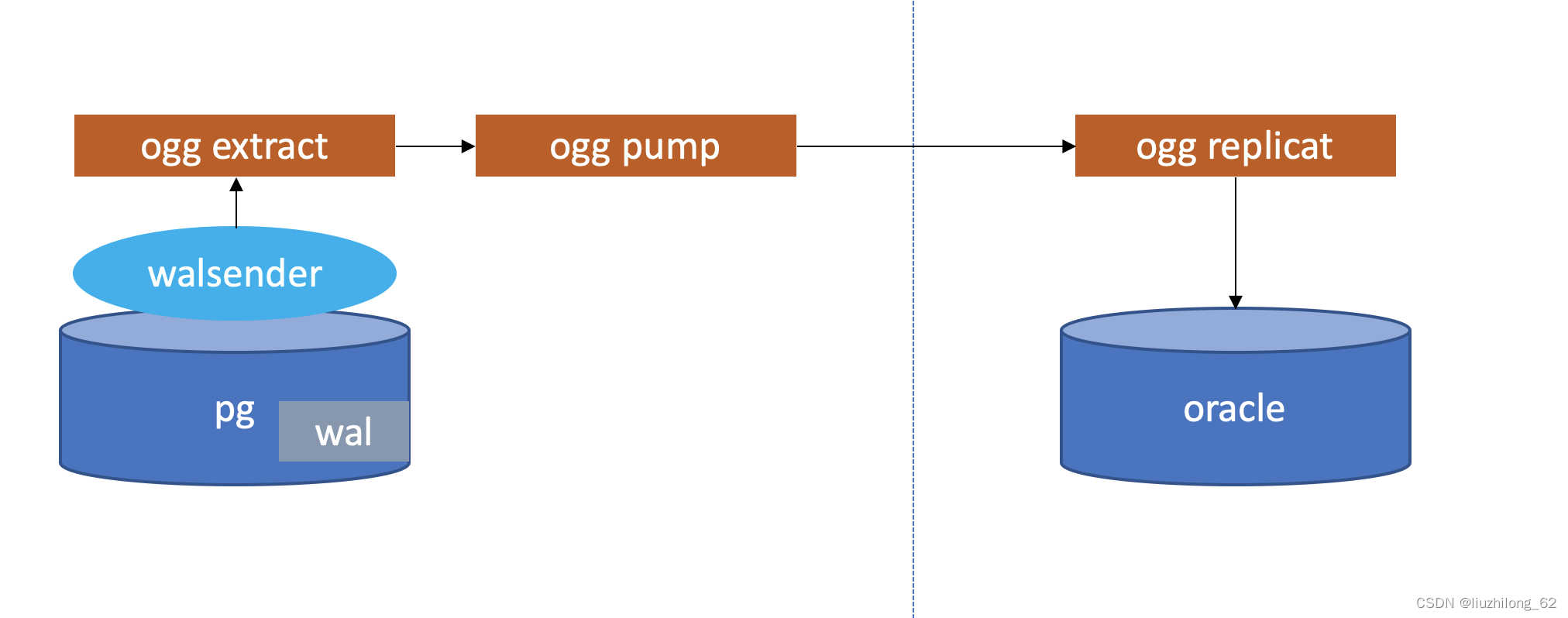
1.源端创建库及表#
[root@node2 ~]# su - postgres
Last login: Tue Jul 21 21:08:52 CST 2020 on pts/0
[postgres@node2 ~]$ pg_ctl -D /opt/pgsql_data -l logfile start
waiting for server to start.... done
server started
postgres=# create database test
postgres=# \c lzldb
postgres=# create table tab1(id int primary key,name varchar(20))2.目标端创建库及表#
sqlplus / as sysdba
SQL> create table ORALZL.tab1(id number primary key,name varchar2(20));
3.解压安装ogg for postgresql#
--跟ogg for oracle不同,ogg for pg只需要解压。for o需要跑runinstaller
[postgres@node1 ~]$ id postgres
uid=54323(postgres) gid=54330(postgres) groups=54330(postgres)
[postgres@node1 ~]$ exit
logout
[root@node1 ~]# mkdir /ogg
[root@node1 ~]# chown -R postgres /ogg
[root@node1 ~]# chmod -R 755 /ogg
[root@node1 ~]#
[root@node1 soft]# ls -l

total 240744

-rw-r--r--. 1 root root 87028695 Jul 22 02:51 19100200714_ggs_Linux_x64_PostgreSQL_64bit.zip
[root@node1 soft]# chmod 777 19100200714_ggs_Linux_x64_PostgreSQL_64bit.zip
[root@node1 soft]# unzip 19100200714_ggs_Linux_x64_PostgreSQL_64bit.zip
Archive: 19100200714_ggs_Linux_x64_PostgreSQL_64bit.zip
 inflating: ggs_Linux_x64_PostgreSQL_64bit.tar
 inflating: OGG-19.1.0.0-README.txt
 inflating: release-notes-oracle-goldengate_19.1.0.200714.pdf
[root@node1 soft]# chmod 777 ggs_Linux_x64_PostgreSQL_64bit.tar
[root@node1 soft]# su - postgres
[postgres@node1 ~]$ cd /soft
[postgres@node1 soft]$ tar -xf ggs_Linux_x64_PostgreSQL_64bit.tar -C /ogg4.pg用户环境变量配置#
pg源端
[postgres@node1 ~]$ cat .bash_profile
## .bash_profile
## Get the aliases and functions
if [ -f ~/.bashrc ]; then
. ~/.bashrc
fi
## User specific environment and startup programs
PATH=$PATH:$HOME/.local/bin:$HOME/bin
export GGHOME=/ogg
export PG_DATA=/opt/pgsql/pgsql/bin
export PATH=$PG_DATA:$PATH
export PG_HOME=/opt/pgsql/pgsql
export LD_LIBRARY_PATH=$PG_HOME/lib:$LD_LIBRARY_PATH:$GGHOME/lib
export ODBCINI=/home/postgres/odbc.ini
export DD_ODBC_HOME=/ogg
export PATH
[postgres@node1 ~]$ source .bash_profile5.配置管理进程#
[postgres@node1 ~]$ cd /ogg
[postgres@node1 ogg]$ ./ggsci
Oracle GoldenGate Command Interpreter for PostgreSQL
Version 19.1.0.0.200714 OGGCORE_19.1.0.0.0OGGBP_PLATFORMS_200628.2141
Linux, x64, 64bit (optimized), PostgreSQL on Jun 29 2020 03:59:15
Operating system character set identified as UTF-8.
Copyright (C) 1995, 2019, Oracle and/or its affiliates. All rights reserved.
GGSCI (node1) 2> info all
Program   Status   Group    Lag at Chkpt Time Since Chkpt
MANAGER   STOPPED


GGSCI (node1) 3> create subdirs
Creating subdirectories under current directory /ogg
Parameter file         /ogg/dirprm: created.
Report file          /ogg/dirrpt: created.
Checkpoint file        /ogg/dirchk: created.
Process status files      /ogg/dirpcs: created.
SQL script files        /ogg/dirsql: created.
Database definitions files   /ogg/dirdef: created.
Extract data files       /ogg/dirdat: created.
Temporary files        /ogg/dirtmp: created.
Credential store files     /ogg/dircrd: created.
Masterkey wallet files     /ogg/dirwlt: created.
Dump files           /ogg/dirdmp: created.
GGSCI (node1) 4> edit params mgr
GGSCI (node1) 5> view params mgr
port 7809
GGSCI (node1) 6> start mgr
Manager started.
GGSCI (node1) 7> info all
Program   Status   Group    Lag at Chkpt Time Since Chkpt
MANAGER RUNNING 6.源端postgresql参数调整#
[postgres@node1 ogg]$ vi /opt/pgsql_data/postgresql.conf
wal_level = logical      #minimal, replica, or logical
max_replication_slots = 10  #max number of replication slots
max_wal_sender = 10      #maximum number of wal sender processes
wal_receiver_status_interval=10s #optional, keep the system default
wal_sender_timeout      #optional, keep the system default
track_commit_timestamp    #optional, keep the system default
wal_receiver_status_interval=10s
wal_sender_timeout = 60s
track_commit_timestamp=off
调整后重启源端postgresql
[postgres@node1 ogg]$ pg_ctl -D /opt/pgsql_data -l logfile stop
[postgres@node1 ogg]$ pg_ctl -D /opt/pgsql_data -l logfile start
7.ogg for pg数据源配置#
cd /home/postgres/
vi odbc.ini
[ODBC Data Sources]
PGDSN=DataDirect 7.1 PostgreSQL Wire Protocol
postgres=DataDirect 7.1 PostgreSQL Wire Protocol
scott=DataDirect 7.1 PostgreSQL Wire Protocol
[ODBC]
IANAAppCodePage=4
InstallDir=/ogg
[PGDSN]
Driver=/ogg/lib/GGpsql25.so
Description=DataDirect 7.1 PostgreSQL Wire Protocol
Database=test
HostName=192.168.1.112
PortNumber=5432
LogonID=postgres
Password=postgres
8. 连接测试#
[postgres@node1 ~]$ cd /ogg
[postgres@node1 ogg]$ ./ggsci
--dblogin sourcedb pgdsn userid pg, password 123456
GGSCI (node1) 1> dblogin sourcedb pgdsn userid postgres, password postgres
2020-07-22 03:10:44 INFO  OGG-03036 Database character set identified as UTF-8. Locale: en_US.UTF-8.
2020-07-22 03:10:44 INFO  OGG-03037 Session character set identified as UTF-8.
Successfully logged into database.
GGSCI (node1 as postgres@pgdsn) 2>9.开启表级别附加日志#
源端:
GGSCI (node1) 3> dblogin sourcedb pgdsn userid postgres, password postgres
2020-07-22 03:21:01 INFO  OGG-03036 Database character set identified as UTF-8. Locale: en_US.UTF-8.
2020-07-22 03:21:01 INFO  OGG-03037 Session character set identified as UTF-8.
Successfully logged into database.
GGSCI (node1 as postgres@pgdsn) 4> add trandata public.tab1 --如果表有主键这步可以忽略
Logging of supplemental log data is enabled for table public.tab1. REPLICA IDENTITY was DEFAULT and is changed to FULL
GGSCI (node1 as postgres@pgdsn) 5>
GGSCI (node1 as postgres@pgdsn) 5> info trandata public.tab1
Logging of supplemental log data is enabled for table public.t1 with REPLICA IDENTITY set to FULL
10 在pg上注册抽取进程#
在pg库上注册抽取进程,实际上就是创建了一个复制槽,output plugin 默认使用test_decoding
 GGSCI (node1 as postgres@pgdsn) 6> Register Extract ext_pg
2020-07-22 03:25:27 INFO OGG-25355 Successfully created replication slot 'ext_pg_2947c06e0ea2ec74' for EXTRACT group 'EXT_PG' in database 'test'.11.配置抽取进程和投递进程#
配置抽取进程
 edit param ext_pg

SETENV ( PGCLIENTENCODING = "UTF8" )
 SETENV (NLS_LANG="AMERICAN_AMERICA.AL32UTF8")
 extract ext_pg
 SETENV (ODBCINI="/home/pg/odbc.ini" )
 SOURCEDB pgdsn, USERID pg, PASSWORD 123456
 exttrail ./dirdat/st
 TABLE PUBLIC.TAB1;
 ----GETTRUNCATES  ###此特性postgresql 2020-07-22 03:33:37 ERROR  OGG-25541 GETTRUNCATES is not valid with OGG EXTRACT on PostgreSQL database version 10.12. PostgreSQL database supports capture of TRUNCATE operations starting from version 11.
说明pg到oracle无法同步truncate命令
配置投递进程
 extract pump_pg
 SETENV (ODBCINI="/home/pg/odbc.ini" )
 RMTHOST 172.17.100.150, MGRPORT 7809, compress
 numfiles 10000
 RMTTRAIL ./dirdat/rt
TABLE PUBLIC.TAB1;12.添加trail和启动抽取和投递#
ADD extract ext_pg, TRANLOG,BEGIN now
 add exttrail ./dirdat/st,extract ext_pg,megabytes 500
 add extract pump_pg,exttrailsource ./dirdat/st
 add rmttrail ./dirdat/rt,extract pump_pg,megabytes 500
 start ext_pg
 start pump_pg
13 配置defgen#
如果表结构一直可以配置参数ASSUMETARGETDEFS
edit param defgen

DEFSFILE ./dirdef/tab1.def, PURGE
 SOURCEDB pgdsn, USERID pg, PASSWORD 123456
 TABLE PUBLIC.tab1;
生成表定义文件
defgen paramfile /oggpg/dirdef/tab1.prm拷贝defgen文件到目标端的dirdef目录下
14.目标端验证trail投递正常#
[oracle@lzl dirdat]$ cd dirdat
 [oracle@lzl dirdat]$ ll
-rw-r----- 1 pg pg 1439 Feb 28 11:02 rt00000000015.在pg上注册抽取进程#
在pg库上注册抽取进程,实际上就是创建了一个复制槽
GGSCI (node1 as postgres@pgdsn) 6> Register Extract ext_pg
2020-07-22 03:25:27 INFO OGG-25355 Successfully created replication slot 'ext_pg_2947c06e0ea2ec74' for EXTRACT group 'EXT_PG' in database 'test'.16.配置oracle用户环境变量#
export ORACLE_BASE=/oracle/app/oracle
 export ORACLE_HOME=$ORACLE_BASE/product/11.2.0/dbhome_1
 export ORACLE_SID=oralzl
 export OGG_HOME=/oggfororacle
 export PATH=$ORACLE_HOME/bin:$ORACLE_HOME/OPatch:$PATH
 export TNS_ADMIN=$ORACLE_HOME/network/admin
export LD_LIBRARY_PATH=$ORACLE_HOME/lib:$OGG_HOME:$ORACLE_HOME/lib32:/lib/usr/lib:/usr/local/lib17.配置oracle侧的监听和tns#
ogg for oracle会默认使用TNS_ADMIN下的tns
也可以在配置抽取的时候手动配置
如:USERID [email protected]:1521/oralzl, PASSWORD 123456
18.目标端安装ogg for oracle#
下载ogg软件 配置oggcore.rsp文件
oracle.install.responseFileVersion=/home/oracle/oggcore.rsp
INSTALL_OPTION=ORA11g
SOFTWARE_LOCATION=/ogg
START_MANAGER=false
MANAGER_PORT=7809
DATABASE_LOCATION=/oracle/db/11.2.0.4
INVENTORY_LOCATION=/oracle/oraInventory
UNIX_GROUP_NAME=oinstall
静默安装OGG
./runInstaller -silent -nowait -responseFile /home/oracle/oggcore.rsp19 oracle库的用户和权限#
create user goldengate identified by "123456";
 grant create session,alter session to goldengate;
 grant alter system to goldengate;
 grant resource to goldengate;
 grant connect to goldengate;
 grant select any dictionary to goldengate;
 grant flashback any table to goldengate;
 grant select any table to goldengate;
 grant select any table to goldengate;
 grant insert any table to goldengate;
 grant update any table to goldengate;
 grant delete any table to goldengate;
 grant select on dba_clusters to goldengate;
 grant execute on dbms_flashback to goldengate;
 grant create table to goldengate;
 grant create sequence to goldengate;
 grant alter any table to goldengate;
 grant dba to goldengate;
 grant lock any table to goldengate;
20 目标端mgr进程#
edit param mgr

PORT 7809
 DYNAMICPORTLIST 7810-7980
 PURGEOLDEXTRACTS ./dirdat/*, USECHECKPOINTS, MINKEEPDAYS 3
 PURGEDDLHISTORY MINKEEPDAYS 7, MAXKEEPDAYS 10
 LAGREPORTHOURS 1
 LAGINFOMINUTES 30
 LAGCRITICALMINUTES 45
start mgr21 目标端配置复制进程#
GGSCI (node2) 8> dblogin userid [email protected]:1521/oralzl,password 123456
GGSCI (node2 as postgres@pgdsn) 9> add checkpointtable goldengate.chkt
Successfully created checkpoint table public.chkt.
复制进程:
 edit param rep_pg
REPLICAT rep_pg
 USERID [email protected]:1521/oralzl, PASSWORD 123456
 SOURCEDEFS ./dirdef/tab1.def
 MAP public.tab1, TARGET oralzl.tab1;
add replicat rep_pg,exttrail ./dirdat/rt,checkpointtable goldengate.chkt
 start rep_pg
22 测试同步#
[postgres@node1 ~]$ psql
postgres=# \c lzldb
test=# \d tab1;
Table "public.tab1"
Column | Type | Collation | Nullable | Default
--------+-----------------------+-----------+----------+---------
id | integer | | not null |
name | character varying(20) | | |
Indexes:
"t1_pkey" PRIMARY KEY, btree (id)
lzldb=# insert into t2 values(1,'lzl1') ;
INSERT 0 1
lzldb=# select * from t2;
id | name
----+------
1 | lzl1
[postgres@node2 ~]$sqlplus / as sysdba
SQL> select * from oralzl.tab1;
id name
---------- ----------
1 lzl1